Vocnu vs DubTab: sign-up, free minutes and price
Vocnu signs you up with any email address and gives a new account 20 free minutes of Premium voice-over, then charges only for the minutes you watch, with credits that never expire. DubTab asks for a Google account, its free trial is 15 minutes once, and after that you buy hours by the month or the year, which come to about $1.60 to $2.10 an hour only if you use them all. Where DubTab is ahead is speed: it says its voice comes about half a second after the speaker, quick enough for live streams and calls, where Vocnu speaks a few seconds behind. Vocnu publishes this page. We installed DubTab on 10 November 2026, but it opens only with a Google sign-in, so its side here is quoted from its own pages; Vocnu's side is from our test on a film scene that day.
For Chrome 120 or newer, Brave and Edge on a computer.
The short answer
Pick Vocnu if you want to start with any email address and free minutes, watch a few hours a month or less, and pay only for what you watch, with a voice in every language it offers. Pick DubTab if you need the voice about half a second behind the speaker for live streams, calls or meetings, use it for many hours every month, or want to dub video files on your computer in its desktop app.
Where Vocnu goes further
- Any email address. Vocnu signs you up with the email you choose. DubTab's subscribe steps say "Open DubTab and sign in with Google", and when we opened the extension, Continue with Google was the only way in.
- More free minutes. Vocnu gives 40 free credits once you confirm your email, no card needed: 20 minutes of Premium voice-over, 40 of Standard or 80 of Economy. DubTab's free plan is "a one-time 15 minutes to test DubTab".
- No subscription. Vocnu sells one-time credit packs, and the credits never expire. DubTab sells monthly or yearly plans, and on a monthly plan "Unused time doesn't roll over".
- Less for light use. DubTab's smallest plan, Starter, is $19 a month. The same $19 buys about 1.3 to 2.2 hours of Vocnu's Premium voice-over or about 5 to 8.5 hours of Economy, with nothing lost if you watch less.
- A voice in every language. Vocnu reads each of its 35 languages in Premium and Standard voices. DubTab's FAQ says it transcribes and translates over 50 languages, and that its AI voices "are available for major languages".
- A finished file. Vocnu's app voices a video you upload and gives you a finished MP4, the voice-over and subtitles.
- The seller. In the Chrome Web Store, Vocnu's developer, MB JAD Tech, has identified itself as a trader under EU rules. DubTab's developer has not, and the store notes that for consumers in the EU, "consumer rights do not apply to contracts between you and this developer".
What we could test
- DubTab: we installed version 1.4.5 from the Chrome Web Store in a fresh Chrome profile on 10 November 2026 and opened it on a YouTube video. Its panel offered one way in, Continue with Google. We did not sign in, so we did not hear DubTab's voice, and everything on its side of this page is quoted from dubtab.com and its store listing, read the same day.
- Vocnu: version 0.5.68 of the extension, signed in to a Vocnu account, with Premium voice-over, its default, on 1:20 to 2:05 of Sprite Fright, Blender Studio's open movie, played from Blender Studio's YouTube channel and voiced into French. It read the video's English captions. We logged the player's time, speed and volume about once a second, recorded the sound the browser played and saved screenshots.
Vocnu on the same scene
Vocnu paused the video for about half a minute at the start while it prepared, then played it at normal speed with the French voice starting each line within half a second of its speaker. It lowered the film's sound to about a tenth under the voice, read every character in one man's voice, and showed the French over the video.
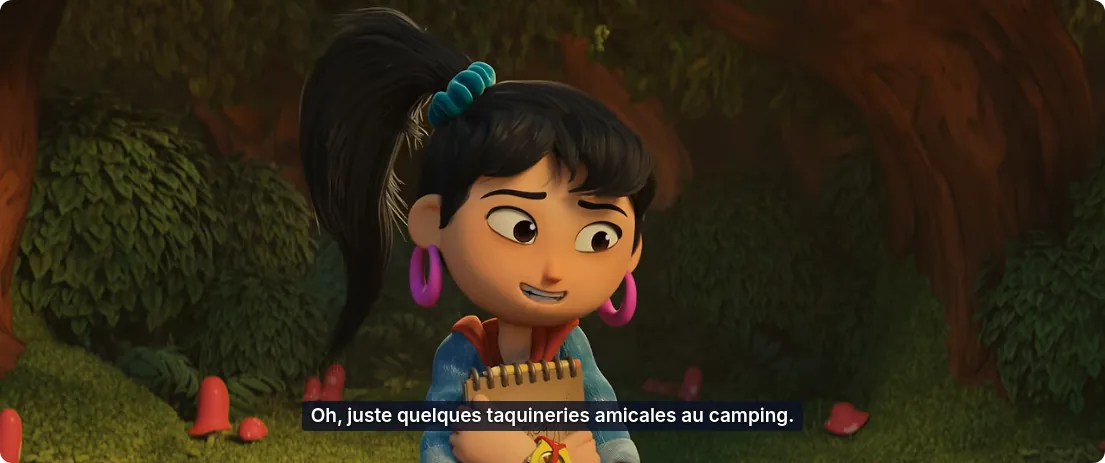
The pause is how Vocnu starts every video: it prepares the voice-over a little ahead, so each line can start with its speaker while the film keeps its speed, and it waits again only after a long jump forward or back. On a live stream there is nothing ahead to prepare, so there Vocnu speaks a few seconds behind the picture.
What each one offers
Quotes on DubTab's side are its own words from dubtab.com and its Chrome Web Store listing, read on 10 November 2026.
| Feature | Vocnu | DubTab, from its site |
|---|---|---|
| Signing up | Any email address | "sign in with Google" |
| Free to try | 40 credits once you confirm your email, no card needed | 15 minutes, "One-time trial. No reset." |
| How you pay | One-time credit packs that never expire | Monthly plans from $19 for 9 hours to $129 for 80 hours; yearly plans 17% off, with all hours upfront |
| Where it works | Any page with an HTML5 video player, players inside frames included, and YouTube live streams | "any website with audio" in Chrome and Edge, calls in Zoom and Google Meet included |
| How soon the voice comes | With the speaker, after a wait of about half a minute at the start; a few seconds behind on live streams | "About 0.5 seconds" |
| Languages | 35, each with Premium and Standard voices | "Over 50 languages for transcription and translation", AI voices "for major languages" |
| Subtitles | Over the video, in fullscreen too, or subtitles without the voice | Bilingual mode or Translated Only |
| Your own files | Upload a video and get a finished MP4, the voice-over and subtitles | A desktop app for Windows 11 and macOS 14.2 or later plays MP4, MKV, MOV or WebM files dubbed, "Prepared ahead, so it stays in sync" |
| Also | Rewatching the same minutes within 30 days is free | AI Summary and Ask AI, with credits of their own |
| Chrome Web Store seller | MB JAD Tech, identified as a trader | Not identified as a trader |
When DubTab is the better choice
- You need the voice right away, on live streams, calls or meetings. DubTab says its voice comes about half a second after the speaker; Vocnu is a few seconds behind on live streams.
- You dub many hours every month. Used in full, DubTab's plans come to about $1.60 to $2.10 an hour, less than any of Vocnu's grades.
- You want to watch course files on your computer dubbed, in DubTab's desktop app.
- You want summaries of what you watch or to ask questions about it.
- Your language is one of DubTab's that is not among Vocnu's 35, and subtitles are enough for you.
Price per minute
Vocnu charges credits for the minutes it voices, and the price depends on the voice quality you choose. DubTab sells hours by the month or the year. In euros for Vocnu, depending on the credit pack, and in US dollars for DubTab:
| Option | A minute | An hour |
|---|---|---|
| Vocnu Premium, used in our test | €0.13 to €0.20 | €7.92 to €12.00 |
| Vocnu Standard | €0.07 to €0.10 | €3.96 to €6.00 |
| Vocnu Economy | €0.03 to €0.05 | €1.98 to €3.00 |
| DubTab Free, from its site | $0, 15 minutes once | Not enough for an hour |
| DubTab Starter, $19 a month, from its site | About $0.035 | About $2.10 |
| DubTab Ultra, $129 a month, from its site | About $0.027 | About $1.60 |
DubTab's figures are its plan prices divided by the hours each includes, 9 on Starter and 80 on Ultra, with Pro and Power in between, so they hold only if you use every hour. Vocnu also takes US dollars at checkout, where VAT or sales tax is added on top: Premium then comes to $0.15 to $0.24 a minute, Standard to $0.07 to $0.12 and Economy to $0.04 to $0.06. Below about 5 hours a month, Vocnu costs less than DubTab's $19 Starter even in Economy, and below about 1.3 hours even in Premium; used in full, DubTab's plans cost less.
Vocnu's credits never expire, watching the same minutes again within 30 days costs nothing, and so does a video already in your language. A new account gets 40 free credits once it confirms its email: 20 minutes of Premium voice-over, 40 of Standard or 80 of Economy.