Vocnu vs EarDub, the same scene in French
Vocnu voices a video that has no captions on any credits, its free ones included, and it voices YouTube live streams as they play. EarDub's own pages say it handles videos without captions only on its paid plans and can't dub live streams. Vocnu also charges only for the minutes you watch, with credits that never expire, while EarDub sells daily and monthly quotas that reset. On captioned YouTube, EarDub is free for 30 minutes a day and costs much less if you watch a lot. Vocnu publishes this page. We ran both extensions on the same scene into French on 10 November 2026: both kept time with the speakers and translated well, and below is where each came out ahead.
For Chrome 120 or newer, Brave and Edge on a computer.
The short answer
Pick Vocnu if the videos you watch have no captions and you don't want a subscription, if you follow live streams, or if the video plays in a player embedded in another page. Pick EarDub if you mostly watch YouTube videos with captions and want that free or very cheap, want the voice to start sooner, use Firefox or an Android phone, or want both languages on screen while you learn.
Where Vocnu goes further
- Videos without captions, free credits included. Vocnu voices a video from its speech when it has no captions, on any credits. EarDub's pricing page says videos without captions are dubbed on its paid plans, Basic and Pro: "recognizing speech costs more to run than reading captions".
- Live streams. Vocnu voices a YouTube live stream as it plays, a few seconds behind the picture, and shows a line that would come too late as a subtitle only. EarDub's FAQ lists "live streams and some embedded players" among what it can't dub.
- Players inside other pages. Vocnu works on any page with an HTML5 video player, players inside frames included.
- Nothing that resets. Vocnu's credits never expire and you pay for the minutes you watch. EarDub's "Free-plan minutes reset daily, while Basic-plan minutes reset monthly. Unused quota does not carry over."
- Your own files. Vocnu's app also voices a video you upload and gives you a finished MP4, the voice-over and subtitles.
What we tested
- The scene: 1:20 to 2:05 of Sprite Fright, Blender Studio's open movie, played from Blender Studio's YouTube channel. English speech, with the video's English captions, which EarDub's Free plan needs and which Vocnu read too.
- The language: French, which both extensions offer.
- EarDub: version 0.1.41 from the Chrome Web Store, in a fresh Chrome profile, on the Free plan with a new account and its default settings apart from the language.
- Vocnu: version 0.5.68 of the extension, signed in to a Vocnu account, with Premium voice-over, its default.
- How we watched: we switched each extension on at 1:20, logged the player's time, speed and volume about once a second, recorded the sound the browser played and saved screenshots.
What happened
| In the test | Vocnu | EarDub |
|---|---|---|
| The start | Paused the video at 1:20 for about half a minute while it prepared, then played on from there | Paused for about 9 seconds, then jumped ahead to 1:27, where the next line begins. The 7 seconds in between have no dialogue and were not played |
| First French voice | About 38 seconds after switching on | About 11 seconds after switching on |
| Timing | Every line started within half a second of the English captions | Every line started within half a second of the English captions |
| Video speed | Normal all the way | Normal all the way |
| The film's own sound | Lowered to about a tenth once the dialogue began | At 20% the whole time, EarDub's default |
| The voice | One man's voice for every character | One man's voice for every character, Henri, its default for French |
| Subtitles | French, over the video | French above the English captions, its default |
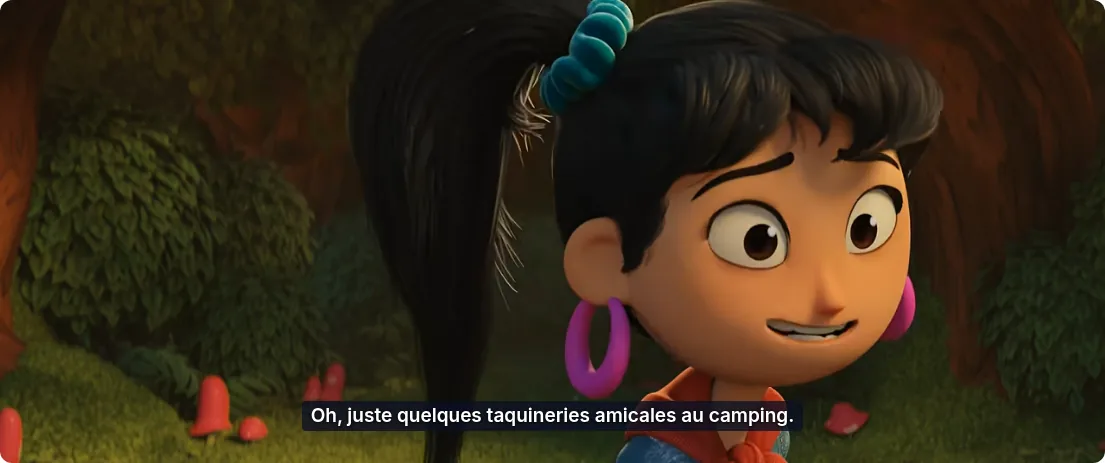
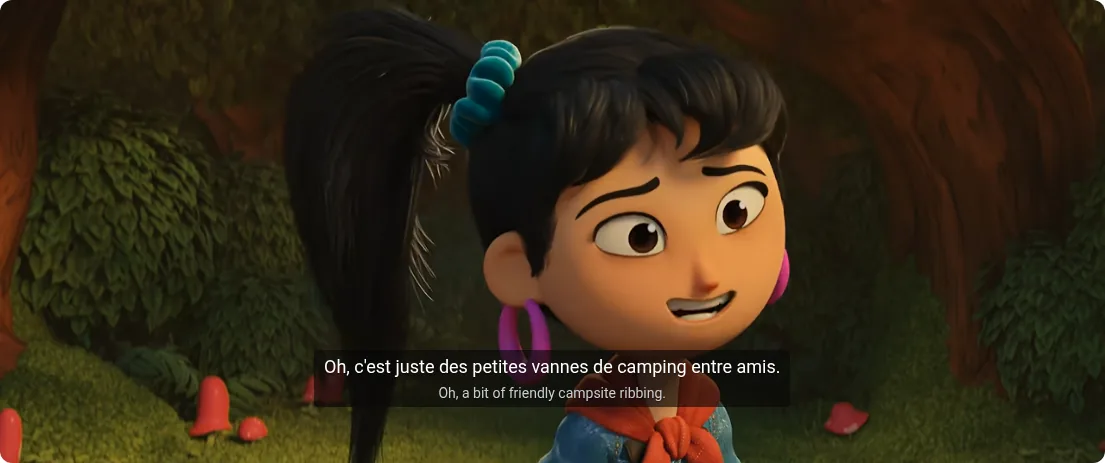
The pause is how Vocnu starts every video: it prepares the voice-over a little ahead, so each line can start with its speaker while the film keeps its speed, and it waits again only after a long jump forward or back. EarDub got going sooner. From the first line on, both voiced every line of the scene within half a second of the speaker, so after the start there was nothing between them on timing.
How they sound
We recorded what the browser played in both runs. Below are the same 13 seconds from each, from "Oy, fungus freak!" on. Both clips are set to the same overall loudness and are otherwise as recorded.
The clearest difference is the film underneath. Vocnu turned it down to about a tenth once the talking began, so its voice sits on a quiet, steady background. EarDub leaves it at 20%, so more of the music and the actors comes through, and it has a separate slider for each if you want it otherwise. Both read every character in one man's voice, as a voice-over does.
The same lines in French
These are three lines of the scene as each extension voiced them, next to the video's English captions. Both translations are faithful and casual, which suits friends teasing each other at a campsite, and neither dropped or changed a line.
| English caption | Vocnu | EarDub |
|---|---|---|
| Oy, fungus freak! Make yourself useful and fix the tent. | Hé, espèce de dingue des champignons ! Rends-toi utile et répare la tente. | Hé, le mordu de champignons ! Rends-toi utile et répare la tente. |
| Oh, a bit of friendly campsite ribbing. Fun. | Oh, juste quelques taquineries amicales au camping. Sympa. | Oh, c'est juste des petites vannes de camping entre amis. Sympa. |
| She wouldn't survive 5 minutes alone in these woods. | Elle tiendrait pas cinq minutes seule dans ces bois. | Elle tiendrait pas cinq minutes toute seule dans ces bois. |
What each one offers
Quotes on EarDub's side are its own words from its Chrome Web Store listing, eardub.com and its pricing page, read on 10 November 2026. We tested only what the sections above describe.
| Feature | Vocnu | EarDub, from its site |
|---|---|---|
| Price | €0.03 to €0.20 a minute with a voice, depending on the voice quality; 40 free credits once you confirm your email, no card needed | Free for 30 minutes a day; Basic $9.99 a month or $83 a year for 60 hours a month; Pro $19.99 a month or $155 a year, "Unlimited dubbing time (fair use)" |
| Videos without captions | Voiced from the speech, on any credits | "speech recognition on paid plans" |
| Where it works | Any page with an HTML5 video player, players inside frames included | "on YouTube by default, and on other sites after you allow them", but not "some embedded players" |
| Live streams | Voiced live, a few seconds behind the picture | Not dubbed, by its FAQ |
| Browsers and devices | Chrome 120 or newer, Brave and Edge on a computer | Chrome, Edge and Firefox; on Android in Vivaldi, or Firefox 142 or newer; "iPhone, iPad and the YouTube app aren't supported yet" |
| Languages | 35 | 75 |
| Voices | Natural, expressive voices in Premium; a female and a male voice in Standard, and in Economy for all but Croatian and Slovenian | "300+ AI voices, with regional accents" |
| Subtitles | Over the video, in fullscreen too, or subtitles without the voice | "Bilingual subtitles: show, resize or hide them" |
| Also | An app that voices your own video files and gives back an MP4 | Chapter summaries and study notes for captioned videos of 5 minutes or more |
When EarDub is the better choice
- You watch a lot of YouTube with captions. EarDub's Free plan gives you 30 minutes a day, every day, and Basic's 60 hours for $9.99 a month come to well under a cent a minute. Vocnu's free credits are a one-time 20 minutes of Premium voice-over or 80 of Economy.
- You want the voice right away. EarDub spoke about 11 seconds after we switched it on, Vocnu about 38.
- You use Firefox, or want it on an Android phone.
- You want to pick from many voices and accents, such as Mexican or Argentine Spanish.
- You are learning the language and want the original and the translation on screen together, which EarDub shows by default.
- Your language is one of EarDub's 75 that are not among Vocnu's 35.
Price per minute
Vocnu charges credits for the minutes it voices, and the price depends on the voice quality you choose. EarDub sells time by the day or the month. In euros for Vocnu, depending on the credit pack, and in US dollars for EarDub:
| Option | A minute | An hour |
|---|---|---|
| Vocnu Premium, used in this test | €0.13 to €0.20 | €7.92 to €12.00 |
| Vocnu Standard | €0.07 to €0.10 | €3.96 to €6.00 |
| Vocnu Economy | €0.03 to €0.05 | €1.98 to €3.00 |
| EarDub Free, used in this test | $0, captioned videos only | $0, up to 30 minutes a day |
| EarDub Basic, from its site | Under $0.003 | About $0.17 |
| EarDub Pro, from its site | $19.99 a month | No time limit, "fair use" |
EarDub's Basic figures are its monthly price divided by the 60 hours it includes, so they hold only if you use them all. Vocnu also takes US dollars at checkout, where VAT or sales tax is added on top: Premium then comes to $0.15 to $0.24 a minute, Standard to $0.07 to $0.12 and Economy to $0.04 to $0.06. The $9.99 of a month of Basic buys about 40 to 70 minutes of Vocnu Premium or three to four and a half hours of Economy, so if you watch more than that each month, EarDub costs less.
Vocnu's credits never expire, watching the same minutes again within 30 days costs nothing, and so does a video already in your language. A new account gets 40 free credits once it confirms its email: 20 minutes of Premium voice-over, 40 of Standard or 80 of Economy.