
What Apple TV gives you instead of a translator
Apple TV, the subscription called Apple TV+ until 2025, plays each title with the soundtracks and subtitles it comes with. Apple's support page on changing subtitles and languages, published on 12 November 2026, shows how to switch between those tracks. When you see no subtitle or language options, it says, they might not be available for that show or movie. It describes no way to translate a title into a language it lacks.
That leaves two ways to watch in your language: pick one the title already has, or add one from outside Apple TV. The second needs a web browser on a computer, since that is where extensions run.
Apple's Apple TV User Guide lists a web browser among the ways to watch, and says to go to tv.apple.com to subscribe and watch there. On 18 November 2026 the guide named no supported browsers and ruled none out, so Chrome, Brave and Edge are not excluded. Its one note for the browser: if autoplay gives you trouble, try turning off any ad blocker extensions or apps you have installed. The title pages quoted below were read in Brave, where tv.apple.com loaded with no notice about the browser. Playing a title was not tried.
Apple's own Apple TV apps, on a Mac, a Windows PC, a TV, a phone or a tablet, take no browser extensions. To add a language on a Mac, watch on tv.apple.com in Chrome, Brave or Edge instead of the app.
See a title's languages before you press play
Every show and film on tv.apple.com has a public page that you can read without signing in. Near its foot, under Information, a Languages column has three lists: Original Audio, Audio and Subtitles. Audio holds the soundtracks the player lets you pick, and Subtitles the subtitle languages. Some entries carry letters, which the same page explains under Accessibility. AD is audio description, a narration of what happens on screen for people who are blind or have low vision. CC is closed captions, subtitles with the sounds that are not dialogue added.
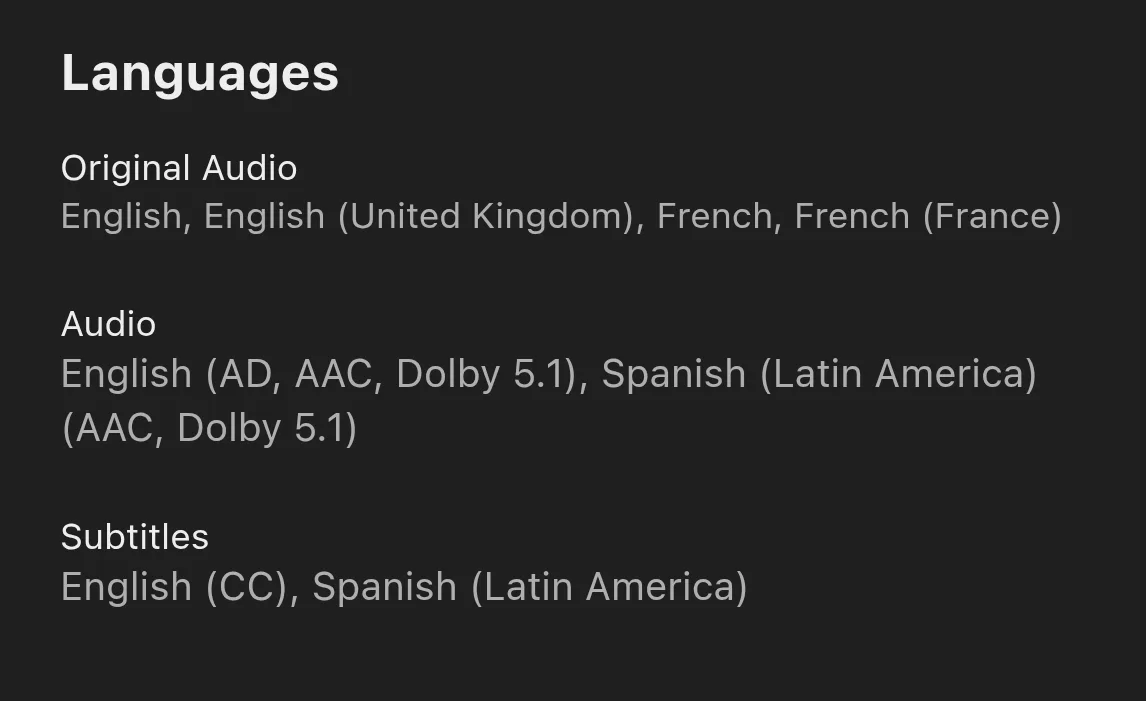
Apple's support page points you here too: if a language is missing in the player, check the show or movie's description page. Read it for the country you watch from. The country sits in the address, as /us/ or /lt/ right after tv.apple.com, and the lists change with it.
Why the same film has other languages elsewhere
Apple's support page says movies and TV shows aren't available in all countries and regions, and that the languages and accessibility features a title supports vary by country and region. Title pages show how far apart that can be. Interstellar, which its page credits to Paramount Pictures, read on 18 November 2026:
- United States
- audio in English and Latin American Spanish, subtitles in the same two.
- United Kingdom
- audio in English, French and Latin American Spanish, subtitles in 33 languages, Lithuanian among them.
- Lithuania
- audio in English, Czech, Polish and Russian, and the same 33 subtitle languages. No Lithuanian audio.
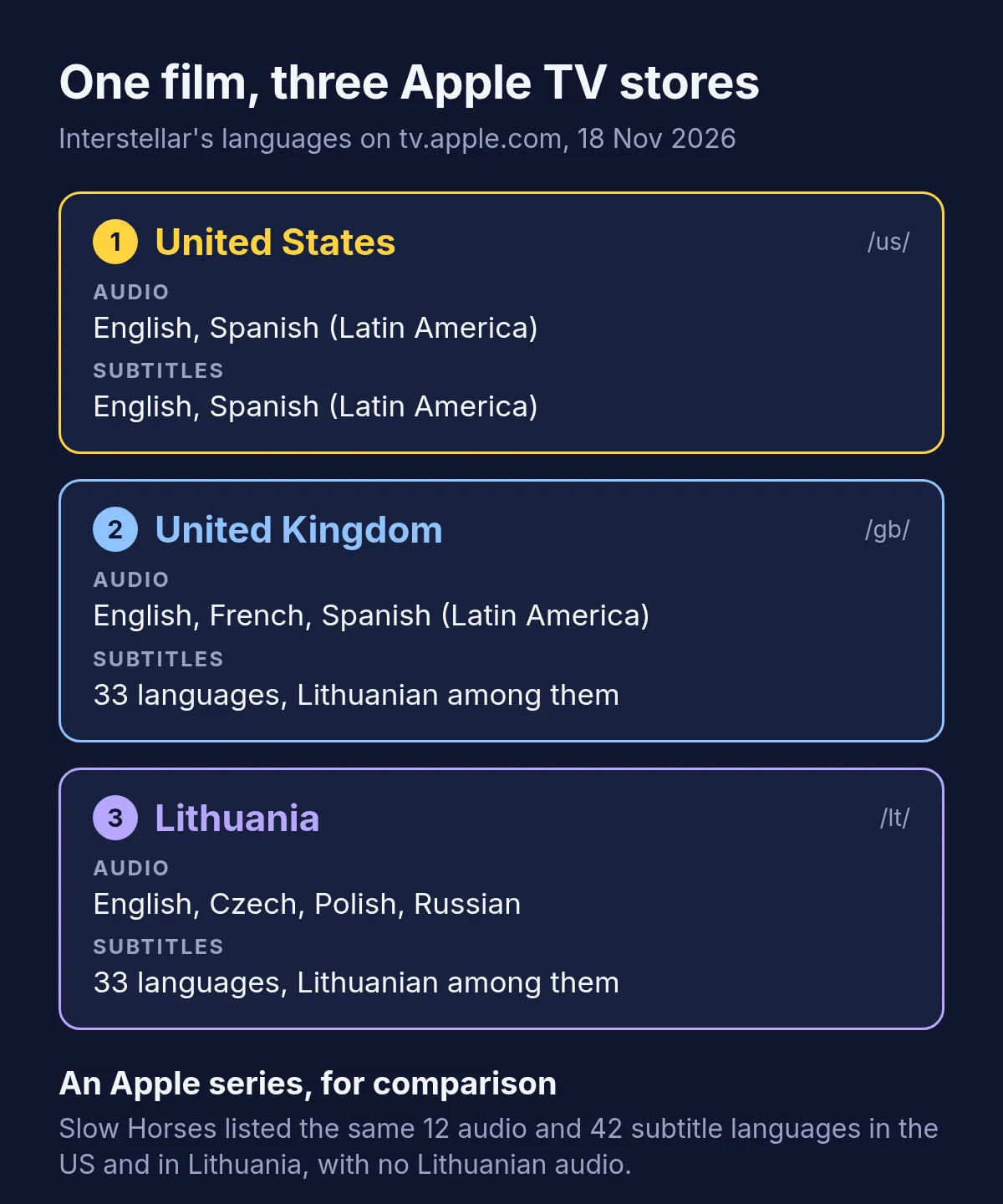
Apple's own series can be steadier. Slow Horses listed the same 12 audio languages and 42 subtitle languages in the United States and in Lithuania, with Lithuanian subtitles and no Lithuanian audio in either. Two titles prove no rule, so check the one you want to watch, on the page for your own country.
Where the web player keeps its language buttons
Apple's support page gives one set of steps for a Mac, a PC and the web:
- Start the title and move the pointer over the video, so the controls show.
- For subtitles, click the Languages button. Turn subtitles on, pick a language under Languages, and change how they look under Style.
- For the soundtrack, click the Audio button and choose the audio language.
Both menus hold only what the title's page lists for your country. If your language is on neither list, no setting in Apple TV adds it.
When neither menu has your language
Take Lithuanian. Slow Horses has Lithuanian subtitles but no Lithuanian audio, and Interstellar in the United States has neither. What is left comes from outside Apple TV:
| Option | What you get | Where it works |
|---|---|---|
| Subtitles in a second language | Apple's own subtitles in a language you read well, often English | Every device with Apple TV |
| A dual-subtitle extension, such as DuoCue | Two of the title's own subtitle languages on screen at once | A browser on a computer |
| A voice-over extension, such as Vocnu | The title translated into your language and read aloud over the original sound, with subtitles | Chrome, Brave or Edge on a computer |
Only the last adds a language Apple does not offer. DuoCue, which used to be called Apple TV+ Dual Subtitles, says on its Chrome Web Store page that only the languages the title actually has are listed. That suits someone learning one of them, and it cannot show a language the title lacks.
Hearing an Apple TV title in your language with Vocnu
The Vocnu extension translates a video while it plays and has one AI voice read it in your language over the original sound, turned down, with subtitles in your language over the picture. It covers 38 languages and runs in Chrome, Brave and Edge on a computer. Nothing in it is written for Apple TV in particular. Where it can read the subtitle files a player loads, it translates those, and where it cannot, it listens to the tab's sound once you allow that with one click on its button.
- Add Vocnu to Chrome, Brave or Edge from the Chrome Web Store. In the app it opens, sign in or create a free account, then press Connect the extension.
- Open the show or film on tv.apple.com and start it. Click Vocnu's button in the toolbar or press Alt+Shift+V, and choose your language.
- If Vocnu needs to listen to the video, it tells you over the player. Click its button and the voice begins.
Fullscreen works as well: Vocnu's subtitles go into fullscreen with the video, and the voice keeps reading.
There is no test of Vocnu on Apple TV behind this page, so it gives no timings or verdict on quality there. How to translate Netflix has a full test on a film: how soon the first line came, what pausing and jumping did, and how the translation held up. What holds on any site:
- One voice reads for every character, over the original sound turned down, and it does not follow the actors' lips.
- The translation is a machine's, so a line can come out wrong and names may be spelled by how they sound.
- Songs keep their own sound. Two switches in Vocnu's menu cover them: Song subtitles shows the lyrics in your language, and Voice songs reads them as well.
- A title already in your language is never voiced or charged.
- On a computer only: Vocnu does not run in the Apple TV apps on a Mac, a Windows PC, a TV, a phone or a tablet, nor in Safari.
What an episode, an hour of drama and Interstellar cost
You pay for the minutes Vocnu voices, at the price of the voice you pick. Premium has the most natural voices and the finest translation. Standard is a plain synthetic voice with a quicker translation that slips more often. Each price depends on the plan or pack:
| Voice | A 30-minute episode | A 1-hour episode | Interstellar, 2 h 49 min |
|---|---|---|---|
| Premium | €2.38 to €5.00 | €4.77 to €10 | €13 to €28 |
| Standard | €0.60 to €1.25 | €1.19 to €2.50 | €3.38 to €7.08 |
A new account gets free minutes once its email is confirmed: 20 of Premium voice-over or 80 of Standard, enough for an hour-long episode in Standard. Watching the same minutes again within 90 days, in the same language, voice and mode, costs nothing. Plans start at €10 a month and packs of hours at €10, and a pack's hours do not expire.
Questions and answers
Apple TV has none of its own. It plays each title with the audio and subtitles it has in your country, and Apple's help describes no way to translate them. On tv.apple.com, in Chrome, Brave or Edge on a computer, an extension such as Vocnu can translate a show and read it aloud in your language.
Start it and move the pointer over the video. Click the Audio button for the soundtrack or the Languages button for subtitles. Both list only the languages that title has in your country.
Apple's help says the languages a show or movie supports vary by country and region, so a title can have yours in one country and not in another. On 18 November 2026 Interstellar had Lithuanian subtitles on Apple TV in Lithuania and the UK, and none in the US. The Languages list on a title's page shows what you get where you are.
Apple's user guide, read on 18 November 2026, says to watch Apple TV at tv.apple.com in a web browser and names no browsers, so it rules none of the three out. Its one note for browsers is to try turning off ad blocker extensions if autoplay gives you trouble.
No. Vocnu is a browser extension, so it works on tv.apple.com in Chrome, Brave or Edge on a computer, and not in the Apple TV apps on a Mac, a Windows PC, a TV, a phone or a tablet.
At 2 hours 49 minutes, it costs €3.38 to €7.08 in Standard and €13 to €28 in Premium. Watching it again within 90 days, in the same language, voice and mode, costs nothing.
Sources
- Apple TV User Guide: Get the Apple TV app and sign insupport.apple.com (opens in a new tab)
- Apple Support: Change subtitles or languages for videos in the Apple TV appsupport.apple.com (opens in a new tab)
- Apple Newsroom: The Apple TV subscription, formerly Apple TV+apple.com (opens in a new tab)
- Apple TV: Interstellar, United Statestv.apple.com (opens in a new tab)
- Apple TV: Interstellar, United Kingdomtv.apple.com (opens in a new tab)
- Apple TV: Interstellar, Lithuaniatv.apple.com (opens in a new tab)
- Apple TV: Slow Horsestv.apple.com (opens in a new tab)
- Chrome Web Store: DuoCuechromewebstore.google.com (opens in a new tab)
Found something out of date? Write to support@vocnu.com and we will check it and correct the page.