Watch in your language
Netflix doesn't have your language? How to translate what you're watching
Netflix gives every title its own set of audio and subtitle languages, and the ones you see depend on where you are, your profile and your device. Here is where to find a title's list, why your language may be missing from it, and what is left when it is. I tried that last part on Glass Onion: A Knives Out Mystery in Lithuanian, a language the film has neither in audio nor in subtitles.

See which languages a title has
On netflix.com, start the title and move the mouse over the player. The speech bubble at the bottom right, Audio & Subtitles, opens two lists side by side: Audio on the left, Subtitles on the right. Pick one in each.
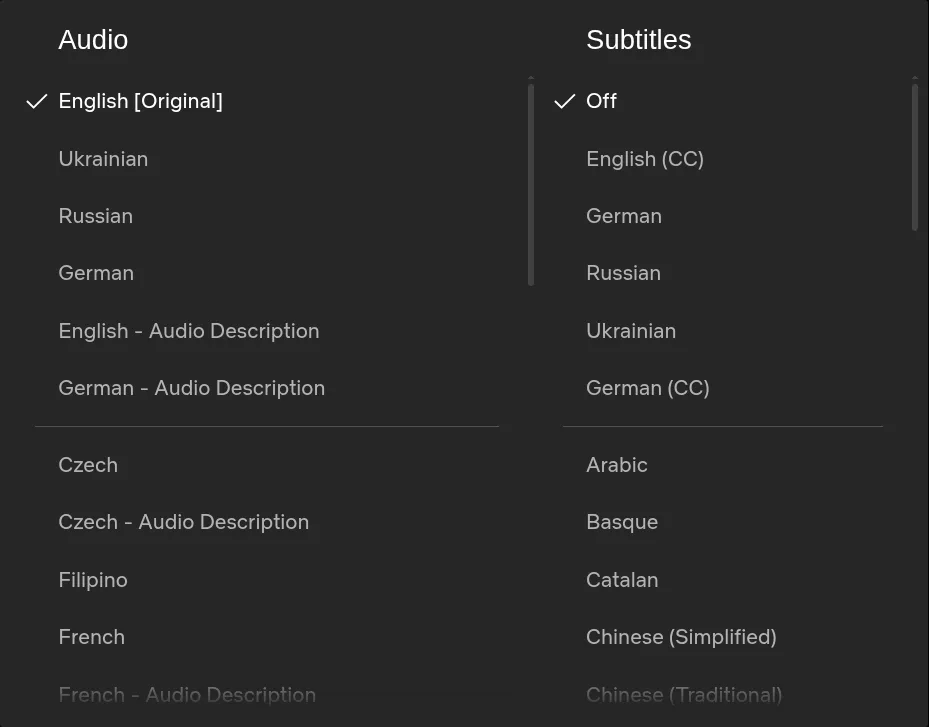
Each list starts with a short group, on this film English, Ukrainian, Russian and German, and the rest follow below a line in alphabetical order. Watched from Lithuania on 12 November 2026, Glass Onion offered 20 audio languages and 14 audio description tracks, and 37 subtitle languages besides Off. Its page on netflix.com, outside the player, named only six audio tracks and four subtitle languages, so look in the player for the whole list. Lithuanian was in neither.
On a TV, Netflix's help says to start the title, pause it, select the player controls at the bottom, choose Other and then Audio and Subtitles. The choice saves by itself.
Why your language is not on the list
Netflix's help names four things that decide which languages you see: where you are, your profile's language preferences, the title and the device. A title comes with the languages its licences and agreements allow, so the same film can offer different ones from one country to the next. Seasons of a series can come from different sources, and those offered before 2018 may lack some languages. On a licensed show whose episodes come out week by week, the languages come once they are completed.
What you can check, by Netflix's help:
- Your profile's languages. In a web browser: Account, Profiles, your profile, Languages, then Audio and subtitle languages, and Save. On a phone or tablet: My Netflix, your profile's name, Manage Profiles, the profile, then Audio & Subtitles.
- Netflix's pages by language: netflix.com/browse/subtitles and netflix.com/browse/audio list the titles that have subtitles or audio in a language where you are.
- Downloads. A downloaded title shows only the two most relevant languages, even when you are online. Delete the download to see the rest.
- The device. Devices made before 2014 may not show subtitles in Arabic, Chinese, Hebrew, Hindi, Japanese, Korean, Thai, Romanian or Vietnamese.
If the language is in none of these places, the title does not have it where you are, and no setting adds it. From Lithuania on 12 November 2026, those pages by language offered 40 subtitle languages and 42 audio languages, and Lithuanian was in neither list. When a friend gets a language you don't, or a title you look for never shows up, what to check when a Netflix language is missing goes through the causes in order. Disney+ also limits its languages by country and title, and keeps them apart from its app language: what to do when Disney+ lacks your language.
When neither list has your language
Netflix plays only the tracks a title comes with, and it has no button that translates them. That leaves three ways. The last two need a browser on a computer, since Netflix's apps on TVs, phones and tablets take no extensions:
- Subtitles in a second language you read well.
- A subtitle translator extension, which shows Netflix's subtitles translated into your language as text. You still read, but in your own language.
- A voice-over extension, which reads the translation aloud, so your eyes stay on the picture.
The Vocnu extension is the third kind. On Netflix it takes the subtitles in the language spoken, whether or not you turned them on, translates them and has one AI voice read them over the original sound turned down, with subtitles in your language over the picture. A title without subtitles in the language spoken is heard from its sound instead: Vocnu covers the video once at the start and plays it fast while it listens, which takes a few minutes for an episode and longer for a film. It runs in Chrome, Brave and Edge on a computer, in 38 languages, and a title already in your language is never voiced or charged. On YouTube, how to watch a video in another language goes through the same choices. Prime Video has a catch of its own: some titles have no English subtitles at all, and no English audio either.
I tried it on Glass Onion in Lithuanian
On 12 November 2026 I played Glass Onion: A Knives Out Mystery (2022, 2 h 21 min) on netflix.com in Chrome on a laptop, with version 0.5.87 of the Vocnu extension on a test account set to Lithuanian and Economy, its cheapest grade. Glass Onion has English subtitles, so Vocnu voiced it from those. Setting it up took three steps:
- Add Vocnu to Chrome, Brave or Edge from the Chrome Web Store, sign in or create a free account in the app it opens, and press Connect the extension.
- Start the film on netflix.com, press the Vocnu button in the browser's toolbar or Alt+Shift+V, and choose your language.
- Press play. The film holds for a while the first time, as the first lines are made.
| Moment | What happened |
|---|---|
| Start | The film held at 0:14 for about half a minute, with a progress note over the player. Then it played on, and the first line came in Lithuanian on time at 0:27. |
| Lines | Each line was ready about a second before its moment and was read at normal speed, over the English sound turned down. |
| Pause | I paused for ten seconds in the middle of a line. On play, the voice finished that line from where it stopped, and the next one came on time. |
| Jump | I jumped ahead to 7:00. The film held for about 27 seconds while that part was made, then the voice went on in step with the picture. |
| Cost | 4 credits for seven minutes of the film voiced, at half a credit a minute in Economy. Three of the seven were minutes it had begun to make ahead before I jumped past them. |
The Lithuanian read naturally most of the time, and short lines were right word for word: "Welcome to our office, campaign center, and kindergarten" became "Sveiki atvykę į mūsų biurą, kampanijos centrą ir darželį". Names were written by sound, the way Lithuanian translations often write them: Miles Bron became Mailzas Bronas, Claire Debella became Kler Debela, and Lionel became Lajonelis. Not everything held up:
- Birdie came out as "Berde", while Amy stayed Amy.
- "Never bet against Bron, we know it" lost its sense: the Lithuanian said Bron never needs to bet against.
- A "manned flight" became a plane with a crew.
- "Oh, shit, sorry" came out as a polite "Oi, atsiprašau", without the swearing.

I tried only Economy, the cheapest grade, with its plain synthetic voice. For following the plot it did the job, slips like those above aside.
Limits and what it costs
- A computer only: Chrome, Brave or Edge. Netflix's apps on a TV, phone or tablet take no extensions.
- One voice reads every character, over the original sound turned down.
- Machine translation: a line can come out wrong, as above, and names are spelled by sound.
- About half a minute of waiting at the start and after a jump when the title has subtitles in the language spoken. Without them, the wait at the start runs to minutes, longer for a film.
You pay for the minutes Vocnu voices, at the rate of the grade you choose. The prices run from the largest credit pack to the smallest:
| Grade | A 50-minute episode | Glass Onion, 2 h 21 min |
|---|---|---|
| Premium | 100 credits, €6.60 to €10 | 282 credits, €19 to €28 |
| Standard | 50 credits, €3.30 to €5.00 | 141 credits, €9.31 to €14 |
| Economy | 25 credits, €1.65 to €2.50 | 71 credits, €4.69 to €7.10 |
A new account gets 40 free credits once it confirms its email: 20 minutes of Premium voice-over, 40 of Standard or 80 of Economy, enough for a whole episode in Economy. Watching the same minutes again within 90 days, in the same language, voice and mode, costs nothing.