
How HBO Max picks the language you hear
Before you hunt for a missing language, it helps to know why a show starts in the one it does. HBO Max's US help page gives its rule in three steps:
- It plays the audio language you chose last.
- If you have never chosen one, it uses the app language of your profile, which HBO Max calls the Display Language.
- If the title has neither, it plays the English audio track.
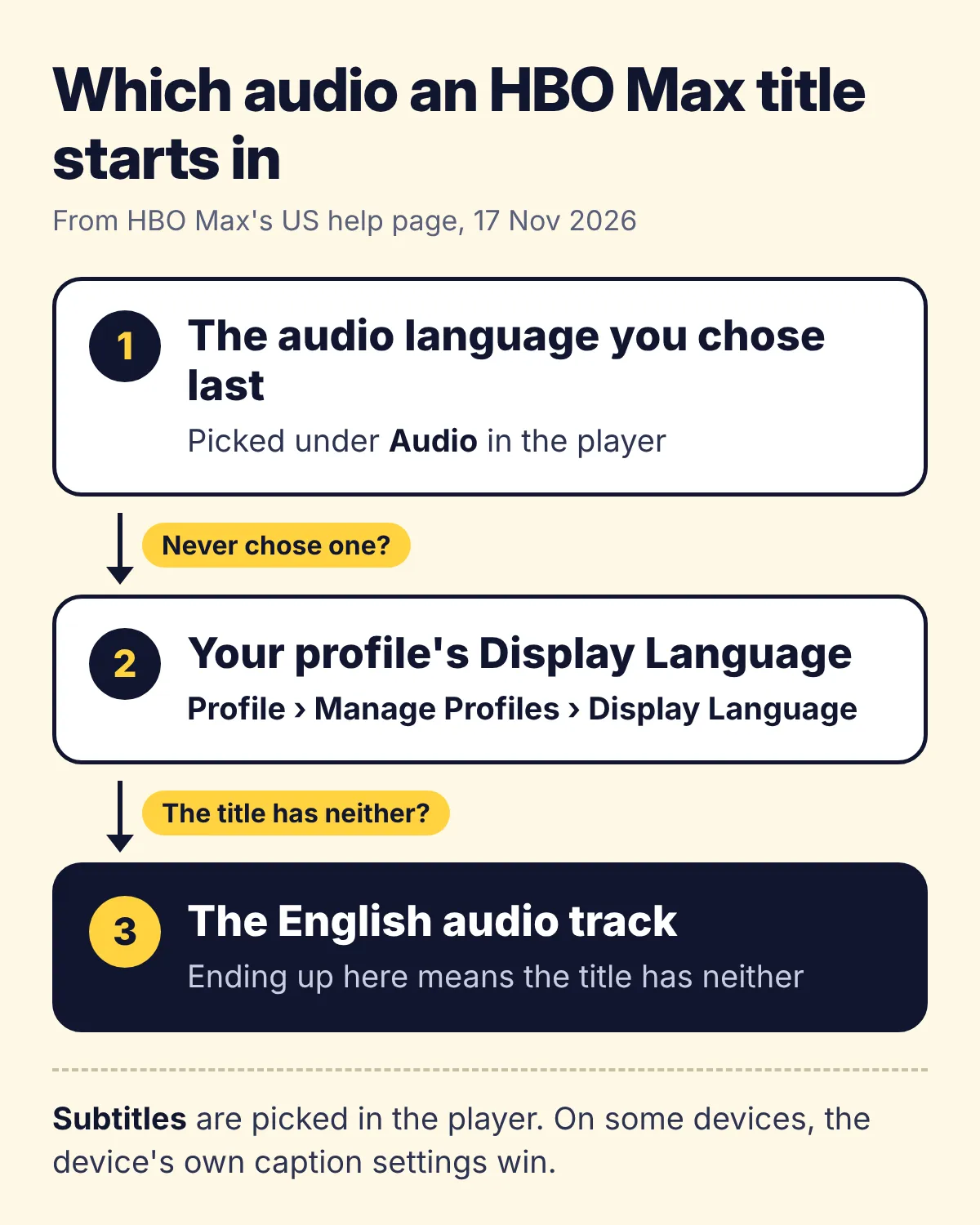
That rule explains most of the puzzles people search for. A show that opens in Spanish usually means someone once picked Spanish audio, or the profile's Display Language is Spanish. Audio that seems to switch on its own is the rule at work: when the next title lacks the language you chose last, HBO Max drops to the next step. And English where you expected your own language means the title has neither of your choices.
The Display Language belongs to the profile, not to the device. HBO Max saves it with the profile and uses it on every device, and an account can have up to five profiles, each with a language of its own. So on the same TV, a family member's profile set to Spanish can start a film in Spanish while yours starts it in English.
Changing the language on a computer
On a PC, Mac or Chromebook, HBO Max plays at HBOMax.com, and its help recommends the latest Chrome, Firefox, Microsoft Edge for Windows or Safari. To change what one title plays:
- Start the show and click the picture to bring up the controls.
- Choose the Audio and Subtitles icon.
- Under Audio, choose a language. A track with Audio Description after its language narrates what happens on screen, so pick the plain language to leave that out.
- Under Subtitles, choose a language, a caption track such as English - CC, or Off.
- Choose X to save.
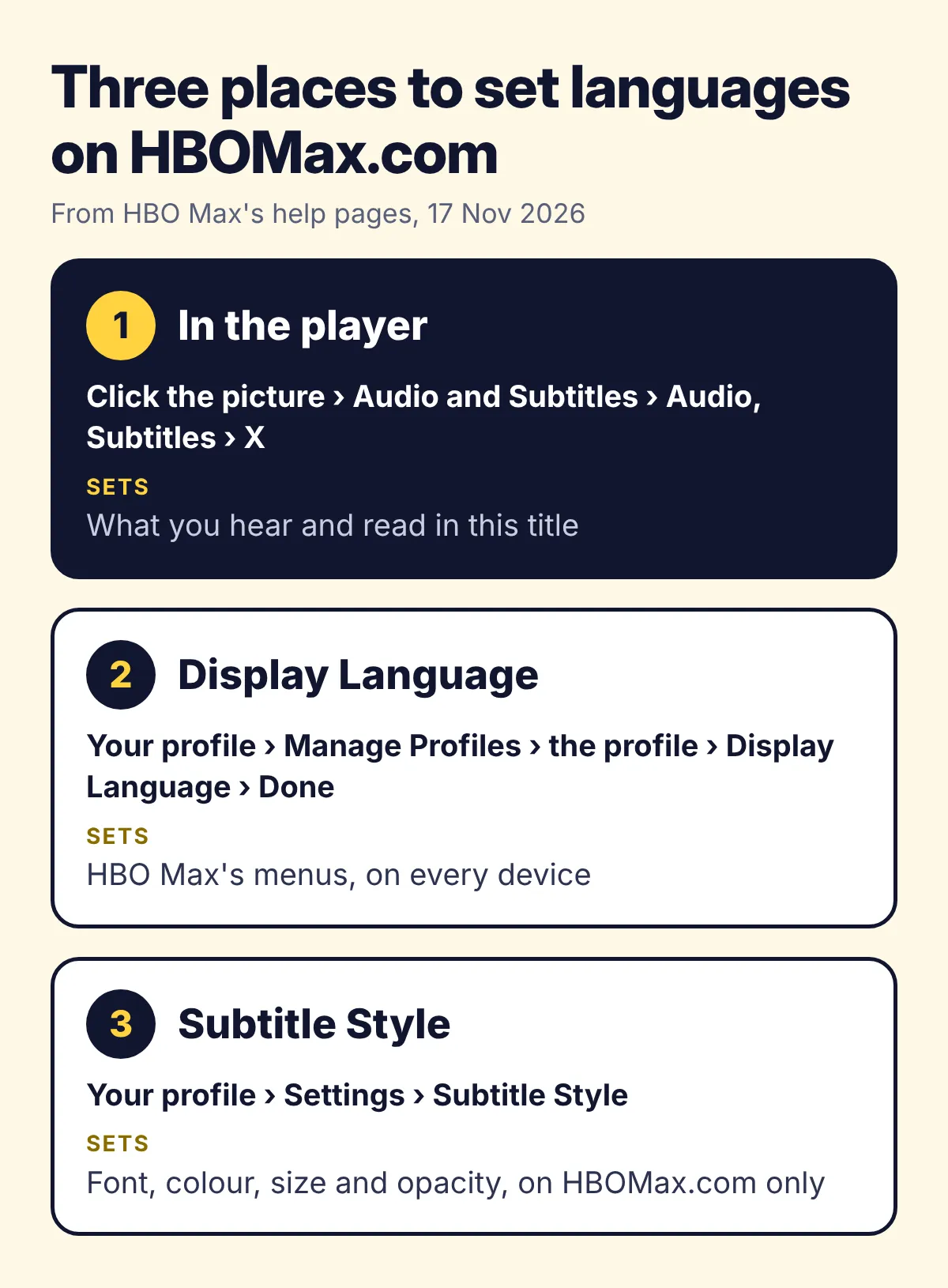
Two settings sit outside the player. The Display Language is under your profile, Manage Profiles, the profile, Display Language, then Done. The look of subtitles is under your profile, Settings, Subtitle Style, where you can change their font, colour, size and opacity. HBO Max's help says that style stays on HBOMax.com and does not carry over to your other devices.
Why your language isn't in the menu
When the language is under neither Audio nor Subtitles, one of three things is behind it, and only two of them are yours to change.
- The title. HBO Max's help says some shows and movies have subtitles, captions and several audio tracks, so not every title has them. Its help pages for the UK and Lithuania add that closed captions and some audio tracks may only be available in English, and so may audio description. A title that comes with its original audio and English subtitles there has nothing more to give.
- Where you are. HBO Max streams in the US and in many countries of Latin America, Europe and Asia Pacific, and its help says what you can stream changes with your physical location. Your home country is the one you signed up in, yet abroad what you can stream follows the country you are in, so a show on your Continue Watching list may not play there. If you see a message such as Not available in your region yet, its help says to turn off any VPN or proxy first.
- The device. HBO Max follows the subtitle and caption settings of the device it runs on, so subtitles you switched off in the player can keep showing until you switch them off in the device's settings. Audio description that will not stop can come from the device too, such as a phone's accessibility settings. On a TV, you pause first to reach the Audio and Subtitles icon, and the back button saves your choice.
A quick way to tell them apart is to open the same episode on HBOMax.com on a computer. A language you find there but not on the TV points at the TV. One that is missing in both places is missing from the title where you are, and the rest of this page is about that.
Three ways to watch when the title lacks it
HBO Max has no translate button. Searches for an HBO Max translator mostly lead to browser extensions, which give you the translation as text or as a voice. With subtitles in a second language, that makes three options:
- Subtitles in a language you read well. Since HBO Max's help says captions may come only in English, English is the likeliest second language, and it works on every device. The catch is reading for a whole episode in a language that isn't yours.
- A subtitle translator extension. Several on the Chrome Web Store, some with HBO Max in their name, show its subtitles translated into your language, some together with the original line. You still read, now in your own language.
- A voice-over extension such as Vocnu. The translation is read aloud over the original sound turned down, so your eyes stay on the picture. That helps a child who can't read yet, or anyone with the show on while doing something else.
Both kinds of extension work only on HBOMax.com in a browser on a computer. HBO Max's apps on a TV, phone or tablet take no extensions.
Hearing HBO Max in your language with Vocnu
The Vocnu extension translates what a video says as it plays, and one AI voice reads it in your language over the original sound, turned down, with your language's subtitles on the picture. It knows 38 languages and runs in Chrome, Brave and Edge on a computer. Nothing in it is made for HBO Max in particular: where it can read the subtitle file HBO Max's player loads, it translates that, and where it cannot, it listens to the tab's sound, which takes longer at the start. HBO Max's help names Chrome and Edge for Windows among its browsers but not Brave, so if a show won't play in Brave, switch to one of those.
- Add Vocnu from the Chrome Web Store. It opens its app, where you sign in or create a free account and press Connect the extension.
- Open the episode on HBOMax.com, press the Vocnu button in the toolbar or Alt+Shift+V, and pick your language.
- Play it. If Vocnu has to listen to the tab, it asks you to click its toolbar button once.
I have not tested Vocnu on HBO Max for this page, so it gives no timings or notes on quality there. The nearest is How to translate Netflix, a full test on a film, from the wait for the first line to how the translation read. Vocnu worked from that film's subtitles, so where it has to listen on HBO Max, the start can be slower.
Some things hold on any site. Every character gets the same voice, and nothing follows the lips. Machine translation can get a line wrong or spell a name by its sound. For songs, Vocnu's menu has two switches: Song subtitles shows the lyrics in your language, and Voice songs reads them too. An episode already in your language is never voiced or charged, and Vocnu does not run in HBO Max's apps on a TV, phone or tablet.
What an HBO Max episode costs
You pay for the minutes Vocnu voices, at the price of the voice you choose. Premium has the most natural voices and the finest translation. Standard reads with two clear voices in each language, a female and a male one, and a translation by smaller models that now and then slips. Economy is a plain synthetic voice with a quick translation, good for following a show; it slips more often and does not read Croatian or Slovenian yet. Each price depends on the plan or pack:
| What you watch | Premium | Standard | Economy |
|---|---|---|---|
| A half-hour comedy episode | €2.38 to €5.00 | €1.19 to €2.50 | €0.60 to €1.25 |
| An hour-long drama episode | €4.77 to €10 | €2.38 to €5.00 | €1.19 to €2.50 |
| A season of eight hour-long episodes | €38 to €80 | €19 to €40 | €9.54 to €20 |
A new account gets free minutes once it confirms its email: 20 of Premium voice-over, 40 of Standard or 80 of Economy, enough for a whole hour-long episode in Economy. Watching the same minutes again within 90 days, in the same language, voice and mode, costs nothing. Packs of hours start at €10 and their hours never expire, and monthly plans cost less a minute.
Questions and answers
HBO Max plays the audio language you chose last and, if you never chose one, your profile's Display Language. So a pick someone made once, or a profile set to Spanish, starts shows in Spanish. Change the audio under Audio and Subtitles in the player, and the Display Language under your profile, Manage Profiles.
Usually it is HBO Max's fallback: when a title lacks the language you chose last, it plays your profile's Display Language, and when it lacks that too, English. A title can also simply lack your language, so check its Audio and Subtitles menu.
On a computer, phone or tablet: your profile, Manage Profiles, the profile, Display Language, then Done. On a TV: the profile screen, the Edit icon below the profile, Display Language, Done. HBO Max saves it with the profile and uses it on every device.
HBO Max has none built in. On a computer, browser extensions fill the gap: some show its subtitles translated as text, and Vocnu reads a translation aloud in Chrome, Brave or Edge. None of them works in HBO Max's apps on a TV, phone or tablet.
HBO Max follows the subtitle and caption settings of your device. If they keep showing after you choose Off in the player, turn captions off in the device's own accessibility or caption settings.
An hour-long episode costs €1.19 to €2.50 in Economy, €2.38 to €5.00 in Standard and €4.77 to €10 in Premium, depending on the plan or pack. A new account's free minutes cover one in Economy.
Sources
- HBO Max Help (US): Subtitles, captions, and audiohelp.hbomax.com (opens in a new tab)
- HBO Max Help (UK): Subtitles, captions and audiohelp.hbomax.com (opens in a new tab)
- HBO Max Help (Lithuania, English): Subtitles, captions, and audiohelp.hbomax.com (opens in a new tab)
- HBO Max Help: Create or change HBO Max profileshelp.hbomax.com (opens in a new tab)
- HBO Max Help: Where is HBO Max available?help.hbomax.com (opens in a new tab)
- HBO Max Help: Install HBO Max on supported deviceshelp.hbomax.com (opens in a new tab)
- HBO Max Help: Accessibility features on HBO Maxhelp.hbomax.com (opens in a new tab)
- Warner Bros. Discovery: Max to Become HBO Max this Summer (14 May 2025)press.wbd.com (opens in a new tab)
Found something out of date? Write to support@vocnu.com and we will check it and correct the page.