
Check what Crunchyroll has for the title
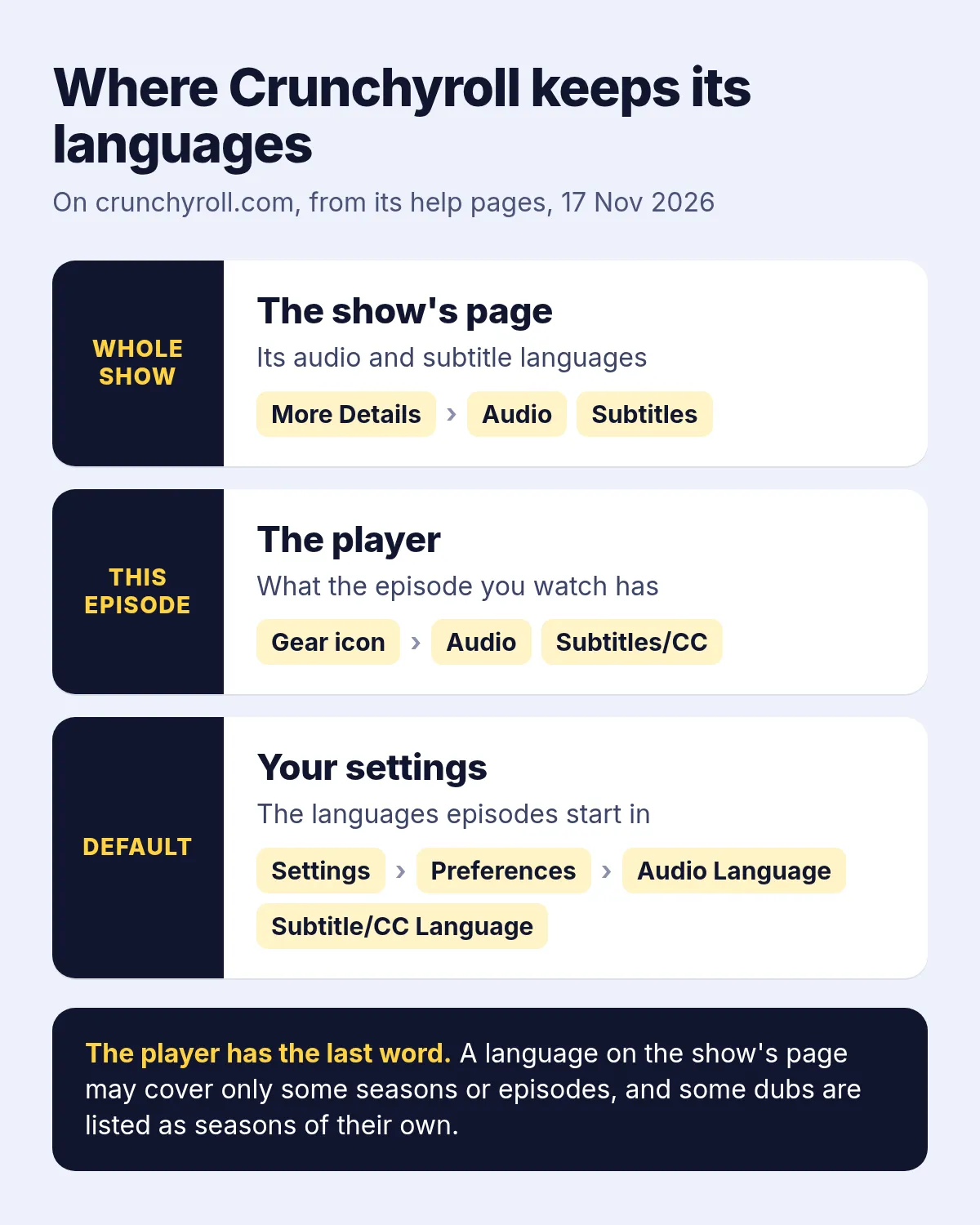
Crunchyroll's help pages, which we read on 17 November 2026, put the languages in three places on its website:
| Where | What it shows | How to get there |
|---|---|---|
| The show's page | The audio and subtitle languages of the whole show | More Details, under the show's description |
| The player | What the episode you're watching has | The gear icon, then Audio or Subtitles/CC |
| Your settings | The languages episodes start in by default | Settings, Preferences, then Audio Language and Subtitle/CC Language |
The show's page can promise more than an episode has. Crunchyroll says a language listed there may cover only some seasons or episodes, so open the player's menu on the episode itself. Some series still list a dub as a season of its own, so look through the season picker too. To see only dubbed shows, open Categories, then Browse All (A-Z), then Filter, and choose Dubbed under Language: Crunchyroll notes that dubs in languages other than English turn up there as well, and that the library differs by region.
Why your language isn't there
Crunchyroll's own answer is licensing by country. When you see no subtitles or dub in your language, its help page says, that version usually isn't available in your country right now. Three more points from its help pages explain most of the gaps:
- Languages vary by season and by episode, so a dub can cover the first season and stop there.
- Hindi subtitles and dubs exist, but not on every title yet, and the website itself has no Hindi version.
- In some regions, certain anime in Japanese must show subtitles at all times for licensing reasons, and you can't turn them off.
Crunchyroll also says VPNs aren't supported and can make subtitles disappear or overlap. So when your language is missing, the real choices are the Japanese with subtitles in a language you read, a dub in a second language you know, or a voice-over in your own.
Crunchyroll translators: reading or listening
Search for a Crunchyroll translator and most of what comes up are browser extensions that translate the subtitles into more text: a second line under Crunchyroll's, or your language in place of it. They work if you read well and fast. They don't help someone who would rather listen: a parent who reads slowly, a viewer with dyslexia, or anyone who wants to watch the animation instead of the bottom of the screen.
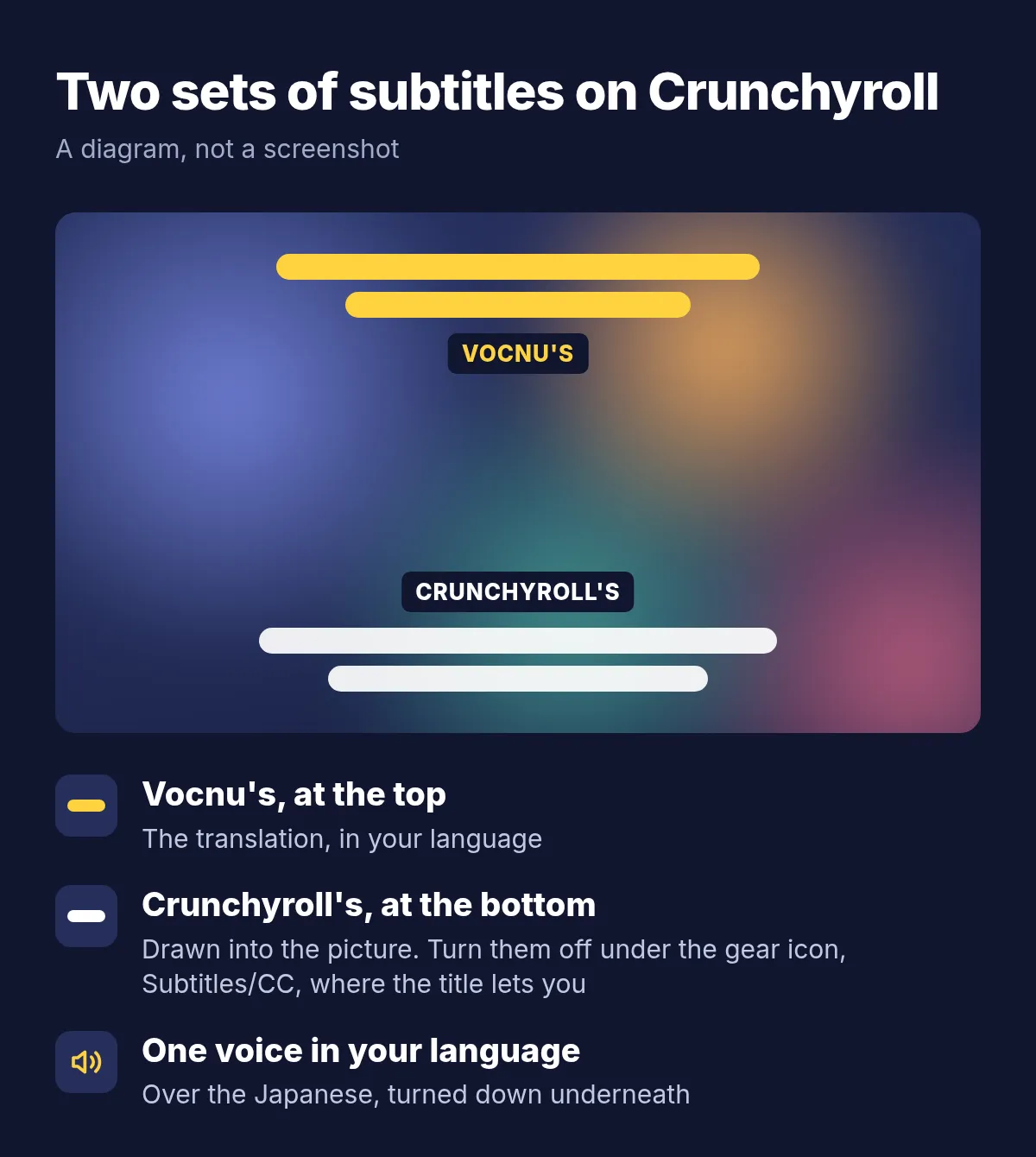
Voice-over is the listening option. One AI narrator reads every line in your language while the Japanese plays lower underneath, so you still hear the cast's acting, the music and the effects. You don't get a new cast, and the lips don't match. Where Crunchyroll has a dub in your language, that dub is the better way to listen; Vocnu is for the titles that have none.
What Vocnu does on Crunchyroll
Crunchyroll's web player doesn't load a subtitle file the way most players do: it plays a version of the episode with the subtitles already drawn into the picture. The list of the episode's subtitle files still comes with it, and Vocnu reads that list. It takes the file in the language spoken where Crunchyroll lists one, otherwise the English one, translates it into your language and voices it. Because it works from a written file, it doesn't have to guess the words from the sound.
- Your subtitles go to the top of the picture, clear of Crunchyroll's at the bottom. Vocnu's window reminds you that you can turn Crunchyroll's off in its player to see only yours; on titles where Crunchyroll keeps subtitles on, both stay.
- Lines that Crunchyroll's files mark as on-screen signs appear translated in your subtitles but are not read aloud.
- For opening and ending songs, the extension has two switches, Song subtitles and Voice songs, both marked experimental: one shows the lyrics in your language, the other has them read too.
- Character names are spelled the same way in every episode, from Vocnu's names library.
- An episode already in your language, such as an English dub when you chose English, is not voiced or charged.
- If an episode lists no subtitle file Vocnu can use, it listens to the tab's sound instead and voices what it hears.
Vocnu was tested on Crunchyroll on 26 October 2026, reading Crunchyroll's own subtitle files, and the site is on its list of places it works. This page shows no recording from Crunchyroll, though. For what a session looks like, from the first wait to the subtitles over the player, see how we translated a film on Netflix.
Set it up on crunchyroll.com
- On a computer, add Vocnu to Chrome, Brave or Edge from the Chrome Web Store. It opens the Vocnu app: sign in or create a free account and press Connect the extension.
- Open the episode on crunchyroll.com and keep the original Japanese audio: the subtitle files Vocnu reads were written for it.
- In the player's gear menu, set Subtitles/CC to Off if the title lets you, so only your subtitles show.
- Press the Vocnu button in the browser's toolbar, or Alt+Shift+V, choose your language and a voice, and play. The episode waits a moment at the start while the first lines are voiced.
Watching anime on other sites as well? The same steps work there, and the anime guide lets you hear the voices and a few voiced scenes first.
What a 24-minute episode costs
You pay for the minutes Vocnu voices, at the price of the voice you choose. Premium has the most natural voices and the finest translation. Standard has two clear voices a language and a plainer delivery. Economy reads with a flat synthetic voice for the lowest price. Each price depends on the plan or pack:
| Voice | One 24-minute episode | Twelve such episodes | A 2-hour film |
|---|---|---|---|
| Premium | €1.91 to €4.00 | €23 to €48 | €9.54 to €20 |
| Standard | €0.95 to €2.00 | €11 to €24 | €4.77 to €10 |
| Economy | €0.48 to €1.00 | €5.72 to €12 | €2.38 to €5.00 |
A new account gets free minutes once its email is confirmed: 20 of Premium voice-over, 40 of Standard or 80 of Economy, so one episode in Standard or three in Economy. Watching the same minutes again within 90 days, in the same language, voice and mode, is free, and packs of hours start at €10.
Before you start
- Vocnu runs only in Chrome, Brave and Edge on a computer. Crunchyroll's apps for phones, TVs and consoles can't use it, and neither can Firefox or Safari, though Crunchyroll's website supports both.
- You still watch on Crunchyroll with your own account. Vocnu doesn't download episodes or stand in for a subscription.
- One narrator voices the whole cast, so in a scene where five people shout at once, glance at the subtitles to follow who says what.
Questions and answers
No. It's voice-over: one AI narrator reads a translation over the lowered Japanese audio, and the cast stays audible. A dub replaces the voices with actors in your language, and only Crunchyroll can add one.
No. Vocnu reads the episode's subtitle files from the list Crunchyroll sends with it, with Crunchyroll's subtitles on or off. Turning them off only leaves your subtitles alone on screen.
Any of Vocnu's 38 voice-over languages, Hindi, Ukrainian, Thai and Lithuanian among them. The voices page has a sample of each voice.
No. Vocnu is a browser extension for Chrome, Brave and Edge on a computer, so you watch on crunchyroll.com there.
It may. On Hindi, for one, Crunchyroll's help page says it is working to add more subtitles and dubs based on demand and availability. Check the show's More Details now and then; until your language turns up, a voice-over fills the gap.
Sources
- Crunchyroll Help: What languages are available for shows?help.crunchyroll.com (opens in a new tab)
- Crunchyroll Help: How do I change the audio language?help.crunchyroll.com (opens in a new tab)
- Crunchyroll Help: How do I change the subtitle language?help.crunchyroll.com (opens in a new tab)
- Crunchyroll Help: How can I find dubbed content only?help.crunchyroll.com (opens in a new tab)
- Crunchyroll Help: Subtitles are not showing up on webhelp.crunchyroll.com (opens in a new tab)
- Crunchyroll Help: Why can't I turn off subtitles for some content?help.crunchyroll.com (opens in a new tab)
- Crunchyroll Help: Accessing Hindi Subtitles and Dubs on Crunchyrollhelp.crunchyroll.com (opens in a new tab)
- Crunchyroll Help: Getting started on Crunchyroll websitehelp.crunchyroll.com (opens in a new tab)
Found something out of date? Write to support@vocnu.com and we will check it and correct the page.