Watch in your language
Your language is missing on Netflix: what to check, in order
A dub a friend gets and you don't. Italian subtitles on a family film, but no Italian audio. One subtitle language whatever you pick. Netflix viewers ask about these again and again, and most have a cause you can find in a few minutes. Below are the checks in the order that settles it fastest, each from Netflix's own Help Center and Terms of Use as I read them on 16 November 2026, and what is left when the title simply has no such language.

First: missing from the title, or only for you?
Netflix's help names four things that decide which audio and subtitle languages you see: where you are, your profile's language preferences, the title and the device. The title is out of your hands, the other three are not. Four checks tell them apart:
- Make sure Netflix sees your country. Turn off any VPN or proxy, open fast.com, Netflix's speed test, choose Show more info and read the country next to Client. If it is not where you are, you get another country's titles and languages.
- Add the language to your profile: on netflix.com, Account, Profiles, your profile, Languages, then Audio and subtitle languages. Tick it and Save.
- Start the title and open Audio & Subtitles in the player. Netflix's help says the player lists every language the title has, except on a download. On a TV, choose Other to see them all.
- Still not there? Open netflix.com/browse/audio or netflix.com/browse/subtitles and pick your language. If the title is not among those listed, it does not have that language where you are.
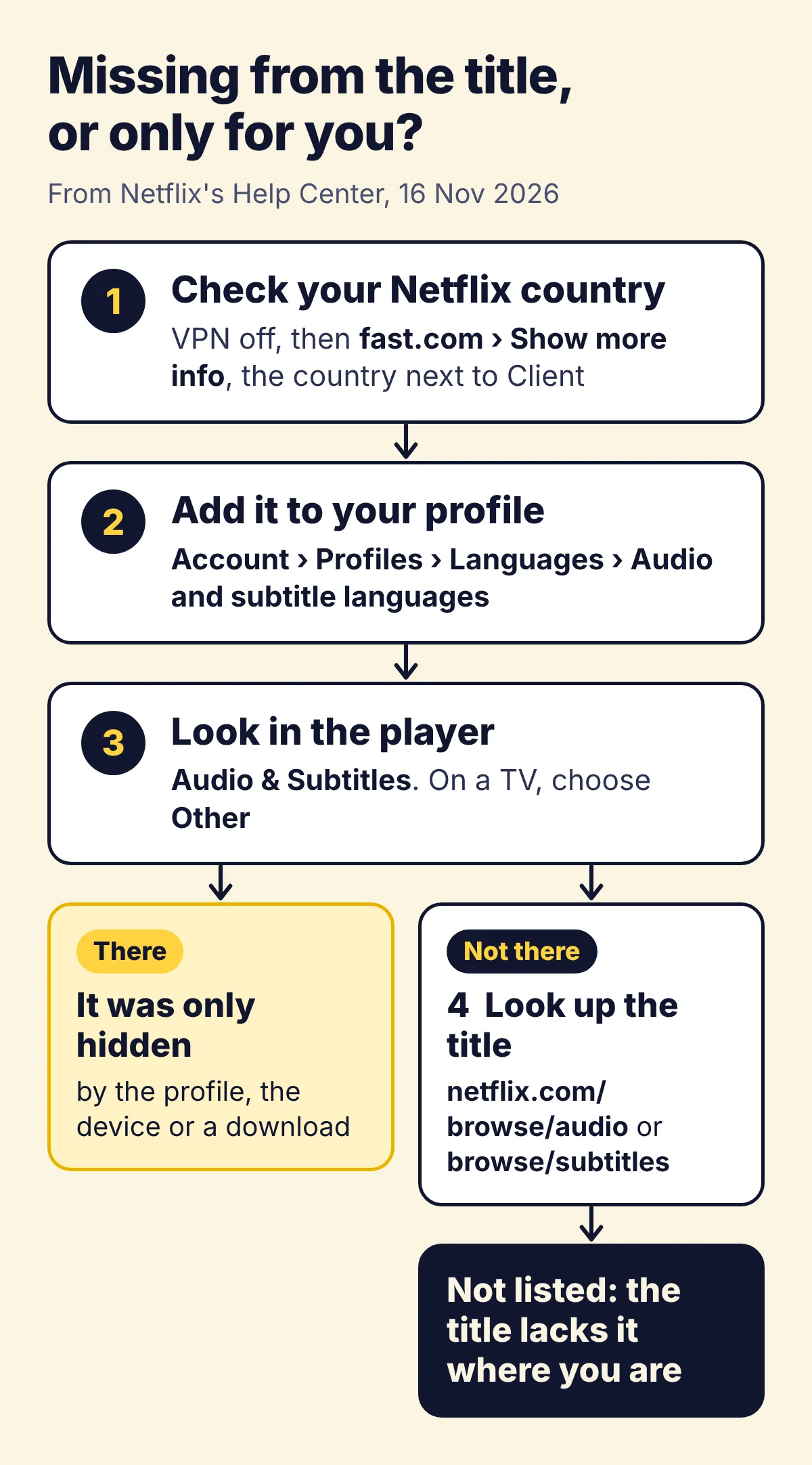
If the language shows in one place and not another, say on a laptop but not on the TV, the device is the cause. If it shows nowhere, the title lacks it where you are, and no setting adds it: the last part of this page is for you.
Your profile can hide languages, and whole titles
A Netflix profile has two language settings. The display language is the language of Netflix's own menus. The audio and subtitle languages are the ones the profile prefers for what it plays. Netflix's help gives these paths:
- Display language. In a browser: Account, Profiles, the profile, Languages, Display Language, then Save. On a phone: My Netflix, your profile's name, Manage Profiles, the profile, Display Language. On a TV: the profile screen, the Edit icon on the profile, Language. You may have to sign out and back in before it shows.
- Audio and subtitle languages. In a browser: Account, Profiles, the profile, Languages, Audio and subtitle languages, then Save. On a phone: My Netflix, your profile's name, Manage Profiles, the profile, Audio & Subtitles. On a TV it is chosen in the player: pause, open the controls at the bottom, choose Other, then Audio and Subtitles.
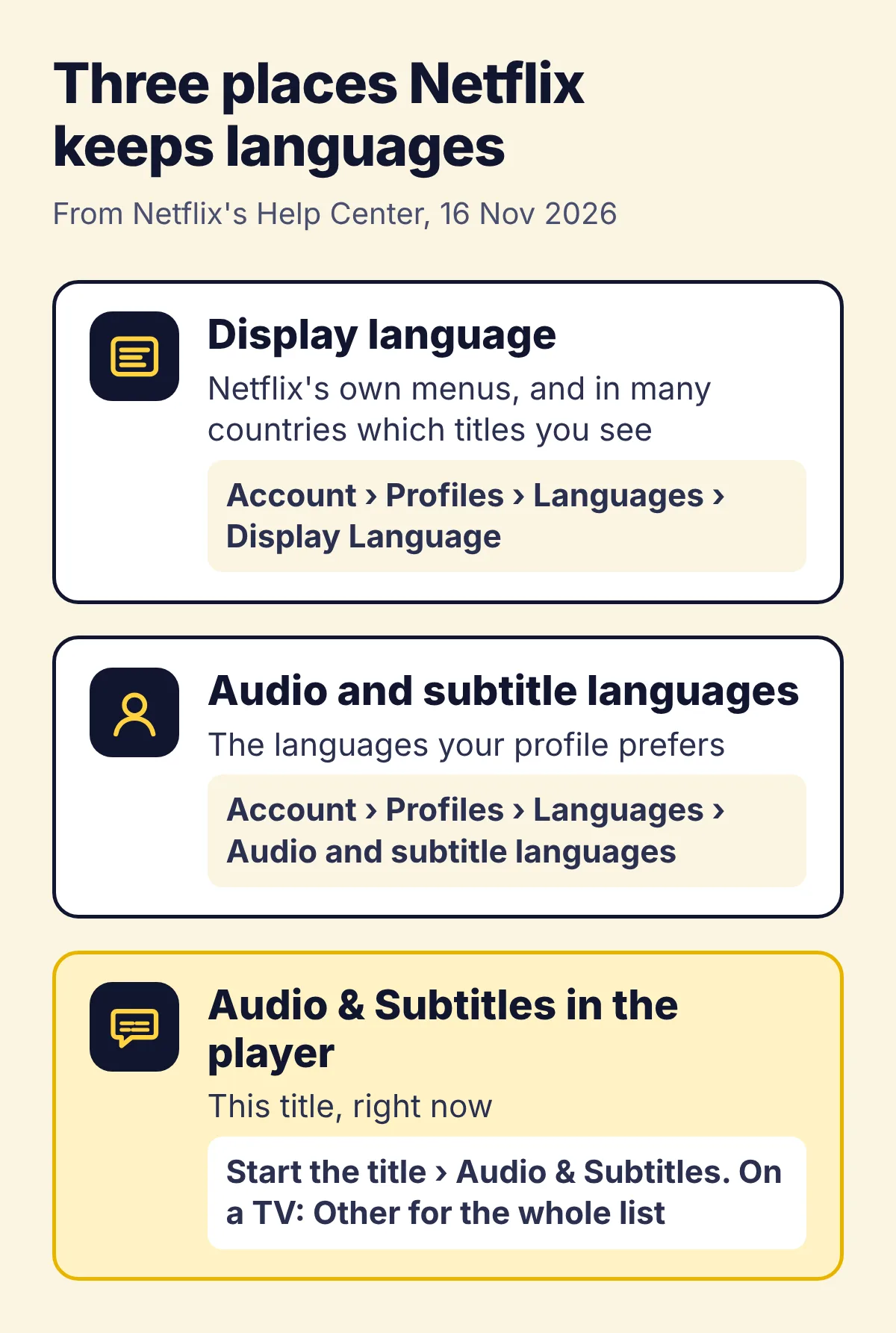
The display language also decides which titles you see at all. Netflix pairs many countries with one or a few languages: Italian in Italy, German in Germany, German, French or Italian in Switzerland, English or Russian in Lithuania. When a profile's language is one of those, Netflix shows it only the titles that have audio or subtitles in that language. So a film a friend finds may not show up for you at all. To see every title in your country, Netflix's help says to choose a language that is not paired with it.
One more catch for families. Netflix does not save audio and subtitle choices for most Kids titles watched from an adult profile, only from a Kids profile. If you have to pick the audio again every time, its help says to play a title rated Teens or above for two or three minutes, which saves your preferred audio language.
The TV, the app and downloads
- On a TV, the player may show only a short row of languages at the bottom, without the Audio & Subtitles icon. Choose Other to see the rest.
- A downloaded title keeps only the two most relevant languages, even when you are online. Delete the download and stream the title to see them all.
- Devices made before 2014 may not show subtitles in Arabic, Chinese, Hebrew, Hindi, Japanese, Korean, Thai, Romanian or Vietnamese. If subtitles do not appear, Netflix's help says to try another device.
- Subtitles you never turned on can appear anyway when a title has dialogue in a language other than its original one.
Where Netflix thinks you are
Netflix licenses many titles country by country, and its help says a title's languages depend on its licences and agreements. So the same film can offer a dub in one country and not in the next, and a friend abroad can see a language you never will at home. Two things change your country without you noticing:
- A VPN or proxy. Netflix's help says that when titles are not available in your language, or you miss titles others nearby can see, it may think you are in another country. Turn the VPN off, and check your antivirus too, since some come with one. Over a VPN you may see only the titles that are available everywhere.
- Travel. Netflix's help says the choices for streaming and downloading, audio and subtitles included, vary by country. If you live in the EU, you get your home country's Netflix in another EU country for a limited time. Elsewhere you get what that country has, and downloads may not be available there.
When a friend has the dub and you don't
In different countries, the licences above explain it. In the same country, compare the profiles and the devices first: a different display language, a download or a TV that shows a short list explains most cases. If they match too, Netflix's Terms of Use name one more difference: it keeps testing parts of its service, such as its website and interface, and you can turn off test participation on your Account page at any time.
Netflix does not say that tests change a title's languages. On Reddit, one viewer wrote that support put a missing dub down to a test, and another wrote that turning off a testing setting on their account got it back for them. Treat it as worth a try, not a fix Netflix confirms.
Find the titles that have your language
To go the other way round and see what Netflix has in your language, its help points to Browse by Languages on the web, which lists titles by audio, subtitle or original language, and to netflix.com/browse/audio and netflix.com/browse/subtitles. Search takes phrases too, and its help gives "Hindi Dubbed Movies & TV" and "Spanish movies" as examples. If a title you expect is not there, it says to check the profile's maturity rating and language preferences.
When the title doesn't have your language
Then no setting, profile or device adds it. Netflix plays only the tracks a title comes with and has no button that translates them. How to translate Netflix goes through what is left, with a test on a film that had Lithuanian neither in audio nor in subtitles: subtitles in a second language you read well, an extension that translates the subtitles as text, or one that reads the translation aloud.
The Vocnu extension is the last kind. On Netflix it takes the title's subtitles in the language spoken, even when they are off, translates them, and one AI voice reads them over the original sound turned down, with subtitles in your language over the picture. A title without such subtitles is heard from the tab's sound instead, which takes longer at the start. It works in 38 languages in Chrome, Brave and Edge on a computer, never in Netflix's apps on a TV, phone or tablet, and a title already in your language is never voiced or charged.
Other services have catches of their own. Disney+ keeps its app language apart from each title's audio: what to do when Disney+ lacks your language. On Prime Video, some titles have no English subtitles at all.