
What HIDIVE has, language by language
HIDIVE doesn't publish a list of its languages, so we counted. JustWatch shows the audio and subtitle languages of each title a service streams, and on 19 November 2026, 172 of the 200 most popular HIDIVE titles in its US listing had them filled in. Together they add up to this:
| Language | Audio | Subtitles |
|---|---|---|
| Japanese | The original, on all but one title | None listed |
| English | A dub on more than half | On almost every title |
| Latin American Spanish | No dub listed | About 3 in 10 titles |
| Portuguese | No dub listed | About 2 in 10 titles |
| French | No dub listed | One title |
| Any other language | None listed | None listed |
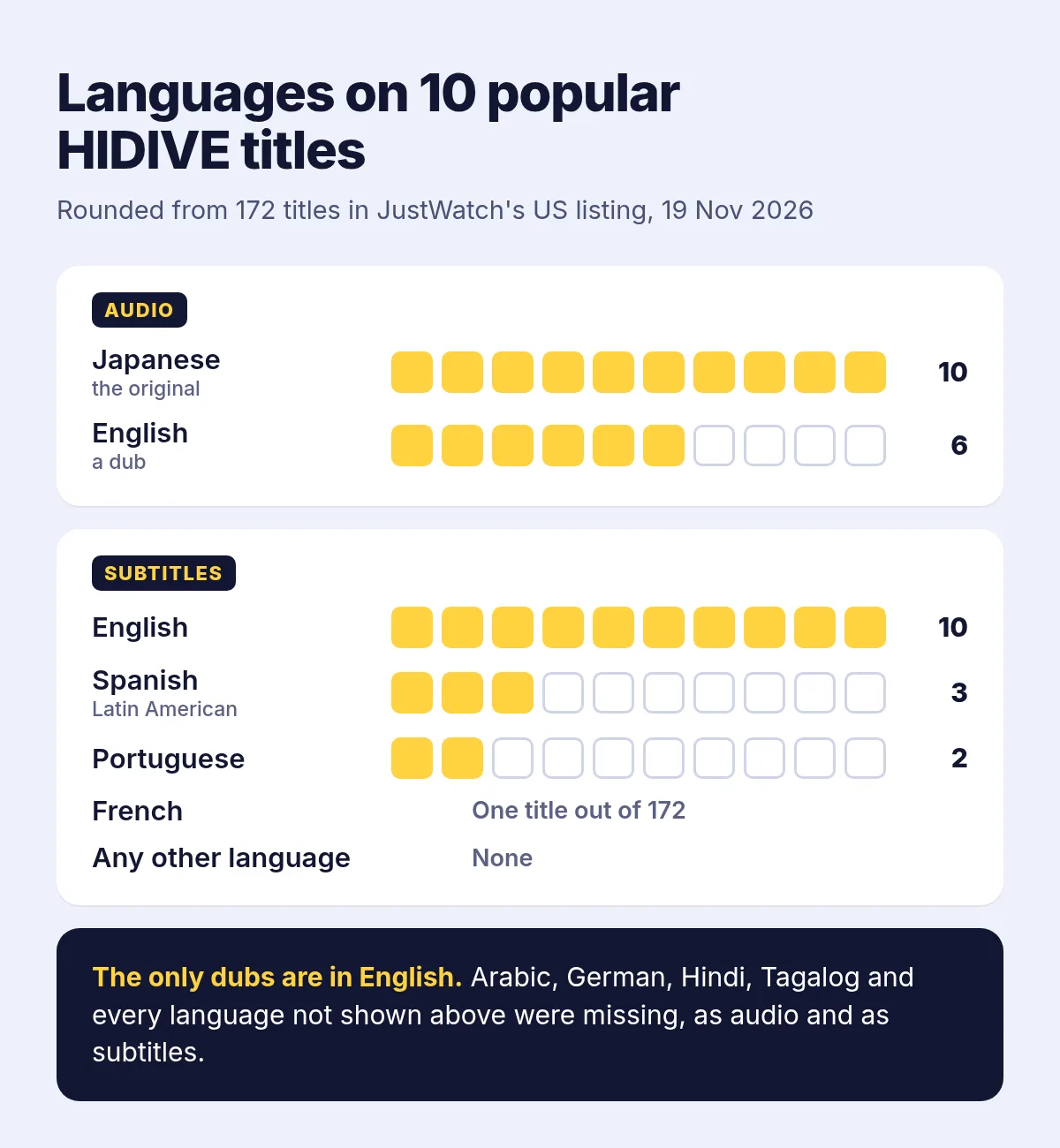
Two things to keep in mind. JustWatch's listings come from the services and can lag behind, so what the episode itself plays has the last word. And the Spanish subtitles belong mostly to one stretch of years: about half the titles first released between 2018 and 2023 have them, against only a few of those from 2024 on. HIDIVE's Canadian listing looks much the same.
Where HIDIVE lets you pick a language
HIDIVE's help pages, which we read on 19 November 2026, keep your audio and subtitle language in your profile:
- On the website, click the profile avatar at the top right, choose Edit Profile, then set the profile's subtitle language and audio.
- In the phone app, tap the three lines at the top left, then preference, then subtitles.
- On Fire TV, Apple TV and Xbox, the same choice sits under account settings.
- On Roku, it's the Roku device's own setting. To switch the audio, pause, press the (*) button and open Accessibility & Language, then Audio Track. HIDIVE notes that on Roku subtitles show only in English, whatever the audio.
The setting picks among what a title already has. In HIDIVE's words, if a title doesn't have the audio or subtitle language you chose, it plays what is available. Choosing Spanish won't add Spanish to a show that has only English, and HIDIVE's own words stay in English too: its iPhone app lists English as its only language.
Why your language isn't there
HIDIVE now serves mainly English-speaking countries. Its help center says the service stopped in certain areas outside North America on 14 December 2023, and Wikipedia describes what was left as English-language markets. Before that, in July 2017, HIDIVE had started adding Spanish and Portuguese subtitles to selected titles, and those two are still the only other languages that turn up in any number, mostly on titles from those years.
What you can watch also depends on where you are. HIDIVE reads your IP address to tell your country and fills the catalog with the shows it has the rights to stream there. When we opened hidive.com from Lithuania on 19 November 2026, its Series and Dubs pages said No content available. A VPN won't get around that: HIDIVE says a VPN stops you from signing in, registering and streaming.
What you can do
- Ask HIDIVE for it. Its help center collects requests for spoken and written languages alike in a Content/Language Survey, which its acquisitions team reviews. That's the only way a real dub or subtitles in your language could come, and nothing promises when.
- Use a second language. If you read Spanish or Portuguese, check whether the title has those subtitles. If you follow spoken English, more than half the catalog has an English dub.
- Look at the other services where you live. Shows are licensed country by country, so another service may carry the same series in your language.
- Translate it in your browser. On a computer, an extension can put subtitles in your language over hidive.com's player, or read them aloud. That's what Vocnu does.
Subtitles in your language with Vocnu
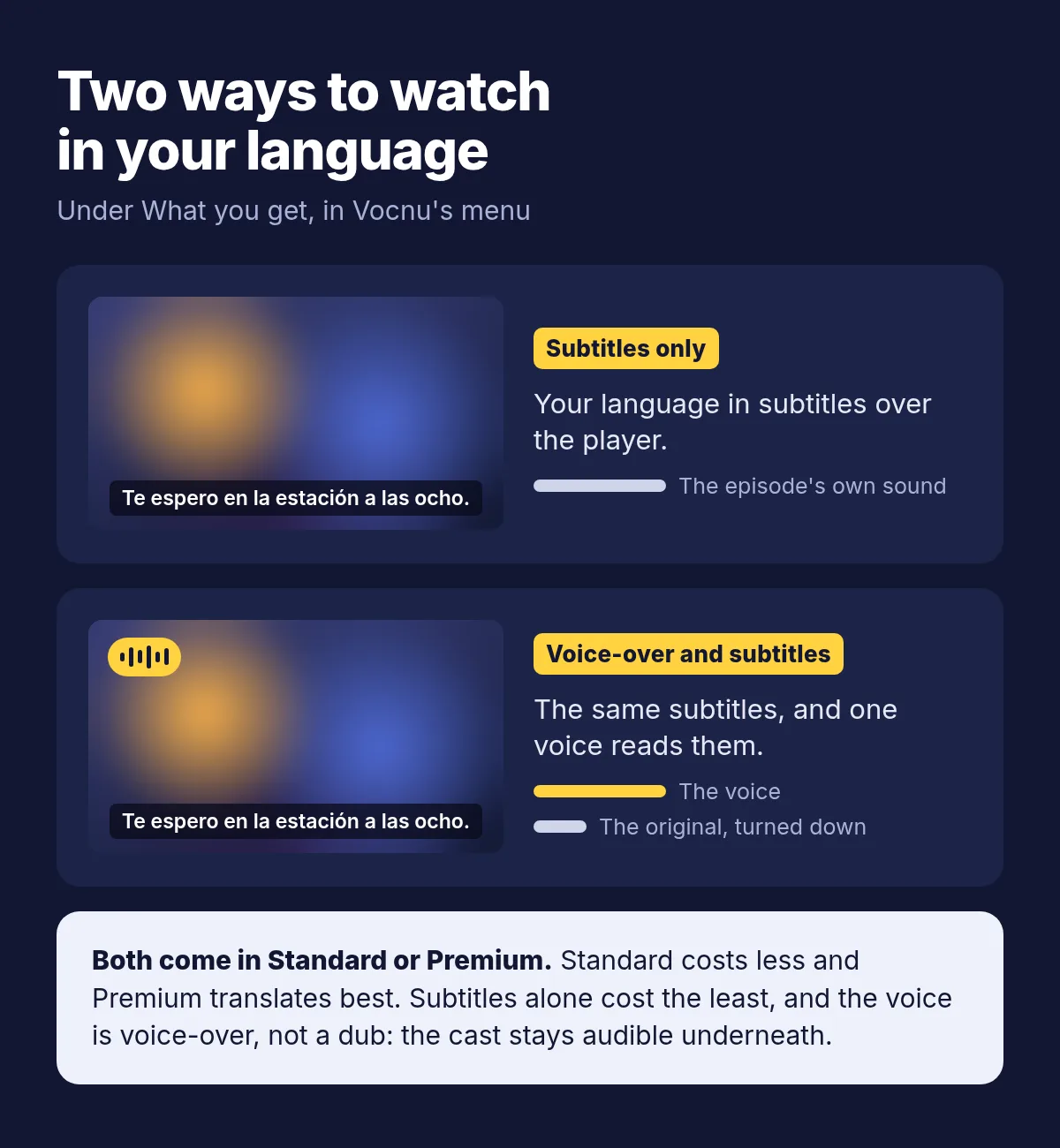
Vocnu is our extension for Chrome, Brave and Edge on a computer. On hidive.com it translates the episode into any of 38 languages and shows your subtitles over the player. Choose Subtitles only under What you get in Vocnu's menu, and the episode's own sound plays as it is.
If you'd rather listen than read, choose Voice-over and subtitles. One voice then reads the translation over the original, which plays lower underneath, so you still hear the cast, the music and the effects. That's voice-over, not a dub: nobody's voice is replaced, and the lips don't match. Where HIDIVE has an English dub and you follow English well, that dub is the better way to listen.
- Where the player has subtitles for the episode, Vocnu translates that text. Where it finds none, it listens to the tab's sound instead, and may ask you to click the Vocnu button in the toolbar once so it can hear it.
- On most video players, Vocnu hides the site's own captions while it works and puts them back as you had them afterwards, so you don't read two sets at once.
- Subtitle quality and Voice-over quality each come in Standard and Premium. Standard costs less: a quick translation that's good for following along and, if you listen, a plain synthetic voice. Premium has the finest translation and the most natural voices.
- Opening and ending songs have two switches of their own, Song subtitles and Voice songs, both marked experimental.
- An episode already in your language isn't translated or charged.
We haven't tried Vocnu on HIDIVE ourselves: we have no HIDIVE account, and the service doesn't open from Lithuania, where we work. HIDIVE is among the sites vocnu.com lists under Also works on, but this page shows no recording from it. For what a session looks like, from the first wait to the subtitles over the player, see how we translated a film on Netflix.
Set it up on hidive.com
- On a computer, add Vocnu to Chrome, Brave or Edge from the Chrome Web Store. It opens the Vocnu app: sign in or create a free account and press Connect the extension.
- Open the episode on hidive.com, signed in to your own HIDIVE account.
- Press the Vocnu button in the browser's toolbar, or Alt+Shift+V, choose your language, and under What you get pick Subtitles only or Voice-over and subtitles.
- Play the episode. The first lines can take a moment to appear.
Watching anime on other sites as well? The anime guide lets you hear the voices and a few voiced scenes first, and the Crunchyroll post covers that site.
What a 24-minute episode costs
You pay for the minutes Vocnu translates, and subtitles alone cost the least. Each price depends on the plan or pack:
| What you choose | One 24-minute episode | Twelve such episodes |
|---|---|---|
| Subtitles only, Standard | €0.24 to €0.50 | €2.86 to €6.00 |
| Voice-over, Standard | €0.48 to €1.00 | €5.72 to €12 |
| Voice-over, Premium | €1.91 to €4.00 | €23 to €48 |
A new account gets free time once it confirms its email, no card needed: 2 h 40 min of Standard subtitles, or 1 h 20 min of Standard voice-over. Watching the same minutes again within 90 days, in the same language and mode, is free. Plans start at €10 a month and packs of hours at €10, and a pack's hours don't expire.
When Vocnu isn't the answer
- You watch on a TV, a phone or a Roku. Vocnu runs only in Chrome, Brave and Edge on a computer, and HIDIVE's apps can't use it.
- The title has an English dub and you follow spoken English. A real dub sounds better than any voice-over.
- HIDIVE doesn't stream in your country. Vocnu translates what you can already play: it doesn't change HIDIVE's catalog or stand in for a subscription.
Questions and answers
On part of its catalog. About 3 in 10 popular titles in HIDIVE's US listing on JustWatch had Latin American Spanish subtitles on 19 November 2026, most of them titles first released between 2018 and 2023.
None turned up in its US listing on JustWatch on 19 November 2026: the only dubs there were English. Vocnu can read a Spanish translation over the original instead. That's a voice-over rather than a dub, but it lets you listen.
Barely. Apart from English, Spanish and Portuguese, one title in the listing had French subtitles, and none had Arabic, German or any other language.
No. Its iPhone app lists English as its only language. Your profile's subtitle setting only picks among the languages a title already has.
HIDIVE shows only what it has the rights to stream in your country, which it tells from your IP address, and since December 2023 it no longer serves certain countries outside North America. A VPN won't help: HIDIVE blocks them.
No. Vocnu is an extension for Chrome, Brave and Edge on a computer, so you watch on hidive.com there.
Sources
- HIDIVE Help Center: How to set subtitle preferencessupport.hidive.com (opens in a new tab)
- HIDIVE Help Center: How do I change audio on Roku?support.hidive.com (opens in a new tab)
- HIDIVE Help Center: Why is HIDIVE no longer available in my country?support.hidive.com (opens in a new tab)
- HIDIVE Help Center: How do I know what content is available in my country?support.hidive.com (opens in a new tab)
- HIDIVE Help Center: Request a show or moviesupport.hidive.com (opens in a new tab)
- HIDIVE Help Center: VPN usage restrictionsupport.hidive.com (opens in a new tab)
- JustWatch: HIDIVE in the US, the 200 most popular titles counted on 19 November 2026justwatch.com (opens in a new tab)
- Wikipedia: Hidiveen.wikipedia.org (opens in a new tab)
- App Store: HIDIVE, its languagesapps.apple.com (opens in a new tab)
Found something out of date? Write to support@vocnu.com and we will check it and correct the page.