
Where Viki shows how far a language is
Every subtitle language on Viki has a completion percentage, and its help names three places to read it:
- On the episode thumbnails, at the bottom of each one. To see your language there, set it under Profile, Account Settings and in the player, then refresh the page.
- In the player on viki.com: start the episode, click the Settings icon at the bottom right, and choose your language next to Subtitles. Viki's help says this is where you check one episode's percentage.
- In the Viki app on a phone: when an episode is below 95% in your preferred language, the player shows a Subtitle Incomplete message with a Notify when ready button.
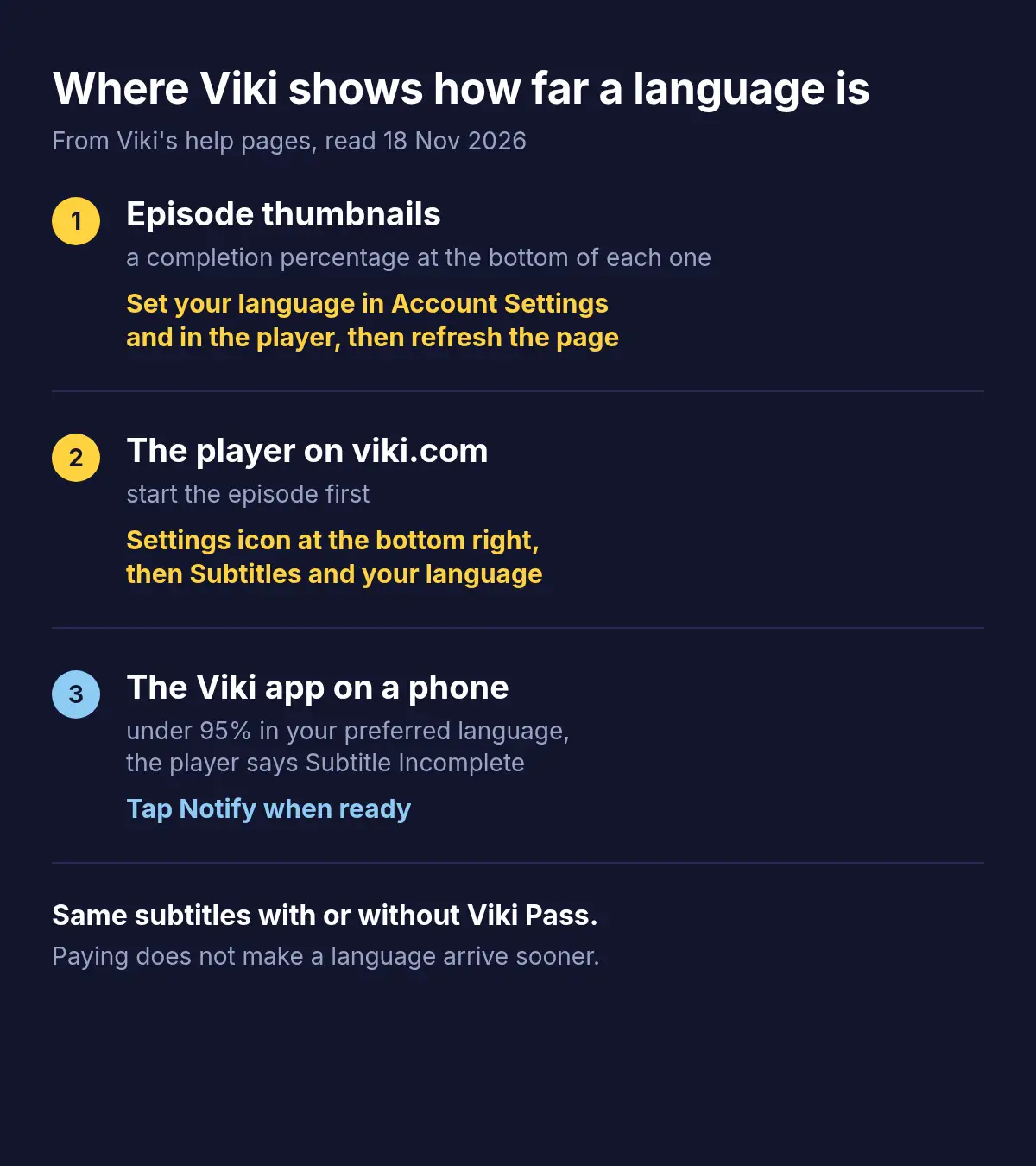
A language at 100% is done. Below that, lines are still missing, and Viki's app counts an episode as ready for its notification at 95%.
Why a language is incomplete or missing
Viki's subtitles are written by its community of volunteer subtitlers, one language at a time. Its help gives the plain reason a language is missing or incomplete: the community has not finished it yet. How fast a language moves depends, it says, on how popular the show is, on the kind of show (a historical drama's language is very different from a modern one's), and on contributors finding the show and recruiting a team for it.
Two cases look like waiting but are not:
- English only. Viki's help says some shows' licences permit English subtitles only, so it cannot offer other languages on them.
- Two sets of subtitles. A second language in the background of the picture is a hardsub: burned into the video by the content provider, it cannot be turned off.
Viki Pass changes none of it. Viki's help says the same subtitles are offered with and without Pass, and how fast they are completed depends on the content and on which contributors are free. Pass brings exclusive shows, no ads, HD and Chromecast.
How many languages Viki's popular series have
Viki says it has subtitles in more than 200 languages, but each series has a list of its own. On 18 November 2026 we read the subtitle languages listed for the 100 series Viki's public catalogue ranked as most watched lately, the list each series page shows under Subtitles.
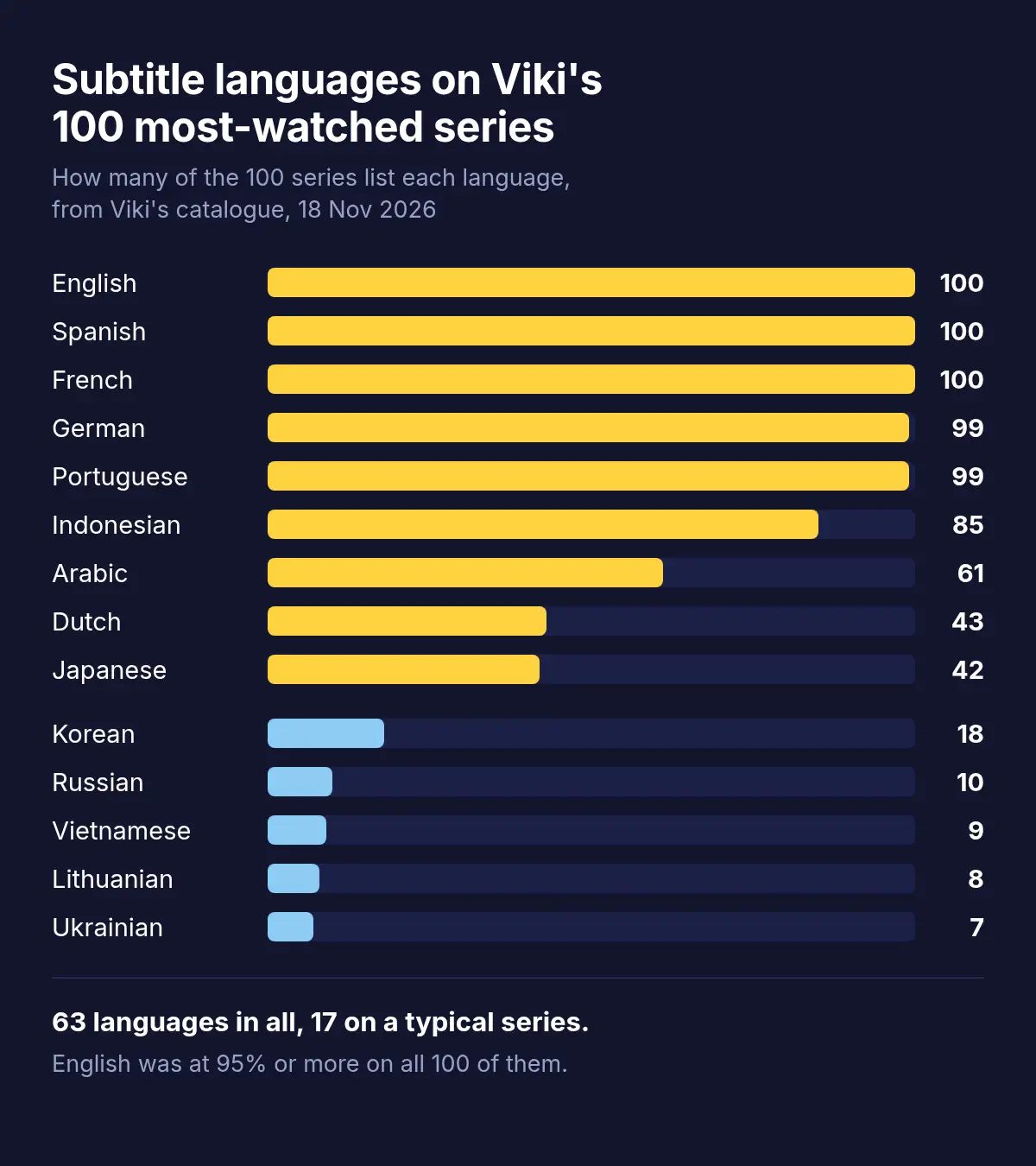
English, Spanish and French were on all 100, and German, Italian, Portuguese and Romanian on 99. English stood at 95% or more on every one, 100% on 93 of them. Past the big European languages the lists thin out: Indonesian on 85 series, Arabic on 61, Dutch on 43, Japanese on 42, Korean on 18, Russian on 10, Vietnamese on 9, Lithuanian on 8 and Ukrainian on 7. The 100 series listed 63 languages between them, and the median series had 17.
So on a popular series English is almost always finished, while for most other languages a missing or unfinished one is the usual case, not bad luck with one show.
What you can do while a language is unfinished
| Option | What you get | Where |
|---|---|---|
| Get notified | A message when an episode reaches 95% in your preferred language, in 10 languages | The Viki app |
| Switch to a finished language | Viki's own subtitles in a language you read well, often English | Every device |
| Ask for a language | A request sent through Viki's form, the only way it takes them | Viki's help pages |
| Cheer or join the subtitlers | Encouragement for the team, or a hand in finishing it | The show's Subtitle team tab, contribute.viki.com |
| Viki's own dubbing | Another audio language, in beta on selected titles | The Audio icon in the player |
| A voice-over extension, such as Vocnu | A translation read aloud over the original sound, with subtitles in your language | Chrome, Brave or Edge on a computer |
Notifications cover English, Spanish, Portuguese, French, Italian, Arabic, Polish, German, Romanian and Japanese. In the app, set your Preferred Language under the Me tab, Settings, subscribe to the show, and check that both New Episode and Subtitle Ready are on under Settings, Push Notifications. Or tap Notify when ready in the player.
To ask for subtitles on a show, use the form on Viki's request page: Viki says only requests sent through it are considered. To cheer the volunteers, tap the heart in the Subtitle team tab on the show's page. To help finish a language yourself, contribute.viki.com is where Viki's subtitlers start.
Viki's dubbing works on selected series and films only. You switch it with the Audio icon in the player, and changing the audio leaves the subtitles as they were. Why a Korean series so rarely has a dub at all is in K-drama not dubbed in English? Why, and how to hear it anyway.
Hearing a Viki episode in your language with Vocnu
The Vocnu extension translates a video as it plays and has one AI voice read the translation over the original sound turned down, with subtitles in your language over the picture, in 38 languages. On viki.com it runs as on any other site, in Chrome, Brave and Edge on a computer, with no mode made for Viki: where it can read the subtitles the player loads, it translates those, and where it cannot, it hears the episode from the tab's sound once you allow it with one click on its button.
That first case matters on Viki. Vocnu reads the lines a subtitle file has, and on Viki's player it does not fill in missing lines from the sound. So pick a finished language in Viki's player before you start, English on almost every popular series, rather than your own language at 60%. Where Vocnu hears the tab's sound instead, it translates what is said, and the percentages do not come into it.
- Add Vocnu to Chrome, Brave or Edge from the Chrome Web Store. In the app it opens, sign in or create a free account and press Connect the extension.
- Start the episode on viki.com and set its subtitles to a finished language under the Settings icon, Subtitles.
- Press the Vocnu button in the browser's toolbar or Alt+Shift+V, choose your language, and press play. If Vocnu has to hear the episode, it says so over the player and starts once you click its button.
Viki's help lists Chrome, Edge, Firefox, Safari and Opera, on Windows 10 or later and macOS Big Sur or later. Brave is not on that list, so if Viki will not play in Brave, use Chrome or Edge.
Vocnu was not tested on Viki for this page, so it gives no timings or notes on quality there. How to translate Netflix has a full test on a film: how long the first line took, what a pause and a jump did, and how the translation came out. On Netflix Vocnu read the film's subtitles, so the waits on Viki can differ. What holds on any site:
- One voice reads every character over the original sound turned down. Nothing moves with the lips.
- Machine translation: a line can come out wrong, and names may be spelled by sound.
- Songs keep their own sound. Vocnu's menu has two switches for them: Song subtitles shows the lyrics in your language, and Voice songs has them read too.
- An episode already in your language is never voiced or charged.
- A computer only: Vocnu does not run in Viki's apps on a TV, phone or tablet.
What an episode or a whole series costs
You pay for the minutes Vocnu voices, at the price of the voice you choose. Premium has the most natural voices and the finest translation. Standard has a plain synthetic voice and a quicker translation that slips more often. Each price depends on the plan or pack:
| Voice | A 45-minute episode | A 70-minute episode | 16 episodes of an hour |
|---|---|---|---|
| Premium | €3.58 to €7.50 | €5.56 to €12 | €76 to €160 |
| Standard | €0.91 to €1.92 | €1.39 to €2.92 | €19 to €40 |
A new account gets free minutes once it confirms its email: 20 of Premium voice-over or 80 of Standard, enough for a 70-minute episode in Standard. Watching the same minutes again within 90 days, in the same language, voice and mode, costs nothing. Plans start at €10 a month and packs of hours at €10, and a pack's hours do not expire.
Questions and answers
Viki's subtitles are written by volunteer subtitlers, one language at a time, and an incomplete language is one they have not finished yet. How fast it moves depends on how popular the show is, what kind of show it is and whether contributors take it up.
Look at the percentage at the bottom of the episode's thumbnail, or choose the language next to Subtitles in the player's settings on viki.com. In the Viki app, tap Notify when ready under the Subtitle Incomplete message, and Viki tells you when the episode reaches 95%, in 10 languages.
No. Viki's help says Pass and non-Pass viewers get the same subtitles. Pass adds exclusive shows, no ads, HD and Chromecast.
Viki's help says some shows' licences permit English subtitles only, and on those it cannot offer other languages, however long you wait.
The second set is a hardsub: subtitles burned into the video by the content provider. They are part of the picture and cannot be turned off.
No. Vocnu reads the lines in the subtitles Viki's player loads, so lines missing from them stay missing. Choose a finished language such as English in the player and Vocnu works from that, or from the episode's sound where it cannot read the subtitles, so you hear your own language without waiting for it.
No. Vocnu is a browser extension, so it works on viki.com in Chrome, Brave or Edge on a computer, not in Viki's apps on TVs, phones or tablets.
Sources
- Viki Help Center: Why are subtitles missing in a specific language?support.viki.com (opens in a new tab)
- Viki Help Center: How do I get notified when subtitles are available?support.viki.com (opens in a new tab)
- Viki Help Center: Does Viki Pass include subtitles and access to regionally restricted content?support.viki.com (opens in a new tab)
- Viki Help Center: How Do I Change the Site and Subtitle Language?support.viki.com (opens in a new tab)
- Viki Help Center: Subtitle Creation on Vikisupport.viki.com (opens in a new tab)
- Viki Help Center: Request Subtitles for a TV Show or Moviesupport.viki.com (opens in a new tab)
- Viki Help Center: Why Do Some Shows Have English Subtitles Only?support.viki.com (opens in a new tab)
- Viki Help Center: Why am I seeing subtitles in 2 languages?support.viki.com (opens in a new tab)
- Viki Help Center: How Do I Change Audio Language (Dubbing) on Viki?support.viki.com (opens in a new tab)
- Viki Help Center: Supported Browserssupport.viki.com (opens in a new tab)
- Viki Help Center: What is Viki?support.viki.com (opens in a new tab)
- Viki: Explore, the catalogue of the 100 series counted on 18 November 2026viki.com (opens in a new tab)
Found something out of date? Write to support@vocnu.com and we will check it and correct the page.