In short
- Pick Chrome for a free gist of any sound in Chrome, in a language it hears.
- Pick Vocnu for whole sentences on the picture, or for languages Chrome doesn’t hear, such as Lithuanian.
- On our German video, Chrome ran about 1.5 seconds behind the narrator and misheard some words.
- Vocnu took about 15 seconds to start, then kept each line in time with the narrator.
- Live Translate is free; Vocnu’s Standard subtitles cost €0.01 to €0.02 a minute.
How we compare. Vocnu publishes this page. Every claim about Chrome's live translate links to its own site, and anything we did not test ourselves is marked as taken from there. Prices are the lowest and highest a tool's published packs or plans work out to on the day we checked, in its own currency.
Side by side
Chrome writes what it hears in a box under the picture; Vocnu writes on the picture and can also speak.
| Feature | Chrome’s Live Translate | Vocnu |
|---|---|---|
| Where you read it | A box of its own at the bottom of the window, which you can drag | Subtitles on the video’s picture |
| What it translates from | The sound playing in Chrome | The player’s subtitles where it has some, otherwise the speech |
| Languages it hears | 17 in our Chrome 158 on Linux, without Lithuanian, Ukrainian, Dutch or Arabic | 37, those four included |
| Languages it translates into | 135 in its list | 38 |
| How it starts | About 1.5 seconds behind the speech, then rewritten as it hears more | About 15 seconds after switching on, then each line in time with the speech |
| Voice | None; you hear the original | Optional, over the original sound turned down |
| Where it works | Any sound in Chrome, video or not | Videos in Chrome, Brave and Edge on a computer |
| Account and price | No account; free | A Vocnu account; from €0.01 a minute after the free time |
Chrome misheard words and kept rewriting them
Chrome told German from English by itself, started about a second and a half behind the narrator, and rewrote each line as it heard more.
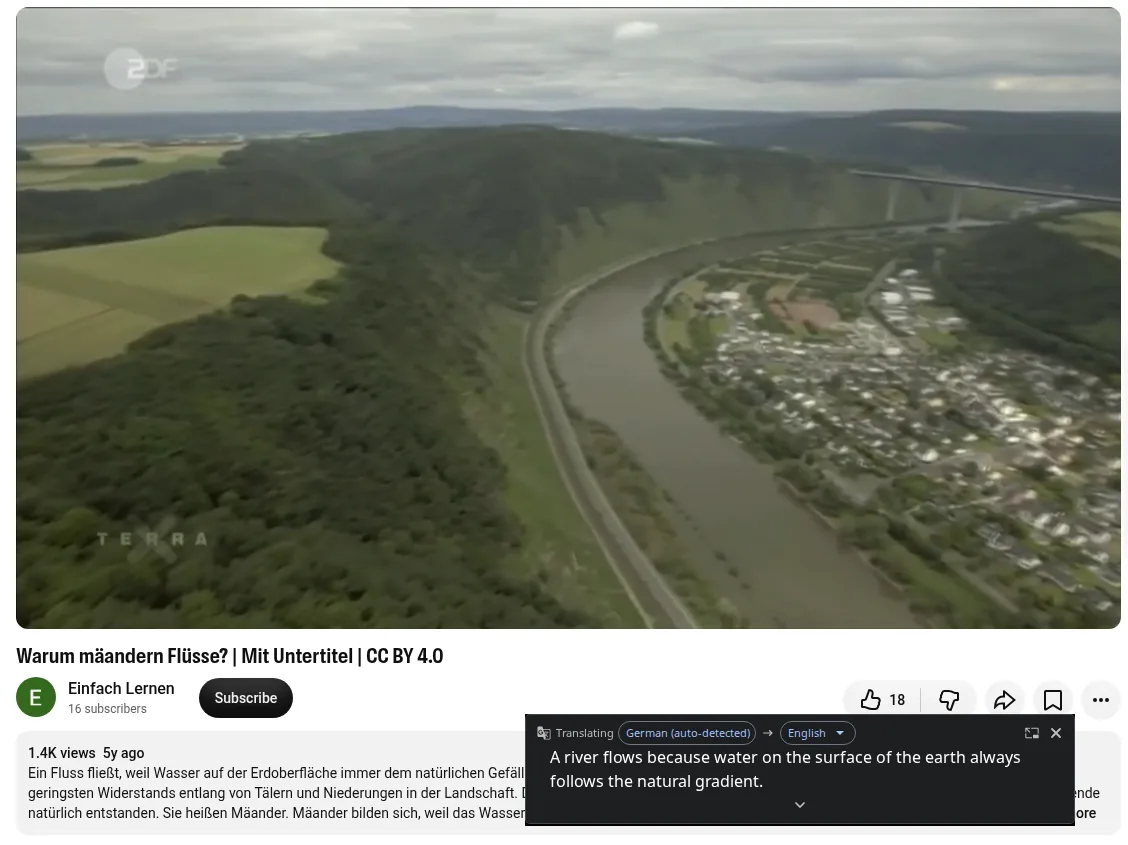
Most of its mistakes were misheard German words. Some it fixed a few words later; some stayed.
| What the narrator said | Chrome’s first try | What it settled on |
|---|---|---|
| “Alle Fließgewässer, vom kleinen Bach bis zum Fluss”: all running water, from the small stream to the river | “All flowing waters from the Kleiner Bach” | “All the rivers from the small stream to the river” |
| “Sie heißen Mäander.”: they are called meanders | “They are called meander meanders” on YouTube, “are called Mehrander Meander form” on Wikimedia Commons | Left as it was, both times |
| “Weiter flussabwärts lagert er es an der Innenseite wieder an.”: further downstream it puts the material down again on the inside | “Continue Down of River” | “Further downstream, it rests on the inside again.” |
| “kann der Fluss die schmale Barriere durchbrechen”: the river can break through the narrow barrier | “the river can see the narrow barrier” on YouTube | “the river can break through the narrow barrier” |
| “und kann bei fehlender Durchströmung langsam verlanden. Eine Art natürliche Begradigung.”: and with no water flowing through, it can slowly fill with silt. A kind of natural straightening. | “and can be used if there is no flow through” | “and can slowly spill over a kind of natural straightening if there is no flow.” |
| “so wie hier in dieser ursprünglichen Auenlandschaft am Rhein”: as here in this untouched floodplain on the Rhine | “as here in this original Shire.” on YouTube | Corrected a few seconds later to the floodplain on the Rhine |
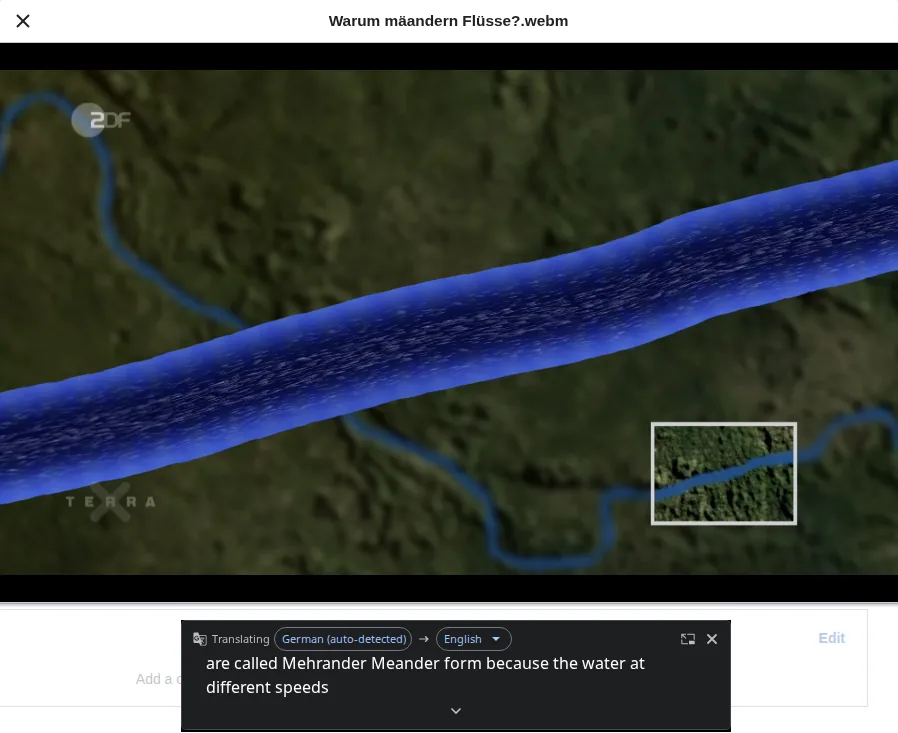
- The text moves: a line can change as you read it, and older lines scroll away.
- It can stall: on Wikimedia Commons the box stopped for about nine seconds, then caught up all at once.
- No two runs gave the same English.
- It writes and doesn’t speak, so you hear only the German narrator.
- By Google’s help, Live Caption works on your computer, but with Live Translate on its captions are sent to Google to translate.
Vocnu translated the uploader’s subtitles
Vocnu found the uploader’s German subtitles and translated those, so it never had to make out a word from the sound.
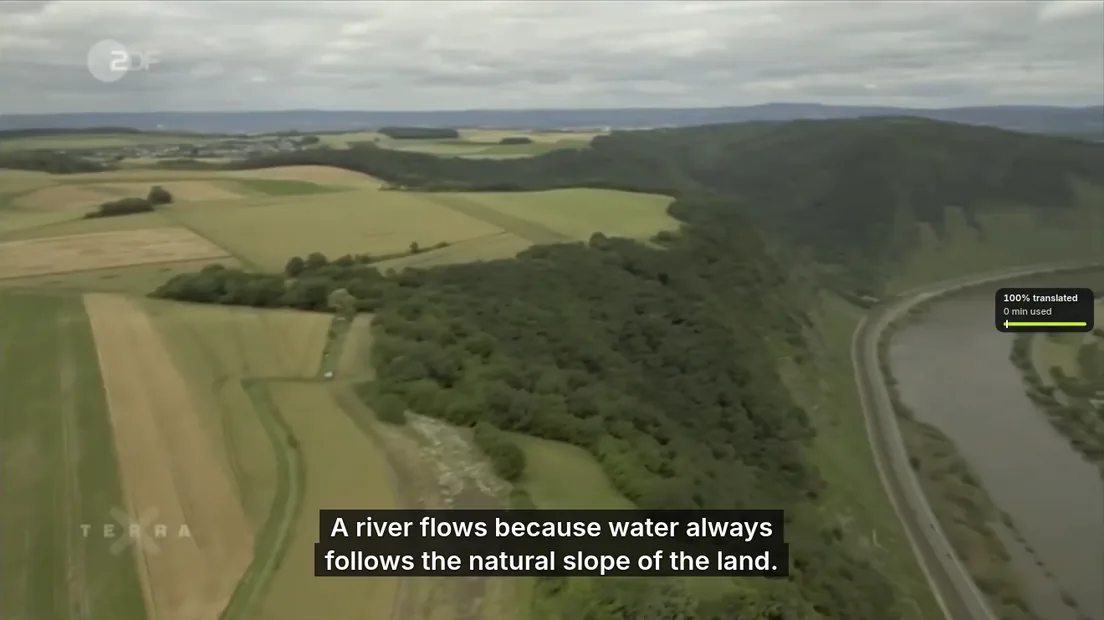
- After about 15 seconds preparing the voice-over, it showed whole English sentences on the picture in time with the narrator, read over the German at about 40%.
- It joined the German subtitles into 16 whole English sentences, none missing or out of order, and the meaning held in every one.
- The terms came through: “Mäander” as meanders, “Altwasser” as an oxbow lake, “verlanden” as silt up.
- Small things slipped: both runs’ first line dropped “auf der Erdoberfläche”, on the surface of the earth, which Chrome kept, and two lines lost “in der Landschaft” and “deshalb”.
- “Ein Prall- und ein Gleithang”, the geographer’s names for a bend’s two banks, became a plain “an outer and an inner bank”.
- Without subtitles, Vocnu listens to the speech too and can mishear, as on the Lithuanian lecture in Vocnu vs CCDub.
- Standard, used here, slips in meaning more often than Premium, and its voices sound plainly synthetic.
- The voice is optional: choose “Subtitles only” in Vocnu’s popup.
When Chrome’s Live Translate is enough
Chrome’s Live Translate is enough when the gist is all you need.
- You want the gist free, with no account, in a language Chrome hears.
- It isn’t a video: a podcast, a call or a radio stream in a tab.
- You’re learning the language: Live Caption alone writes the words as spoken, and by Google’s help that audio stays on your computer.
- You need one of the 135 languages Chrome offered to translate into; Vocnu offers 38.
Other video translators are compared in video translator extensions.
How to turn on Live Translate in Chrome
It takes a minute in Chrome’s caption settings.
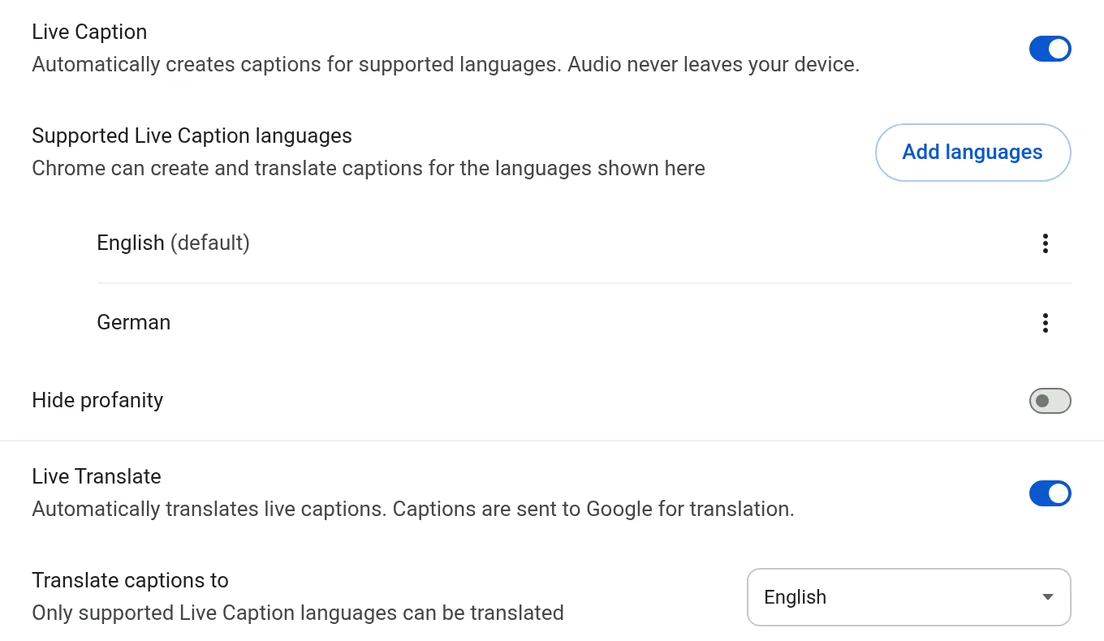
- Open Settings, then Accessibility, then Captions, or go to chrome://settings/captions.
- Turn on Live Caption.
- Under “Supported Live Caption languages”, add the language the video speaks.
- Turn on Live Translate and pick your language under “Translate captions to”.
- Play the video and drag the box where it covers least.
For sound from other apps too, see how to translate audio on your computer.
Edge’s own video translation is gone
Edge used to translate videos by itself on Windows, but Microsoft has retired the feature.
- Its page now says “This feature is no longer available”.
- Microsoft’s admin documentation marks the setting obsolete from Edge 159.
- Vocnu works in Edge as it does in Chrome.
What it costs
Live Translate comes free with Chrome; Vocnu charges for the minutes you watch, least for subtitles alone.
| Option | Price |
|---|---|
| Chrome’s Live Translate, used in this test | Free |
| Vocnu Standard, subtitles only | €0.01 to €0.02 a minute |
| Vocnu Standard with voice-over, used in this test | €0.02 to €0.04 a minute, €1.19 to €2.50 an hour |
| Vocnu Premium with voice-over | €0.08 to €0.17 a minute, €4.77 to €10 an hour |
- A new account gets 2 h 40 min of Standard subtitles or 1 h 20 min of Standard voice-over free once it confirms its email.
- Pack hours never expire. A video already in your language, or watched again within 90 days, costs nothing.
- Plans start at €10 a month.
How we tested
We make Vocnu, so weigh that. On 20 November 2026 we played the same German video through both on one laptop, into English, and read each one’s English against the German, line by line.
- The video
- “Warum mäandern Flüsse?” from ZDF’s Terra X, CC BY 4.0, one clear narrator. Its uploader’s German subtitles were our record of what was said.
- Chrome
- Live Caption and Live Translate on, English under “Translate captions to”. We played the video a few times on YouTube with its subtitles off, then on Wikimedia Commons, recording each run.
- Vocnu
- same laptop, signed in, Standard with the voice-over on, on YouTube. We played it twice and read every English line of the second run against the German.
Questions and answers
Yes. Live Translate translates the captions of whatever plays in Chrome, on Windows, Mac, Linux and Chromebook Plus by Google’s help, as text with no voice.
In Settings, then Accessibility, then Captions, turn on Live Caption and add the video’s language. Then turn on Live Translate and pick your language.
Yes: Chrome writes a free translation in a box as the video plays, though in our test it lagged and misheard some words. Vocnu puts subtitles on the picture, with a voice if you like.
In Chrome, yes: Live Translate writes the sound down on your computer and sends that text to Google to translate. You get text only, misheard words included.
Sources
- Chrome Help: Manage captions and translations in Chromesupport.google.com (opens in a new tab)
- Microsoft Learn: LiveVideoTranslationEnabledlearn.microsoft.com (opens in a new tab)
- Microsoft Edge: Real-time video translationexplore.microsoft.com (opens in a new tab)
- Warum mäandern Flüsse? on YouTubeyoutube.com (opens in a new tab)
- Warum mäandern Flüsse? on Wikimedia Commonscommons.wikimedia.org (opens in a new tab)
Found something out of date? Write to support@vocnu.com and we will check it and correct the page.