
In short
- Vimeo’s CC and Audio menus list only the tracks the owner added, with no translate option for viewers.
- Vimeo AI translates subtitles and audio, but only the video’s owner can run it.
- Vocnu translates a Vimeo video’s own track, or listens to its sound, in Chrome, Brave or Edge.
- In our tests, videos with a caption track started within 30 seconds, and a 28-minute talk with none after 43.
- Standard subtitles cost €0.60 to €1.25 an hour, and a new account gets 2 h 40 min free.
What Vimeo’s player offers a viewer
Vimeo’s player has two menus for language, and both list only what the video’s owner added:
- The CC button turns subtitles on and off, and the gear’s CC/subtitles item picks a track. Customize there changes the font, background and window, not the language.
- The gear’s Audio item picks another sound track. Vimeo’s help on audio tracks says the option is “only available if the video creator has added multiple audio tracks”.
- Vimeo’s captions help: “If you do not see your language, it probably means that the video has not yet been transcribed or translated.”
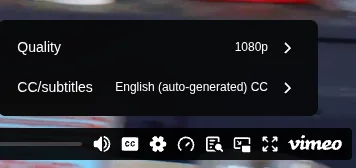
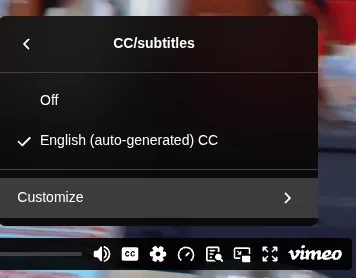
- For videos uploaded after 25 May 2022, Vimeo makes captions in the spoken language, labelled auto-generated, unless the owner turned them off (Vimeo Help).
- A Vimeo player embedded on another site has the same menus. On the film we watched on aeon.co, the only track was Persian (Farsi) (auto-generated).
Vimeo AI translation is the owner’s tool
Searches for Vimeo’s auto-translate lead to Vimeo AI, which works from the owner’s side:
- The owner selects the video in their Library, then Vimeo AI and Translate Video, per Vimeo Help updated on 10 November 2026.
- It is paid in Vimeo’s AI credits per minute and language. Translated audio needs a paid plan with AI credits.
- The results show up as tracks in the viewer’s CC and Audio menus. Until then, a viewer has nothing to switch on.
- If you know the creator, asking them is the free route, as Vimeo’s help suggests.
Subtitles or a voice-over on Vimeo with Vocnu
The Vocnu extension translates what people say in a Vimeo video on a computer, on vimeo.com or embedded on another site:
- Add Vocnu to Chrome, Brave or Edge from the Chrome Web Store, sign in or create a free account, then press Connect the extension.
- Open the Vimeo video with its sound on, press Alt+Shift+V and pick your language under Translate into.
- Under What you get, choose Subtitles only, or Voice + subtitles for an AI voice over the lowered original.
- It translates the video’s own subtitle track, auto-generated ones too, and listens to the sound when there is none, in 38 languages.
- A video with no track waits while Vocnu listens ahead, so long uncaptioned talks start slowest.
Our tests on vimeo.com and an embedded player
On 23 and 24 November 2026 we played three public Vimeo videos with Vocnu in Standard, with Voice + subtitles.
| What we tried | What Vocnu used | What happened |
|---|---|---|
| Breakfast at the Bodega, an English short film on vimeo.com, into Spanish | Vimeo’s English (auto-generated) track | First line after 24 seconds: “¿Me estás tomando el pelo?” for “are you kidding me?”, natural Spanish. Back 13 seconds after a reload. |
| Hills & Mountains, a Persian documentary in Vimeo’s player on aeon.co, into English | The film’s auto-generated Persian track | First line after 30 seconds, “My brothers Akram and Habib, who were 21 and 22,” with the names right. It sat over the film’s own burned-in English subtitles. |
| A 28-minute Spanish talk on vimeo.com with no tracks, into English | The sound, listening ahead | On 24 November, “Preparing the voice-over…” for 43 seconds, then “No human can store as much information as a computer, or even the cloud,” in natural English. Back 30 seconds after a reload. |
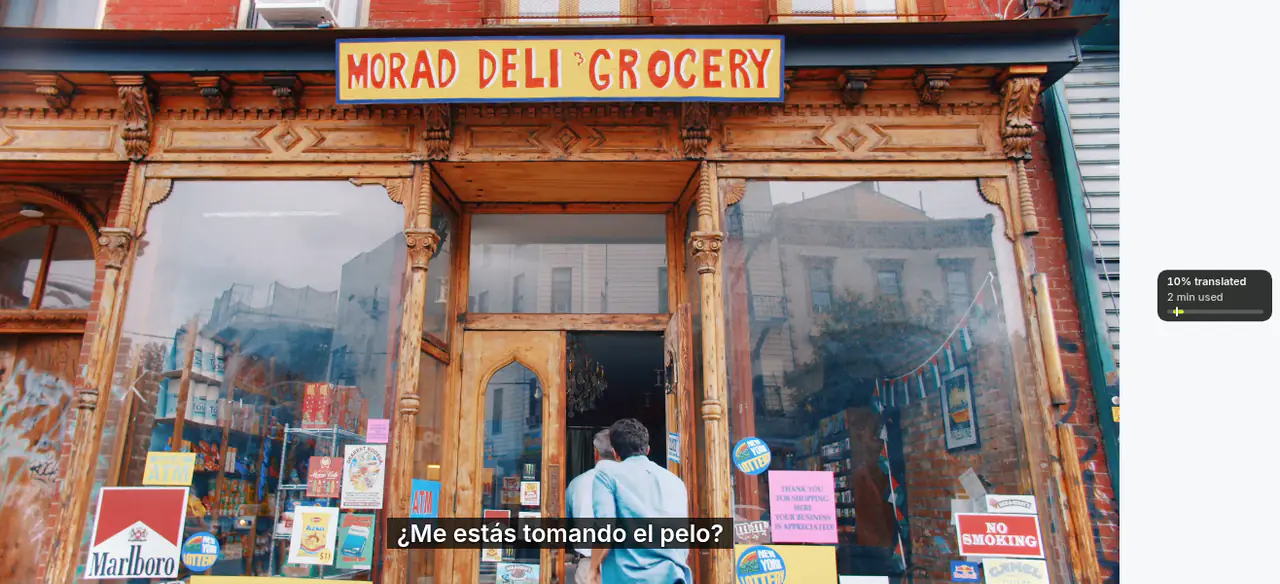
- On a video with no captions, “Preparing the voice-over…” shows while Vocnu listens ahead: 43 seconds on our talk.
- Vimeo’s auto-generated tracks have mistakes, and Vocnu translates what they say.
What it costs
Vimeo’s tracks are free to viewers. Vocnu charges for the time it translates, in Standard or Premium, the finer grade:
| What you choose | A 10-minute video | An hour |
|---|---|---|
| Standard subtitles | €0.10 to €0.21 | €0.60 to €1.25 |
| Standard voice-over | €0.20 to €0.42 | €1.19 to €2.50 |
| Premium voice-over | €0.79 to €1.67 | €4.77 to €10 |
- A new account gets 2 h 40 min of Standard subtitles or 1 h 20 min of Standard voice-over free.
- Watching the same video again within 90 days, in the same language and mode, is free.
- A video already in your language is never translated or charged.
When Vimeo’s own tracks are enough
Skip Vocnu when:
- The CC or Audio menu already lists your language.
- You watch on a phone or a TV. Vocnu needs a computer.
- The video is yours. Vimeo AI adds tracks that every viewer gets.
- The talk is on YouTube or another site: lectures and talks has our tests there, and watching YouTube in another language covers YouTube’s tracks.
Questions and answers
Only for the owner: Vimeo AI translates subtitles and audio from the owner’s Library. A viewer gets just the tracks the owner added, with no translate option in the player.
Not for viewers. Vimeo makes automatic captions in the spoken language, and only the owner can translate them with Vimeo AI.
Pick English under CC if the owner added it. If not, the Vocnu extension adds English subtitles, or a voice-over, on a computer.
It did in our test: on aeon.co it read the embedded player’s Persian track and started in 30 seconds.
Sources
- Vimeo Help: How to enable or disable captions and subtitles while viewing a videohelp.vimeo.com (opens in a new tab)
- Vimeo Help: How to change the audio track of a Vimeo videohelp.vimeo.com (opens in a new tab)
- Vimeo Help: How to use Vimeo AI to translate my video's subtitleshelp.vimeo.com (opens in a new tab)
- Vimeo Help: How to use Vimeo AI to translate my video's audio and subtitleshelp.vimeo.com (opens in a new tab)
- Vimeo Help: How to activate or deactivate default automatic captionshelp.vimeo.com (opens in a new tab)
- Breakfast at the Bodega on Vimeo: the film we testedvimeo.com (opens in a new tab)
- Aeon: Hills & Mountains, the embedded film we testedaeon.co (opens in a new tab)
- Vimeo: the Spanish talk we testedvimeo.com (opens in a new tab)
Found something out of date? Write to support@vocnu.com and we will check it and correct the page.