Why the line is gone before you finish it
Subtitles are timed to the speech, not to the reader. Netflix's style guide for English subtitles lets a line run at up to 20 characters a second in programmes for adults and 17 in children's, with at most 42 characters on a line. So a full two-line subtitle can leave the screen after a little over four seconds, with the next one already in its place.
The British Dyslexia Association describes dyslexia as a specific learning difficulty that mainly affects reading and writing, with reading fluency among its key markers and processing speed among the things that can add to it. Timing made for fluent readers leaves little room for that. On Reddit, people with dyslexia and their families describe the same evenings again and again: someone who wants to show their dad Parasite, but he cannot read the subtitles in time; constant pausing and rewinding; a film class dropped because half the films were subtitled; or foreign films skipped altogether, because stopping every minute spoils them for whoever watches too.
Slow the film down
A slower film keeps every line on screen longer, and in one of those threads it was the most upvoted tip. At three-quarter speed, two full lines that had a little over four seconds get more than five and a half, and a two-hour film takes two hours and forty minutes.
- Netflix
- pause, click the speed icon and choose a speed. By Netflix's help it works in web browsers and in the Android, iPhone and iPad apps, but not while casting or mirroring from a phone or tablet, and not in a web browser on a plan with ads.
- YouTube on a computer
- the gear, then Playback speed. Its buttons go from 1.0 (Normal) upwards, so to slow down use the minus button or drag the slider, which goes down to 0.25. The keys < and > (with Shift on most keyboards) slow the video down and speed it up, and J jumps back 10 seconds when a line got away.
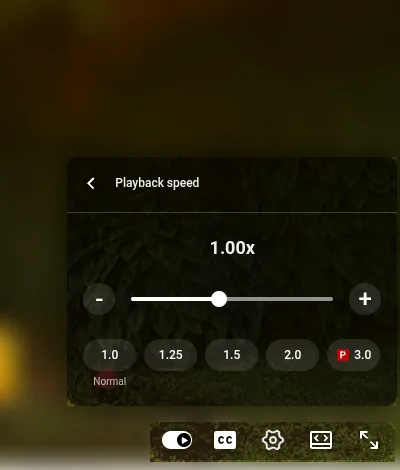
The catch is the sound. Voices come out slow and a little strange, which some people find harder to sit through than the reading. And there is no other lever: Netflix's subtitle settings and YouTube's caption options change how a line looks, never how long it stays.
Make the lines bigger and easier on the eyes
Dyslexia Scotland's guidance on dyslexia-friendly text says dyslexic readers often read faster and with better understanding at larger sizes, that special dyslexia fonts show no consistent advantage, and that some readers prefer dark text on a tinted background to black on white. It also says what works differs from person to person, so try a few settings on a scene with a lot of talk before the film starts.
- Netflix in a web browser
- Account, Profiles, your profile, then Subtitle appearance. You can change the font, size, shadow and background, then Save. It belongs to that profile.
- Netflix on a TV
- pause the title, open Settings in the player controls and change Size and Style. A TV offers fewer options than a browser, and if Settings is missing, that device cannot change subtitles in your language.
- Netflix on Android
- My Netflix, your profile's name, Manage Profiles, the profile, then Subtitle Appearance, which holds for that device only. On iPhone, iPad and Apple TV, Netflix points you to Apple's own caption settings.
- YouTube on a computer
- the gear, Subtitles/CC, then Options at the top of that list. Font size goes from 50% to 400%, and font colour, background colour and background opacity each have their own list.
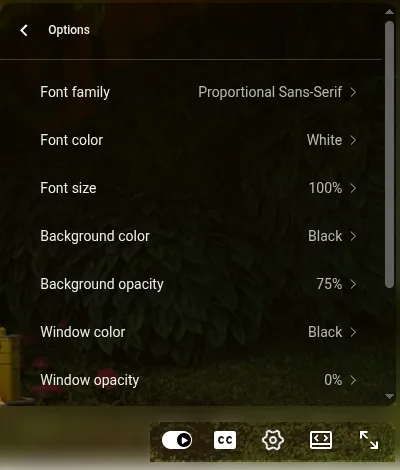
YouTube's fonts include no dyslexia font. If a tinted page suits you on paper, Font color Black with Background color Yellow at 100% opacity is the nearest its lists come to dark text on a tint. Netflix's help says its subtitle appearance settings are missing in some countries whose main language is Arabic or Hebrew, and that some older devices may not show them.
Find a dubbed version, or watch it twice
Where the film has a real dub in your language, that is the simplest answer: each character keeps a voice of their own, and it comes with your subscription. On Netflix, the audio list in the player shows every audio language the title has, and which ones it has depends on where you are; netflix.com/browse/audio lists what you can watch in a given audio language. On YouTube, some videos carry other audio tracks under the gear, original or auto-dubbed; how to watch a YouTube video in another language shows where.
Some people with dyslexia who love foreign films combine the two: the dubbed version first, then the original with subtitles straight after, while the story is still fresh. Others find even good dubs slightly off, or miss the nuance that the subtitles keep. And dubs are made mostly for bigger titles, so a smaller film often has none in your language.
Listen to the translation instead
Dyslexia Scotland's guidance notes that being able to listen to content helps reduce the load of reading. When the subtitles are already in your language, a screen reader can often speak them, where the player shows them as text; what can read a video's subtitles out loud goes through those tools and where they fall short. For a film with no dub in your language, a voice-over extension on a computer reads a translation aloud as the film plays: your eyes stay on the picture, and nobody waits while you catch up.
The Vocnu extension works this way. One AI voice reads the translated lines over the original sound turned down, and Vocnu's subtitles in your language show over the picture, so you can read along or only listen. Three things in its popup matter here: the Dialogue subtitles switch hides those lines if you would rather only listen, Subtitle color offers White, Yellow, Light blue, Light green or another colour you pick, and the Original sound under the voice slider sets how loud the actors stay. There is no size setting for its subtitles.
On Netflix, Vocnu reads the title's subtitles in the language spoken, whether or not they are on. Where another site's player loads subtitles, it translates and voices those, and without them it listens to the tab. It runs in Chrome, Brave and Edge on a computer, in 38 languages, and a film already in your language is never voiced or charged. Everyone in the room hears the same voice, so the film can run without stops for reading. How it went on a Netflix film, from the wait at the start to the slips, is in the Netflix test.
- Every character has the same voice, so a lively cast loses its colour. A real dub, where one exists, is the richer listen.
- The translation is a machine's: now and then a line comes out wrong.
- It needs a computer with Chrome, Brave or Edge. The Netflix and YouTube apps on a TV, phone or tablet take no extensions.
- Standard, the cheaper of the two voices, sounds plain and synthetic; Premium has the most natural ones.
You pay for the minutes Vocnu voices, rounded up for each film or episode, at the price of the voice you choose: a plan or pack lasts four times as long in Standard as in Premium. In euros, depending on the plan or pack:
| Voice | A 45-minute episode | A 2-hour film |
|---|---|---|
| Premium | €3.58 to €7.50 | €9.54 to €20 |
| Standard | €0.91 to €1.92 | €2.38 to €5.00 |
A new account gets 2 h 40 min of Standard subtitles free once it confirms its email, or 1 h 20 min of Standard voice-over. Watching the same minutes again within 90 days, in the same language, voice and mode, costs nothing.
Questions and answers
Their timing follows the speech. Netflix's style guide for English subtitles allows up to 20 characters a second in programmes for adults, so two full lines may stay on screen for only a little over four seconds.
Not in Netflix's or YouTube's own settings: they change how subtitles look, not how long they stay. A slower playback speed is the only way inside the players; a dubbed version or a voice-over takes the reading away instead.
YouTube's caption fonts include none, and Dyslexia Scotland's guidance says special dyslexia fonts show no consistent reading advantage, so use one only if it helps you. Larger text and a background colour that suits you are the settings to try first.
No. Vocnu runs only in Chrome, Brave and Edge on a computer. On a TV, a title's own dubbed audio and Netflix's subtitle Size and Style settings are what you have.
Sources
- British Dyslexia Association: What is dyslexia?bdadyslexia.org.uk (opens in a new tab)
- Dyslexia Scotland: Dyslexia-friendly typed formatsdyslexiascotland.org.uk (opens in a new tab)
- Netflix Partner Help: English (USA) Timed Text Style Guidepartnerhelp.netflixstudios.com (opens in a new tab)
- Netflix Help: How to change playback speedhelp.netflix.com (opens in a new tab)
- Netflix Help: How to change the appearance of subtitles and closed captionshelp.netflix.com (opens in a new tab)
- Netflix Help: Why subtitles or audio isn't available in a specific languagehelp.netflix.com (opens in a new tab)
- YouTube Help: Manage caption settingssupport.google.com (opens in a new tab)
- YouTube Help: Speed up or slow down YouTube videossupport.google.com (opens in a new tab)
- YouTube Help: Keyboard shortcuts for YouTubesupport.google.com (opens in a new tab)
- Blender Studio: Sprite Frightstudio.blender.org (opens in a new tab)
Found something out of date? Write to support@vocnu.com and we will check it and correct the page.