Translate a video
How to translate a Twitch stream as you watch it
Twitch's own help offers captions, not a translation of what a streamer says. To hear a live stream in your language, add a voice-over extension to Chrome, Brave or Edge on a computer. Ours, Vocnu, listens to the tab's sound and reads each sentence in your language over the lowered original, with subtitles. On two live channels on 12 November 2026, the Spanish voice came about 8 seconds after the streamer began each line.

The chat or the stream's voice?
Most tools sold as a Twitch live translator translate the chat: extensions and bots that turn other viewers' messages into your language. That is a different job. This post is about the stream's sound, what the streamer says.
Twitch has no button for that. Its guide to closed captions says the CC button shows up only on streams that carry captions, which the streamer adds, and points you to the live captions your own device can make. Translating the speech is not among them.
Hear a live stream in your language
- Add Vocnu from the Chrome Web Store to Chrome, Brave or Edge on a computer.
- The extension opens the Vocnu app: sign in or create a free account, and press Connect the extension.
- Open the Twitch channel while it is live, start the stream and press the Vocnu button in the browser's toolbar, or Alt+Shift+V.
- Pick your language in Vocnu's menu. It reads 38 languages.
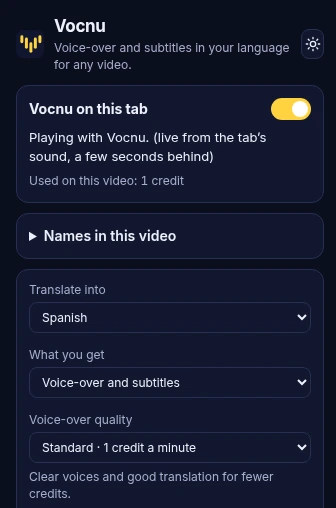
On a live channel Vocnu works live by itself: there is nothing to switch. It waits for the end of each sentence, or a short pause, then translates it and reads it out, and its menu says "live from the tab's sound, a few seconds behind". Leave the tab playing: Vocnu works one tab at a time.
How far behind it ran in our test
On 12 November 2026 we switched Vocnu on over two English channels while they were live, into Spanish in Standard: Atrioc, one streamer talking fast, for about five minutes, and a daily news talk show with several hosts for about three. The numbers below come from our test.
| What we measured | One streamer, fast talk | News show, several hosts |
|---|---|---|
| Lines translated | 70 | 52 |
| Read out by the voice | 61 | 45 |
| Shown as a subtitle only | 9 | 7 |
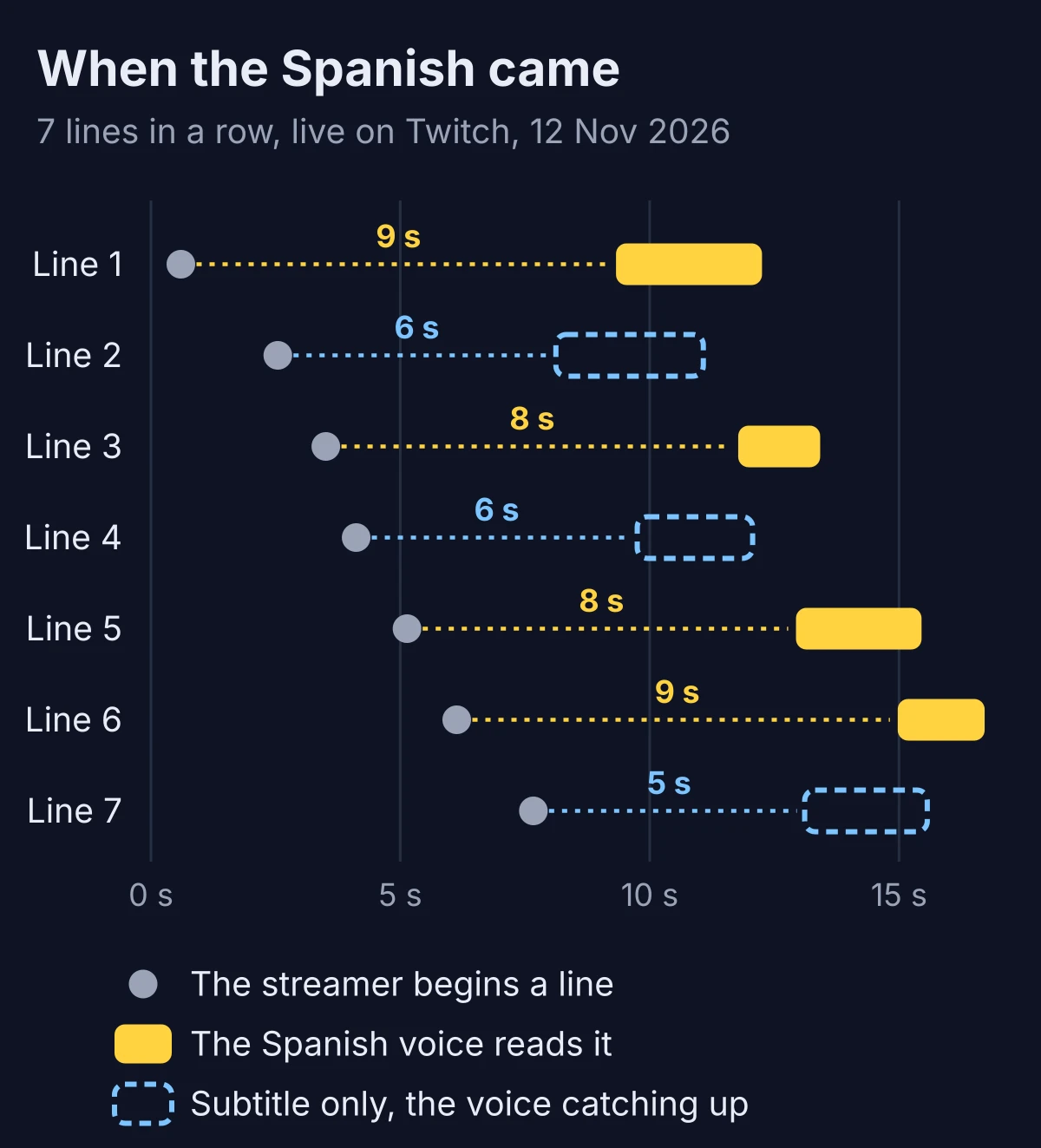
| Usual delay of the voice | About 8 seconds | About 9 seconds |
| Shortest and longest wait for the voice | 5 to 13 seconds | 6 to 13 seconds |
| First Spanish line after switching on | 28 seconds | 11 seconds |
We counted each delay from the moment a line began in the stream's sound to the moment its Spanish voice began, so it is a delay against the picture in your tab. A long sentence comes later than a short one, because Vocnu waits for it to end: the waits of 12 and 13 seconds all followed long sentences. The first line takes longer: Vocnu starts listening only when you switch it on, often in the middle of a sentence.
Fast talk, several voices and pausing
- Fast talk: when the voice still had more than three seconds of Spanish to read, the next line showed only as a subtitle, so the voice never drifted further behind. Those subtitles came 5 to 6 seconds after the line began.
- A pause in mid-sentence can cut a line in two, and each half is translated on its own.
- One voice reads everyone. When two hosts greeted each other, each greeting became its own line in the same Spanish voice. A co-host's quick "yes" over the anchor ended up inside the anchor's sentence.
- Where two people talked at once, or a word was misheard, the Spanish carried the mistake.
- Pausing the player for six seconds stopped the voice too. After play it went on about 8 seconds behind, as before.
- After a reload of the page Vocnu stayed on and was reading again within 7 seconds.

What an evening of streams costs
You pay for the minutes Vocnu reads. Live, it reads in Standard, 1 credit a minute, or in Premium, 2 credits a minute:
- An hour in Standard costs €3.96 to €6.00, and a three-hour stream €12 to €18, depending on the credit pack.
- An hour in Premium costs €7.92 to €12.00.
- Economy does not work live. If your menu is on Economy, Vocnu reads a live stream in Standard by itself, or in Premium where Standard does not read your language yet, and charges that grade.
- A new account's 40 free credits cover 40 minutes of Standard, no card needed. Our two tests took about 10 credits.
When to skip Vocnu
- You only want the chat in your language. A chat translator does that; Vocnu leaves the chat alone.
- You watch in the Twitch app on a phone, a tablet, a console or a TV. Vocnu works in Chrome, Brave and Edge on a computer.
- You live in a country where live translation is not available. There Vocnu's menu says it cannot translate live streams in your country, and nothing is charged.
- You want to answer in chat as things happen. The voice comes some 8 seconds after the picture.
- You want the streamer's own voice. One voice reads everyone over the lowered original sound.
- You need exact quotes. Check the original before you quote a line.