Watch in your language
No English subtitles on Prime Video? What you can do
Prime Video gives each title its own audio and subtitle languages, and what you see depends on the title, where you are and your device. Most foreign films I checked from Lithuania had English subtitles, but not all of them: an Italian TV film there comes with Italian sound and Lithuanian subtitles only. Here is where to see a title's languages before you start it, what Prime's help says about why they differ, and what I tried on that film when English was not there.

Check the title page before you press play
On primevideo.com, open the film or series and scroll down to Details. Two boxes there, Audio languages and Subtitles, list what the title comes with where you are, and you can read them without signing in or starting anything.
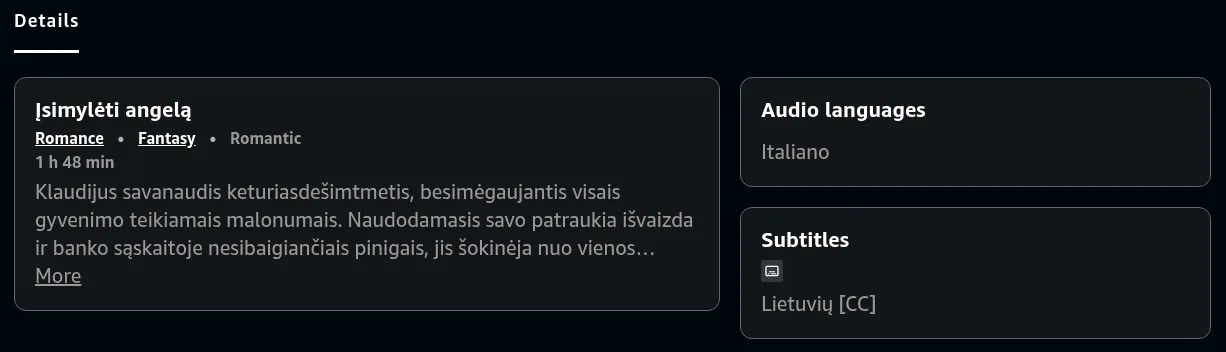
Once the title plays, Prime's help says to select the Closed Caption or Subtitles icon in the player to choose subtitles and the audio track; on some devices Audio is a separate option. Tracks with [Audio Descriptions] in their name describe the picture for people who cannot see it, so they are not the plain dialogue.
How often English is missing
On 16 November 2026 I searched Prime Video from Lithuania for films in ten languages, from Polish, Czech and Italian to Hindi, Tamil and Telugu, and read the language lists of the 185 titles that came up. 126 of them had a language other than English as their sound. 122 of those listed English subtitles, and not one had an English audio track.
The other four had Lithuanian subtitles and nothing else: Įsimylėti angelą in Italian, and titles in French, German and Slovak. So English subtitles are there for most foreign titles, but when they are not, there is no English audio to switch to either. What I saw from Lithuania can differ where you are.
Why a title can lack English
Prime's help puts it in one line: subtitles, alternative languages and audio description tracks vary across the Prime Video catalog. It also says which of these you get depends on the device you are using. A few more things from Prime's help explain why the same search gives different results:
- Where you are. Outside your home country, the titles you can stream may change. Within the EU, someone who lives there sees the same titles while travelling as at home.
- How the title comes to you. Some titles are included with Prime and change over time, others are to rent or buy, and others come with add-on subscriptions, whose providers manage which titles they include.
- The device. A title can offer different features on a TV app than in a web browser, so check it on primevideo.com too.
Two settings sound like they could help, but neither adds a language to a title. The interface language, under Account and Settings, Language, changes Prime Video's own menus. A profile's streaming languages, up to five chosen from over 35, are there to personalise recommendations, as Prime's help describes them: on the web, Manage Profiles, Edit Profile, the profile, then Manage streaming languages. If English is not in the title's Subtitles list, no setting brings it.
When there is no English at all
Prime Video plays only the tracks a title comes with, and its help describes no way to translate them. That leaves three ways, and the last two need a browser on a computer, since Prime Video's apps for TVs, phones, tablets, Windows and Mac take no extensions:
- Subtitles in another language you read well, if the title has one.
- A subtitle translator extension, which shows the title's subtitles translated as text. It needs subtitles to translate, so it is no help on a title with none you can use.
- A voice-over extension, which reads the dialogue to you in your language, so you follow the film without reading.
The Vocnu extension is the third kind, and it needs no subtitles to work from. Once you allow it with one click on the Vocnu button, it listens to the tab, recognises the Italian, Polish or Hindi as it is spoken, translates it and has one AI voice read it over the original sound, which is lowered but kept, with the translation as subtitles over the picture too. At the start the film waits while Vocnu hears the next minutes, then plays with the voice in step, stopping briefly now and then to hear further ahead. If you prefer no pauses, choose Live under Videos without subtitles in Vocnu's menu: the film plays on with the voice a few seconds late, in Standard or Premium, since Economy does not work live. It runs in Chrome, Brave and Edge on a computer, in 38 languages, and a title already in the language you chose is never voiced or charged.
I tried it on the Italian film in English
On 16 November 2026 I played Įsimylėti angelą on primevideo.com in Chrome on a laptop, with version 0.5.96 of the Vocnu extension, the one the Chrome Web Store had that day, on a test account set to English and Economy, its cheapest grade. Setting it up took three steps:
- Add Vocnu to Chrome, Brave or Edge from the Chrome Web Store, sign in or create a free account in the app it opens, and press Connect the extension.
- Start the film on primevideo.com, press the Vocnu button in the browser's toolbar or Alt+Shift+V, and choose English. That click also lets Vocnu listen to the tab.
- Press play. The film waits at the start while Vocnu hears the first minutes.
| Moment | What happened |
|---|---|
| Start | I turned Vocnu on at 5:00. The film held for 50 seconds under Vocnu's note, "Vocnu is preparing the voice-over", with a percentage that climbed. Then it played on with the English voice and subtitles. |
| Lines | Each line was read over the Italian, whose sound went down to less than half while the voice spoke. |
| Pause | I paused the film. The voice stopped with it, and on play both went on at once. |
| Jump | I jumped ahead to 8:07, a part Vocnu had already heard. The film went on with no wait, and the voice with it. |
| Reload | I reloaded the page and went back to 5:00. Vocnu stayed on, and the first English line came 42 seconds later. |
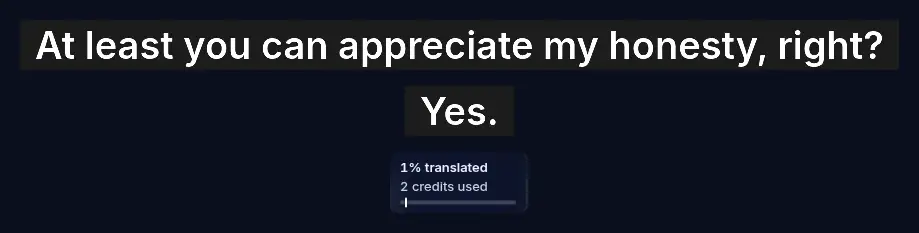
| Cost | The box Vocnu shows over the player read 2 credits used, at half a credit a minute in Economy. |
Then I played it again from 5:00 to read every line, and this time the box read 0 credits used, since watching the same minutes again is free.
Read on their own, the English lines made sense as a scene: a rich man talks a policewoman into sitting down to eat with him, since he took a punch while she caught a mugger. Lines like "I took a punch in the face for you. Without me, you wouldn't have arrested that guy." and "And what do you do for work besides owning ten apartments on Coronari Street?" read like ordinary English. I judged it by sense, not against the Italian word by word, and some slips showed:
- She says "I'm taken", and he answers that he can spot "busy women" by the light in their eyes, where taken was meant.
- The waiter calls him "Mr. Prinzi", while a minute later she calls him Prince Cancellotti, so a title or a name came out wrong.
- A question came in pieces: "in this very altruistic world of yours,", then "Free?", then "to do what you love?".
I tried only Economy, with its plain synthetic voice. For following the scene it did the job. Speech Vocnu hears from the sound goes wrong more easily than text it reads: on another Prime series, it misheard a scene spoken in Arabic.
Limits and what it costs
- A computer only: Chrome, Brave or Edge. Prime Video's apps on a TV, phone, tablet or desktop take no extensions.
- One voice reads every character, over the original sound turned down.
- Machine translation, and here from what Vocnu hears: a line can come out wrong, and names are spelled by sound.
- Waits: 50 seconds at the start on this film, and 53 on an episode of Fallout I voiced into Lithuanian on 13 November, then a shorter one now and then while Vocnu listens to the next minutes, and another after a jump to a part it has not heard. Live mode skips them, with the voice a few seconds late, but not in Economy.
- I tried a title that came with Prime, not one rented, bought or from an add-on subscription.
You pay for the minutes Vocnu voices, at the rate of the grade you choose. The prices run from the largest credit pack to the smallest:
| Grade | An hour-long episode | Įsimylėti angelą, 1 h 48 min |
|---|---|---|
| Premium | 120 credits, €7.92 to €12 | 216 credits, €14 to €22 |
| Standard | 60 credits, €3.96 to €6.00 | 108 credits, €7.13 to €11 |
| Economy | 30 credits, €1.98 to €3.00 | 54 credits, €3.56 to €5.40 |
A new account gets 40 free credits once it confirms its email: 20 minutes of Premium voice-over, 40 of Standard or 80 of Economy. Watching the same minutes again within 90 days, in the same language, voice and mode, costs nothing. On Netflix, how to translate a title into your language goes through the same choices.