Translate a video
How to translate Bilibili videos to English
When a video on bilibili.com has no English subtitles, the site's English version does not help much: it translates the titles, menus and flying comments, not what people say. To follow a Chinese video in English on a computer, play it with a voice-over extension such as Vocnu. It listens to the Mandarin and reads an English translation over the lowered original sound, with English subtitles over the player. On a 12-minute finance explainer on 12 November 2026, the first English line came 34 seconds after we switched it on. A switch in its popup has it voice the Chinese subtitles burned into the picture instead of the speech, and for a chart or a slide, a screenshot in Google Translate helps.

bilibili.com or bilibili.tv?
There are two Bilibilis. bilibili.com is the main Chinese site, where people upload their own videos: explainers, tech reviews, vlogs, games and lectures, nearly all in Chinese. bilibili.tv is the international site, with licensed anime and short dramas, many of them marked ENG SUB because they come with English subtitles. If you are looking at a Chinese video with no English to read, you are almost certainly on bilibili.com, and that is the site this guide is about.
What Bilibili translates for you
Opened from Lithuania, our test video sent us to the English version of the site, bilibili.com/en/. There the menus, the title, the tags and the danmaku, the comments that fly across the picture, came up in English: the title read "How much money do you need to achieve financial independence?". The host still spoke Mandarin, and the Chinese text in the picture stayed Chinese.
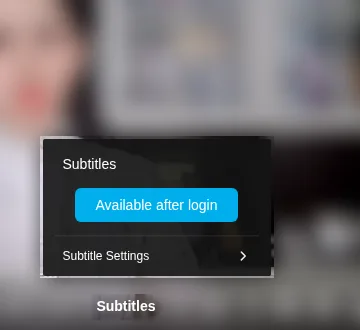
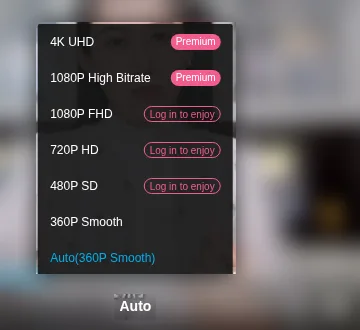
Signed out, the player's Subtitles menu said only "Available after login", and the video had no subtitle track for us at all. We did not sign in, so we cannot say what a signed-in viewer gets on this video. The picture played at 360P: 480P, 720P and 1080P wanted a login, and the two top qualities Premium, Bilibili's paid membership. About a minute in, a login prompt paused the video once; after we closed it, the video played on when we pressed play again.
Bilibili also has a voice translation of its own. In the summer of 2025 it unveiled an AI translated voice for viewers abroad that keeps the creator's own voice, tone and breathing, meant for featured categories such as games, tech and anime. When a video has one, use it. None of the four videos we opened on 12 November had another language, and our test video still had none on 15 November.
Hear it in English with Vocnu
When a video has no English, Vocnu can read it to you. It is an extension for Chrome, Brave and Edge on a computer. It works from the sound, so it does not need subtitles on the video.
- Add Vocnu to your browser from the Chrome Web Store. Brave and Edge install it from there too.
- The extension opens the Vocnu app: sign in or create a free account, and press Connect the extension.
- Open the video on bilibili.com and start it.
- Press the Vocnu button in the browser's toolbar, or Alt+Shift+V, choose English and a voice, and let the video play.
We tried it on 12 November 2026 on 小Lin说's "How much money do you need to achieve financial independence?": 12 minutes of fast Mandarin about money, signed out of Bilibili, in Vocnu's Economy quality. Vocnu worked out by itself that the video was in Chinese, held it for about half a minute while it prepared the first part, and gave its first English line 34 seconds after we switched it on: "There are all kinds of answers online." From there it read on in English, with the host turned down beneath it. It went quiet when we paused, carried on at once after we jumped two minutes ahead, and came back after we reloaded the page.

- One voice reads every line, over the original sound. You still hear the host, but not in their own voice, and the lips are not matched.
- It is a machine translation of fast speech, so expect the odd wrong name, number or term.
- For songs, its popup has two switches, Song subtitles and Voice songs: one shows the lyrics in English, the other has them read too.
- It does not run in the Bilibili app on phones, tablets or TVs.
Chinese text in the picture
On its own, Vocnu translates what is said, not what is written. The labels on a chart and the words on a sign stay in Chinese, and you hear them in English only when the speaker says them aloud. In our test the host talked through a chart of monthly spending, and the voice-over gave us "That covers everyday expenses like food, clothes, entertainment, and travel," while the chart itself stayed Chinese on screen.
Many Bilibili videos, our test video among them, also have Chinese subtitles burned into the picture. For those, Vocnu's popup has a Read the text on screen switch: with it on, Vocnu reads the subtitles from the picture and voices them in English instead of what it hears. We did not try that switch on Bilibili.
For text the speaker does not read out, pause the video and take a screenshot. Open Google Translate, choose Images, set Chinese (Simplified) to English and drop the screenshot in: it gives back the picture with the text translated in place. On a frame of our test video it read the chart's labels as "average monthly expenses" and "buy a house", and the caption under them as "We'll do the math later". It is a frame at a time, so it suits a chart or a slide you want to understand, not a whole video.
What it costs
Vocnu charges for the minutes it voices, at the rate of the quality you pick. Our 12-minute test video:
| Quality | Credits a minute | A 12-minute video |
|---|---|---|
| Economy | 0.5 | €0.40 to €0.60 |
| Standard | 1 | €0.79 to €1.20 |
| Premium | 2 | €1.58 to €2.40 |
The range runs from the largest credit pack to the smallest, and packs start at €5. A new account gets 40 free credits once it confirms its email, enough for 80 minutes of Economy. Credits never expire, and watching the same minutes again within 90 days, in the same language, voice and mode, is free.
When to skip Vocnu
- The show is on bilibili.tv with English subtitles. Read them.
- The video has Bilibili's own English voice. Use it: it comes with the video, in the creator's voice.
- You watch in the Bilibili app, on a phone, a tablet or a TV.
- You want every speaker in their own voice. Vocnu reads all of them in one.
- Most of what matters is on charts or slides that nobody reads out.