
In short
- Google Translate takes text, pictures, web pages and documents, never a video file.
- Free on YouTube: the gear, Subtitles/CC, Auto-translate, then your language.
- Vocnu puts subtitles in your language on any video in Chrome, Brave or Edge.
- Standard subtitles cost €0.60 to €1.25 an hour, and a new account gets 2 h 40 min free.
What translate.google.com does with a video file
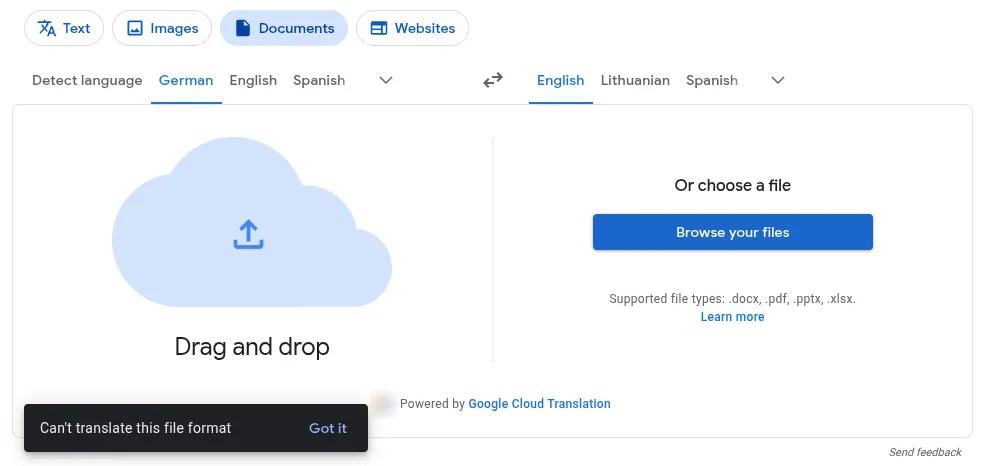
Google Translate’s website has no place for a video:
- The Documents tab takes .docx, .pdf, .pptx and .xlsx files of up to 10 MB, per its help.
- We gave it a short MP4, and it answered “Can’t translate this file format”.
- The Websites tab translates a page’s words, not its video.
What the Translate app on a phone can do
The app never takes the video itself, but it can read or hear one:
- The camera translates words on the screen, one shot at a time. Small or stylized text may come out wrong, per its help.
- Transcribe and Live translate listen through the microphone and show or speak a translation, in up to 73 languages, per the Android help.
- You read the phone, not the video, with the room’s noise mixed in. We didn’t test the app.
Translate a YouTube video’s captions, free
The Google tool that really translates a video sits in YouTube’s player:
- Click the gear on the player.
- Open Subtitles/CC and pick a track, such as German (auto-generated).
- Open Subtitles/CC again, choose Auto-translate and pick one of 156 languages.
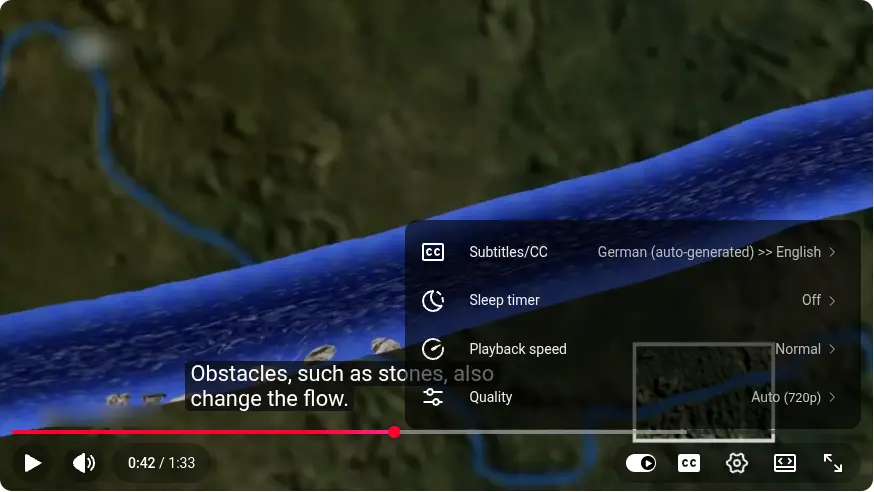
- It needs captions, the uploader’s or YouTube’s automatic ones, which may mishear, per its help.
- Some videos also get an auto-dubbed audio track, English into 20 languages and others mostly into English, per its help.
- How to translate a YouTube video covers every way, and Vocnu vs YouTube auto-dubbing the dubs.
Chrome’s Live Caption with Live Translate
Chrome on a computer can caption any tab and translate the captions, free:
- Open Settings, Accessibility, then Captions.
- Turn on Live Caption, then Live Translate.
- Pick one of over 100 languages, per the Chrome help.
It has limits:
- Our Chrome on Linux heard 17 spoken languages, without Lithuanian, Ukrainian, Dutch or Arabic.
- The text sits in a bubble, not on the video, and goes to Google to be translated.
- On Android, translated captions need a Pixel 6 or later, per Google’s help.
- Vocnu vs Chrome’s live translate tests both on one clip. How to translate computer audio adds Windows and macOS.
Google’s tools side by side, and Vocnu
Only YouTube’s Auto-translate and Vocnu put translated subtitles on the video itself, and only Vocnu does it outside YouTube.
| Tool | What it takes | What you get | Where it works |
|---|---|---|---|
| translate.google.com | Text, pictures, web pages and documents, no video files | Nothing for a video, beyond a transcript you copy in | Any browser |
| Translate app camera | Text in front of the camera | The words on screen, one shot at a time | Android and iPhone |
| Translate app Transcribe and Live translate | Speech the phone’s microphone hears | A translation on the phone, as text or speech | A phone beside the video |
| YouTube Auto-translate | A YouTube video with captions | Captions in one of 156 languages, on the video | YouTube only |
| YouTube auto-dubbing | Videos whose creator leaves it on | A dubbed track, from English into 20 languages, otherwise mostly into English | YouTube only |
| Chrome Live Caption with Live Translate | Speech in a tab, in the languages Live Caption understands | Translated text in a bubble | Chrome on Windows, Mac and Linux, and Chromebook Plus |
| Google Meet | Speech in a Meet call | Translated captions in the call, nothing for a video you watch | Paid Google Workspace plans such as Business Standard |
| Gemini | An uploaded video, 5 minutes in all on the free plan, an hour with Google AI Pro or Ultra | A text answer in the chat | Gemini’s app and website |
| Vocnu | Any video playing in a tab | Subtitles in your language on the video, or a voice-over | Chrome, Brave or Edge on a computer |
Subtitles in your language on any video with Vocnu
The Vocnu extension does what most people mean by Google Translate for videos: subtitles in your language on the picture, on YouTube or any other site.
- Add Vocnu to Chrome, Brave or Edge from the Chrome Web Store, sign in or create a free account, then press Connect the extension.
- Start the video, press Alt+Shift+V, pick your language under Translate into.
- Under What you get, choose Subtitles only, or Voice + subtitles to hear an AI voice too.
- It translates the player’s subtitles, or the sound when there are none, in 38 languages.
- Without subtitles, Ahead pauses now and then to stay in sync. Live never pauses, runs late and uses Premium.
Our test on two German documentary clips
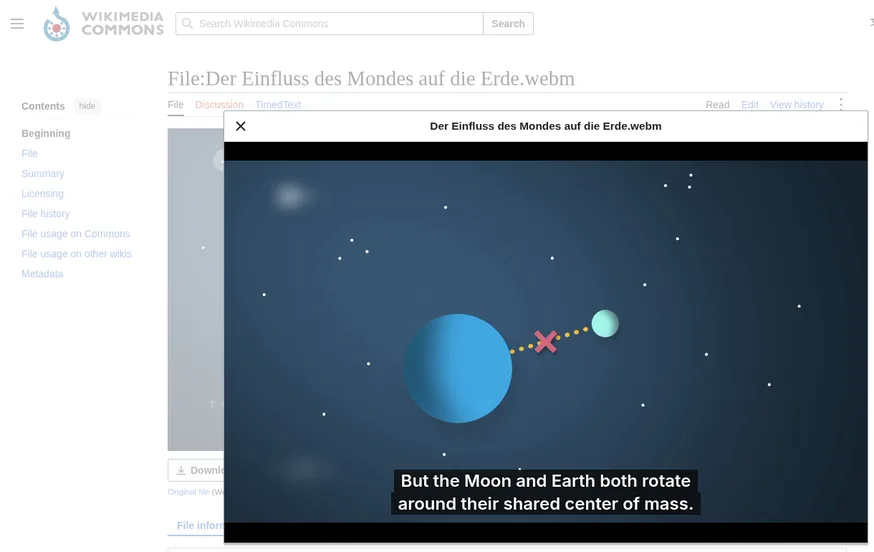
On 20 November 2026 we played two German Terra X clips on Wikimedia Commons with Vocnu set to English subtitles in Standard.
| What we tried | What happened |
|---|---|
| Der Einfluss des Mondes auf die Erde, 90 seconds on the Moon and the tides, with no subtitle file at all | Vocnu held the clip at 0:02 for about half a minute while it read the sound ahead, then played it on with English subtitles in sync. We watched to 1:12 and got 20 lines, with no more pauses. |
| Entstehung der Alpen, 105 seconds on how the Alps formed, which comes with German captions | Vocnu translated those captions rather than the sound. The first English line came about 25 seconds after we turned it on, and the lines kept time up to 1:25, where we stopped. |
| The English itself | Plain and easy to follow, such as “But the Moon and Earth both rotate around their shared center of mass.” One sentence about the tides came out muddled. |
When you need the translated video as a file
For a translated copy to post or send, use an upload editor instead:
- Happy Scribe gives SRT or TXT subtitles or burns them in, with 10 minutes free.
- Clideo adds captions and an AI voiceover to an uploaded video.
- Vocnu gives SRT, VTT and ASS subtitles and the voice-over as audio or an MP4.
What it costs
Google’s tools here are free, apart from Meet and Gemini’s longer uploads. Vocnu charges for the minutes it translates, in Standard or Premium, the finer grade:
| What you choose | A 10-minute video | An hour |
|---|---|---|
| Standard subtitles | €0.10 to €0.21 | €0.60 to €1.25 |
| Premium subtitles | €0.60 to €1.25 | €3.58 to €7.50 |
| Standard voice-over | €0.20 to €0.42 | €1.19 to €2.50 |
| Premium voice-over | €0.79 to €1.67 | €4.77 to €10 |
- A new account gets 2 h 40 min of Standard subtitles or 1 h 20 min of Standard voice-over free.
- Watching the same minutes again within 90 days, in the same language and mode, is free.
- Plans start at €10 a month and packs at €10. Pack hours never expire.
When you don’t need Vocnu
Skip Vocnu when:
- The video is on YouTube with captions: Auto-translate is free.
- You watch on a phone, a tablet or a TV. Vocnu needs a computer.
- You need exact wording. Machine translation slips, Google’s and Vocnu’s alike.
Questions and answers
Not as a file: its website takes documents only. YouTube can auto-translate a video’s captions, and Chrome’s Live Caption can translate what a tab says.
Use YouTube’s Auto-translate under the gear’s Subtitles/CC. It works only where the video has captions.
Chrome’s Live Translate comes closest, as text in a bubble. For subtitles on the video itself, on any site, use an extension such as Vocnu.
A 10-minute video with Standard subtitles costs €0.10 to €0.21, and €0.20 to €0.42 with a voice-over.
Sources
- Google Translate Help: Translate documents & websitessupport.google.com (opens in a new tab)
- Google Translate Help: Translate imagessupport.google.com (opens in a new tab)
- Google Translate Help: Transcribe in Google Translatesupport.google.com (opens in a new tab)
- Google Translate Help: Hear live speech to speech translations with live translatesupport.google.com (opens in a new tab)
- Google: Transform your headphones into a live personal translator on iOSblog.google (opens in a new tab)
- YouTube Help: Use automatic captioningsupport.google.com (opens in a new tab)
- YouTube Help: Use automatic dubbingsupport.google.com (opens in a new tab)
- Google Chrome Help: Manage captions and translations in Chromesupport.google.com (opens in a new tab)
- Android Accessibility Help: Live Captionsupport.google.com (opens in a new tab)
- Google Meet Help: Use translated captions in Google Meetsupport.google.com (opens in a new tab)
- Gemini Apps Help: Attach & analyze files in Gemini Appssupport.google.com (opens in a new tab)
- Happy Scribe: Translate videohappyscribe.com (opens in a new tab)
- Clideo: Video translatorclideo.com (opens in a new tab)
- Warum mäandern Flüsse? on YouTubeyoutube.com (opens in a new tab)
- Der Einfluss des Mondes auf die Erde on Wikimedia Commonscommons.wikimedia.org (opens in a new tab)
- Entstehung der Alpen on Wikimedia Commonscommons.wikimedia.org (opens in a new tab)
Found something out of date? Write to support@vocnu.com and we will check it and correct the page.