
In short
- In a UN-style voice-over, the original voice stays audible under the translated one.
- Lip-sync dubbing replaces the voice and fits it to the lips; subtitles leave the sound as it is.
- Voice-over suits lectures, news, documentaries and interviews; films usually get subtitles or a dub.
- Vocnu adds subtitles in your language to videos in your browser, with this kind of voice-over as an option.
- An hour-long lecture with a Standard voice-over costs €1.19 to €2.50.
What UN-style voice-over is
A new voice reads the translation while the original speaker carries on underneath, turned down:
- You still hear the speaker’s own voice, the music and the room, only quieter.
- Studios often start each translated line a beat late. Matinée writes: “Usually a one second delay is also added to further demonstrate that it is an interpretation.”
- The name comes from its use in “United Nations broadcasts and international news”, per Deepdub’s glossary.
- In Poland it’s called a lektor, “the traditional translation method in Polish television and DVDs”, per Wikipedia.
Voice-over vs dubbing vs subtitles
The three differ in what happens to the voice you hear:
| Method | The original voice | The translation |
|---|---|---|
| Subtitles | Stays at full volume | Text on the picture, read as you watch |
| UN-style voice-over | Turned down, still heard | One voice reads it over the original; the lips aren’t matched |
| Lip-sync dubbing | Replaced | New voices timed to the lips, or the lips reshaped to fit |
- DUBnSUB, a dubbing studio, says lip-sync dubbing “fully replaces the original dialogue with a translated audio track engineered to match the speaker’s mouth movements.”
- AI tools change the picture instead: Rask AI “reshapes the speaker’s mouth frame by frame”, and HeyGen offers “lip-syncing that aligns translated speech perfectly with facial movements.”
- ElevenLabs delivers each translation “in a voice clone of the original speaker.”
- We make Vocnu, which does subtitles and voice-over, not lip-sync. The dubbing tools are described from their own pages, read on 21 November 2026.
Hear it on a 41-second clip
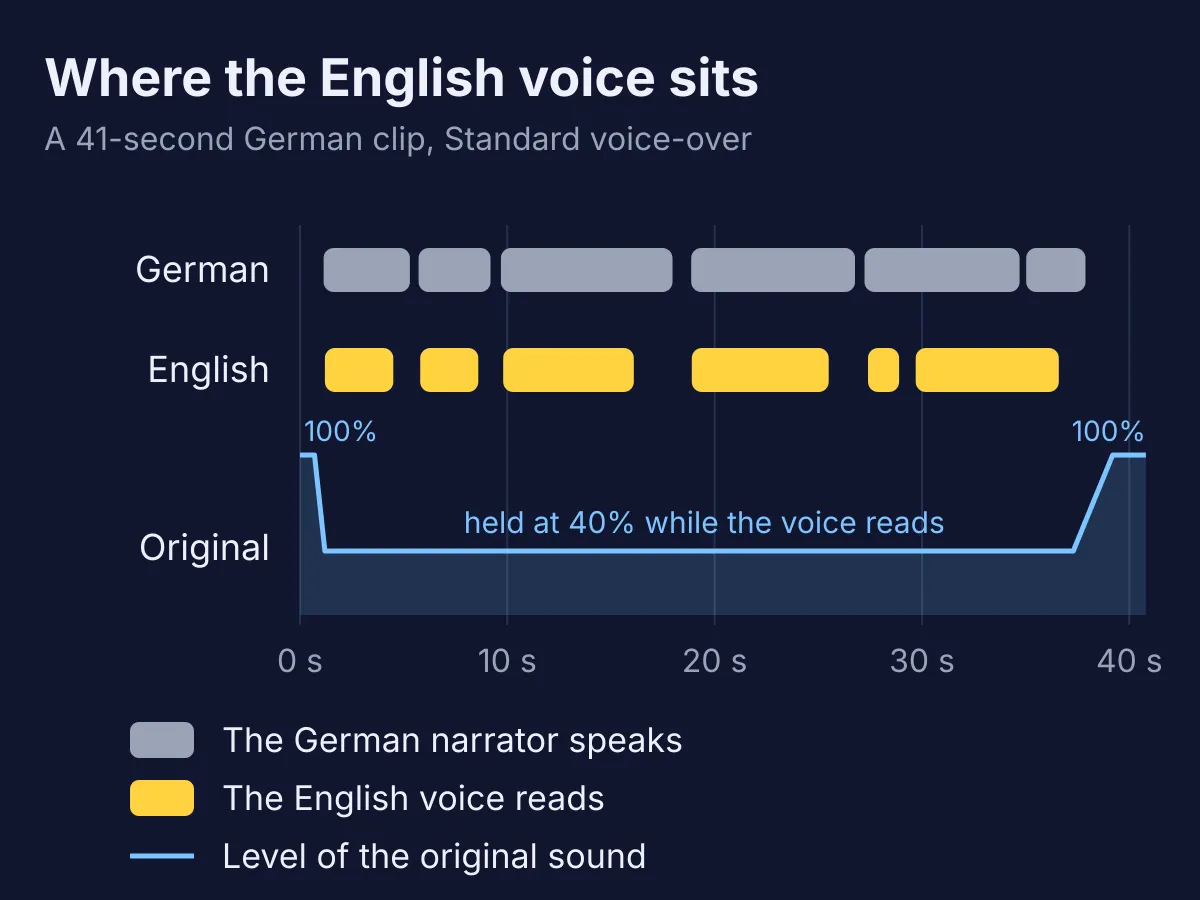
I ran a German Terra X clip about the Humboldt Current through the Vocnu app on 21 November 2026: Standard voice-over into English, the original at the recommended 40%. The same 12 seconds, two ways:
- The German dropped to 40% just before the first English line and stayed there through every pause, back to full only after the last line.
- Each English line began about a tenth of a second after the German one and ended before it, with no one-second delay.
- “Jede Sekunde bewegt der Humboldt-Strom 15 Millionen Kubikmeter Wasser” became “Each second, the Humboldt Current moves 15 million cubic meters of water.”
- The job took under two minutes.

When each one suits
Pick by the kind of video and how much the speaker’s own voice matters:
- Lectures and talks
- a voice-over lets you watch the slides and still hear the speaker. Subtitles work too.
- News and interviews
- a voice-over. The real voice underneath shows the translation is an interpretation, as Matinée puts it.
- Documentaries
- a voice-over or subtitles. Wikipedia calls voice-over the method “most often used in documentaries and news reports.”
- Films and series
- subtitles, or the film’s own dub when it has one. DUBnSUB calls lip-sync “the gold standard for feature films, animated series, and OTT content.”
Where Vocnu fits
Vocnu starts with subtitles in your language and adds a UN-style voice-over when you want one:
- The extension for Chrome, Brave and Edge on a computer works on videos as they play in the browser. Pick Subtitles only or Voice + subtitles.
- The web app takes a file of up to 5 hours and returns subtitles, a voice-over track or the video with both.
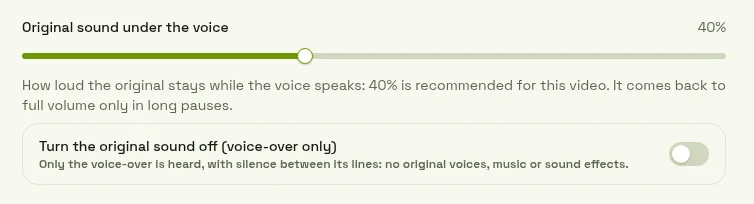
- You choose how loud the original stays under the voice, or mute it.
- One voice reads every speaker, and nothing is matched to the lips. To publish a lip-synced dub, use a dubbing tool.
- A video already in your language is never translated or charged.
You pay for the minutes of video Vocnu translates:
- An hour-long lecture costs €0.60 to €1.25 with Standard subtitles, or €1.19 to €2.50 with a Standard voice-over.
- A new account gets 2 h 40 min of Standard subtitles or 1 h 20 min of Standard voice-over free.
- Plans start at €10 a month and packs at €10.
Questions and answers
A voice-over reads the translation over the original, which you still hear quietly. Dubbing replaces the original voice, and lip-sync dubbing fits the new one to the lips.
For translated video, UN-style voice-over keeps the original audible under the translation, and lip-sync dubbing replaces it. Subtitles are the third way, with no new voice at all.
Studios often sell it as one: DUBnSUB calls it “UN-style voice-over dubbing”. Unlike a dub, it keeps the original voice audible and doesn’t match the lips.
Sources
- Matinée: What is a UN-style voice-over?matinee.co.uk (opens in a new tab)
- Deepdub glossary: UN styledeepdub.ai (opens in a new tab)
- Wikipedia: Voice-over translationen.wikipedia.org (opens in a new tab)
- DUBnSUB: Lip-sync dubbing vs UN-style voice-overdubnsub.com (opens in a new tab)
- Rask AI: AI lip-syncrask.ai (opens in a new tab)
- HeyGen: AI video translatorheygen.com (opens in a new tab)
- ElevenLabs: Dubbing Studioelevenlabs.io (opens in a new tab)
- Wikimedia Commons: Der Humboldtstrom (ZDF/Terra X, CC BY 4.0)commons.wikimedia.org (opens in a new tab)
Found something out of date? Write to support@vocnu.com and we will check it and correct the page.