
In short
- Coursera has no translate button: a lecture plays only the subtitle and audio languages it was given.
- Check the lecture’s own Subtitles menu, which can list languages the course page leaves out.
- AI-dubbed audio covers a few languages on some courses, under Audio in the player’s settings.
- If yours is missing, Vocnu shows the lecture’s subtitles in your language on a computer and can read them aloud.
- An hour of lectures with Standard subtitles costs €0.60 to €1.25, and a new account gets 2 h 40 min free.
Can Coursera translate a course?
No. Coursera has no button that translates a lecture into a language you choose. What a lecture offers is set by Coursera and the course’s partner:
- Translated subtitles, marked auto where a machine made them.
- AI-dubbed audio on some courses, which Coursera says keeps the instructor’s voice.
- Its 2025 launch named Spanish, French, German and Brazilian Portuguese. On 21 November 2026, Generative AI for Everyone also had Arabic, Azerbaijani, Indonesian and Uzbek.
- We make Vocnu. Coursera is described from its own pages and player, read on 21 November 2026 from Lithuania.
Turn on Coursera’s subtitles in your language
- Open a lecture and press the gear at the bottom right of the player.
- Choose Subtitles and tick Enable.
- Open Language and pick yours. A language marked auto is a machine translation.
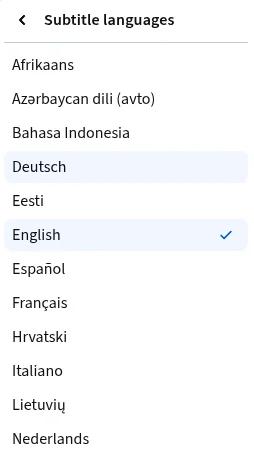
- The course page can undercount. Learning How to Learn said 25 languages without Lithuanian, yet that lecture had Lithuanian subtitles.
- So look in the lecture itself before you reach for a translator.
Switch to an AI-dubbed track
On a course with AI dubbing, the audio language sits in the same menu:
- Press the gear in the player and choose Audio.
- Pick a language marked as made by AI. English (Original) brings the instructor back.
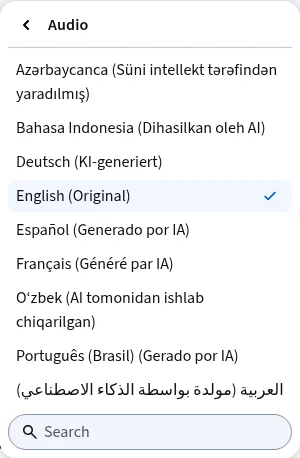
- Spanish swapped the lecture onto a separate soundtrack straight away.
- Courses with dubs are listed on Coursera’s AI-dubbed courses page.
When your language isn’t there
If Coursera has a dub in your language, use it: it’s free and keeps the instructor’s voice. If not, the Vocnu extension works on a computer in Chrome, Brave and Edge, in 38 languages:
- It takes the lecture’s subtitles and shows them in your language over the player. Without subtitles, it listens to the tab.
- Voice + subtitles adds one voice reading the translation over the instructor, who is lowered but still heard.
- A lecture already in your language is never translated or charged.
- Coursera’s free preview plays a course’s first module, so you can try it before you pay.
- Add Vocnu from the Chrome Web Store, sign in or create a free account, and press Connect the extension.
- Open the lecture on coursera.org and press the Vocnu button or Alt+Shift+V.
- Pick your language under Translate into, then Subtitles only or Voice + subtitles under What you get.
- Press the button at the bottom of the menu, such as Subtitles in Spanish, and play.
Udemy works much the same: see how to hear a Udemy course in your language. Other course sites are on Vocnu for online courses.
What I saw on a Coursera lecture
On 21 November 2026 I played How Generative AI works, a free preview lecture of Generative AI for Everyone, in Chrome with a free Coursera account. Vocnu was set to Lithuanian, Voice + subtitles and Standard:
| Moment | What happened |
|---|---|
| Coursera’s languages | The lecture had dozens of subtitle languages and eight dubbed tracks, none of them Lithuanian. |
| Start | The lecture held while a “Preparing the voice-over…” note counted up, then played on about half a minute after I turned Vocnu on. |
| Text | Vocnu translated Coursera’s English subtitles, so it had no need to listen. |
| Sound | While the voice read, the instructor went down to about a third of the volume and kept talking underneath. |
| Pause and jump | After a pause, and after a jump to 2:23, the voice went on at once. |
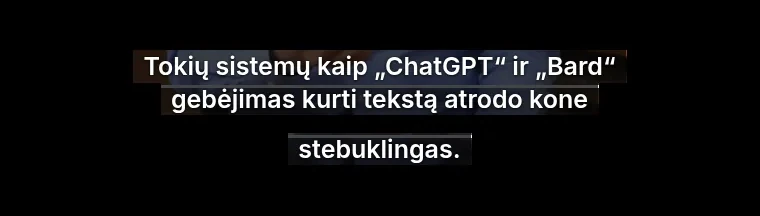
- “The ability of systems like ChatGPT and Bard to generate text seems almost magical.” became “Tokių sistemų kaip „ChatGPT“ ir „Bard“ gebėjimas kurti tekstą atrodo kone stebuklingas.”
- That is right and reads naturally, one sentence made from two English subtitle lines.
- Not tested: a paid course past its preview, Coursera’s phone app and Coursera for Business.
- One lecture is a small sample, so try your own course with the free time first.
What a course costs
You pay for the minutes Vocnu translates, and subtitles alone cost the least:
| What you choose | An hour of lectures | A 10-hour course |
|---|---|---|
| Subtitles only, Standard | €0.60 to €1.25 | €5.96 to €13 |
| Voice-over, Standard | €1.19 to €2.50 | €12 to €25 |
| Voice-over, Premium | €4.77 to €10.00 | €48 to €100 |
- A new account gets 2 h 40 min of Standard subtitles or 1 h 20 min of Standard voice-over free, with no card.
- Watching again within 90 days, in the same language and mode, is free.
- Plans start at €10 a month and packs at €10. Pack hours don’t expire.
Questions and answers
Yes. Subtitle translators add a translated line beside Coursera’s subtitles, and Vocnu shows the lecture in your language and can read it aloud.
No. A course has only the subtitle and dubbed languages it was given, so check the lecture’s Subtitles and Audio menus for yours.
No. Extensions run only in a browser on a computer; Vocnu runs in Chrome, Brave and Edge.
Coursera’s own subtitles and dubs cost nothing extra. With Vocnu, an hour of lectures with Standard subtitles costs €0.60 to €1.25.
Sources
- Coursera Blog: Coursera launches AI-dubbed courses in Spanish, French, Brazilian Portuguese and Germanblog.coursera.org (opens in a new tab)
- Coursera: AI-dubbed coursescoursera.org (opens in a new tab)
- Coursera Blog: Introducing Coursera's new course preview experienceblog.coursera.org (opens in a new tab)
- Coursera Blog: Coursera expands AI-powered translations to 17 popular languagesblog.coursera.org (opens in a new tab)
- Coursera: Generative AI for Everyonecoursera.org (opens in a new tab)
- Coursera: Learning How to Learncoursera.org (opens in a new tab)
Found something out of date? Write to support@vocnu.com and we will check it and correct the page.