
In short
- In a cinema, TheaterEars plays a dubbed track in your earphones, for some new releases.
- A film file goes through a player app or an upload translator.
- Vocnu puts subtitles in your language on streaming films in Chrome, Brave or Edge.
- A two-hour film with Standard subtitles costs €1.19 to €2.50, and a new account gets 2 h 40 min free.
Which movie translator works where
Nothing translates every film everywhere. Each tool reaches the film in one kind of place:
| Where you watch | What can translate it | What you get |
|---|---|---|
| In a cinema | A phone app with the film’s dubbed track, such as TheaterEars | A dubbed soundtrack in your earphones, for the films and languages the app has |
| A streaming app on a TV, phone or tablet | Only the app’s own audio and subtitle menu | The languages that title has in your country |
| A video file on your phone or computer | A player app, or an online translator you upload the file to, such as the Vocnu app | Subtitles or a new soundtrack, made from the file |
| Netflix, Prime Video or another site in a browser on a computer | A browser extension, such as Vocnu | Subtitles in your language over the player, and a voice-over if you want one |
- A film on a streaming service isn’t a file you can upload. It has to be translated in the player, while it plays.
- We make Vocnu. The other tools here are described from their own pages, read on 20 November 2026; only Vocnu was tested.
In a cinema: a dubbed track in your earphones
In a cinema the translation has to come through your own earphones, and TheaterEars is made for that:
- You download the dubbed track before you go, and the app plays it in sync with the screen, per its App Store page.
- It has Spanish for major new releases, Brazilian Portuguese and Canadian French for some, in the US, Canada and Puerto Rico.
- It runs on iPhone and Android, per its site. Vocnu can’t hear a cinema at all.
A film you have as a file
A file is the easy case, as long as it’s yours to use, such as a film under a free licence:
- On Android, Movie Language Converter (MLC) is a player that translates a video’s audio and subtitle files. It shows ads.
- VEED and HeyGen return the video with subtitles or AI voices. HeyGen’s free plan covers three short videos a month.
- The Vocnu app at app.vocnu.com takes a file of up to 5 hours, at the extension’s price a minute.
Streaming in a browser: subtitles as the film plays
Vocnu, an extension for Chrome, Brave and Edge on a computer, shows subtitles in your language over the player as the film plays, in 38 languages.
- It translates the player’s subtitles, or listens to the tab when there are none.
- The film may wait up to half a minute at the start.
- Voice + subtitles adds one voice over the original, played lower. The cast stays audible, and nothing matches their lips.
- Standard is cheaper and fine for following the story. Premium translates best, with the most natural voices.
Other ways to read a streaming film:
- Chrome’s free Live Translate shows translated text in a caption box: see Chrome Live Translate vs Vocnu.
- Immersive Translate adds a translated line beside Netflix’s and Prime Video’s own subtitles.
Each service has its own post, with its language menu and why your language may be missing:
- Netflix, tested on Glass Onion in Lithuanian.
- Prime Video, tested on an Italian TV film with no English subtitles.
- Disney+, HBO Max and Apple TV.
What I saw on Tears of Steel
On 20 November 2026 I played Tears of Steel, Blender’s free 12-minute film, on YouTube in Chrome, with Vocnu set to Spanish and Standard:
| Moment | What happened |
|---|---|
| Start, Subtitles only | The film held at 0:18 for about 10 seconds after I turned Vocnu on, then played on. The first Spanish line came at 0:24, as that line was spoken. |
| Text, Subtitles only | Vocnu translated the English subtitles the video has on YouTube. |
| Sound, Subtitles only | The film’s own sound stayed as loud as it was the whole time. |
| Start, Voice + subtitles | A note over the player counted up as the voice-over was prepared, and the film played on about 15 seconds after I turned Vocnu on. |
| Sound, Voice + subtitles | While the Spanish voice read, the film’s sound went down to about a third of its volume and kept playing underneath. |
- “You’re a jerk, Thom.” became “Eres un idiota, Thom.”
- “Robot’s memory synced and locked!” became “¡Memoria del robot sincronizada y bloqueada!”

Set it up for a film
- On a computer, add Vocnu to Chrome, Brave or Edge from the Chrome Web Store, sign in or create a free account and press Connect the extension.
- Start the film on its streaming site, in your own account.
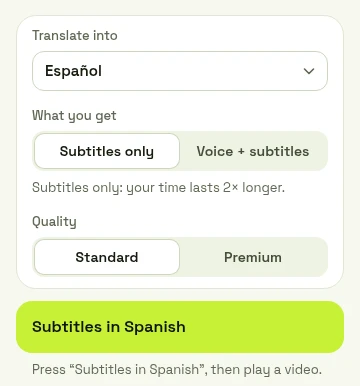
- Press the Vocnu button or Alt+Shift+V. Choose your language under Translate into, then Subtitles only or Voice + subtitles.
- Press the button at the bottom of the menu.
What a two-hour film costs
You pay for the minutes Vocnu translates, and subtitles alone cost the least:
| What you choose | A 2-hour film |
|---|---|
| Subtitles only, Standard | €1.19 to €2.50 |
| Voice-over, Standard | €2.38 to €5.00 |
| Voice-over, Premium | €9.54 to €20 |
- A new account gets 2 h 40 min of Standard subtitles or 1 h 20 min of Standard voice-over free.
- Watching again within 90 days, in the same language and mode, is free. A film already in your language costs nothing.
- Plans start at €10 a month and packs at €10. Pack hours don’t expire.
When Vocnu isn’t the answer
Pick something else when:
- You’re in a cinema. TheaterEars is made for it.
- You watch on a TV, a phone or a tablet. Vocnu needs a computer.
- You want a real dub, matched to the lips. Use the player’s audio menu.
- The film isn’t yours to watch. Vocnu doesn’t download films or open a catalog your account can’t.
Questions and answers
In a cinema, TheaterEars plays a dubbed track. On a computer, Vocnu shows subtitles in your language as a streaming film plays.
The one that fits where you watch: TheaterEars in a cinema, a file translator for a video you have, Vocnu for a film streaming on a computer.
Not inside the streaming apps, which play only the languages a title has. On Android, a player such as MLC works on a file you have.
With Vocnu, a two-hour film with Standard subtitles costs €1.19 to €2.50, and €2.38 to €5.00 with a Standard voice-over.
Sources
- App Store: TheaterEarsapps.apple.com (opens in a new tab)
- TheaterEars: how it workstheaterears.com (opens in a new tab)
- Google Play: Movie Language Converter (MLC)play.google.com (opens in a new tab)
- VEED: Video translatorveed.io (opens in a new tab)
- HeyGen: Video translatorheygen.com (opens in a new tab)
- Immersive Translate: Netflix subtitles translatorimmersivetranslate.com (opens in a new tab)
- Google Chrome Help: Manage captions and translations in Chromesupport.google.com (opens in a new tab)
- Blender: Tears of Steel, the open movie (CC BY 3.0)mango.blender.org (opens in a new tab)
Found something out of date? Write to support@vocnu.com and we will check it and correct the page.