
In short
- A course page’s Audio line lists its languages, and (V.O.) in the player marks the instructor’s original.
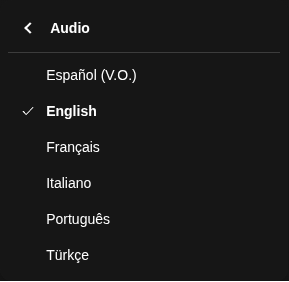
- In the player, open the speech bubble or the gear, then pick English under Audio.
- Some older courses have English subtitles but no English audio.
- On a computer, Vocnu voiced a Spanish-only trailer in English about 9 seconds after we turned it on.
- An hour of Standard voice-over costs €1.19 to €2.50, and a new account gets 1 h 20 min free.
Is Domestika in English?
Mostly, yes. Domestika runs in nine languages, and each course page lists what it has under Audio and the CC icon:
- One language under Audio means you hear only the instructor’s own.
- More than one means the original plus voice-overs. In the player, (V.O.) marks the original.
- On 22 November 2026, all 132 courses on Domestika’s popular, newest and category pages we checked had English audio.
- Older courses can be Spanish or Portuguese only. Of 34 older ones we opened, 9 had no English audio, and all 9 had English subtitles.
- We make Vocnu. Domestika is described from its Help pages, course pages and player, read on 22 November 2026 from Lithuania.
Switch a course to English audio
If a course plays in Spanish but its Audio line lists English, the English voice-over is in the player:
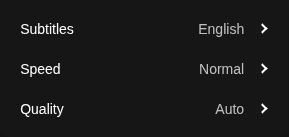
- In a lesson, press the speech bubble at the bottom of the player. On a course trailer, press the gear.
- Under Audio, pick English. The language marked (V.O.) brings back the instructor’s own voice.
- Under Subtitles, pick English or Off.
- To change the site’s language, use the language button at the bottom of Domestika’s home page, or Account Settings once you’re signed in.
- The app follows your phone’s language and turns on a matching voice-over by itself. For a course’s audio, tap the three dots, then Audio/Subtitles.
When a course has no English audio
Some courses were recorded in Spanish or Portuguese and never got an English voice-over. Their player has no Audio choice at all:
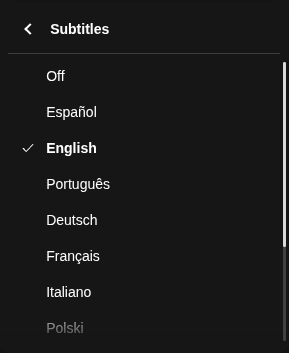
- Its course page says Audio: Spanish, and lists English among 11 subtitle languages.
- The website can’t filter courses by audio, but Domestika keeps a list of courses with English audio. The app can filter.
- English subtitles work, but you read them instead of watching the hands at work.
Hear a Spanish-only course in English
The Vocnu extension adds an English voice on a computer, in Chrome, Brave and Edge. It translates into 38 languages:
- It takes the subtitles Domestika’s player loads and shows them in your language over the video. Without subtitles, it listens to the tab.
- Voice + subtitles adds one voice reading them over the instructor, who is lowered but still heard.
- A lesson already in your language is never translated or charged.
- Add Vocnu from the Chrome Web Store, sign in or create a free account, and press Connect the extension.
- Open the course on domestika.org and press the Vocnu button or Alt+Shift+V.
- Pick English under Translate into, then Voice + subtitles under What you get.
- Press Start in English at the bottom of the menu, and play.
Other course sites are on Vocnu for online courses, and Coursera has its own guide.
What we saw on a Spanish-only course
On 22 November 2026 we played the free trailer of Illustration with Black and White Hatching in Chrome, without a Domestika account. Vocnu was set to English, Voice + subtitles and Standard:
| Moment | What happened |
|---|---|
| Start | A “Preparing the voice-over…” note showed its progress, and the English voice began about 9 seconds after we turned Vocnu on. |
| Text | Vocnu took its text from the English subtitles Domestika’s player had loaded, so it had no need to listen to the tab. |
| Sound | While the voice read, the instructor went down to about a quarter of the volume and kept talking underneath. |
| Pause and reload | The voice stopped with the trailer and went on at once. After a page reload, it was back within seconds. |

- “Hi, my name is Jorge Lewis, I’m a visual artist and illustrator.” in Domestika’s subtitles became “Hi, I’m Jorge Lewis, a visual artist and illustrator.”
- Not tested: a paid lesson, a jump inside a lesson, a course in Portuguese and Domestika’s app.
- A 2-minute trailer is a small sample, so try your own course with the free time.
What a course costs
You pay for the minutes Vocnu translates. For a Spanish-only course, the voice is what you’re after:
| What you choose | An hour of lessons | A 3.5-hour course |
|---|---|---|
| Voice-over, Standard | €1.19 to €2.50 | €4.17 to €8.75 |
| Voice-over, Premium | €4.77 to €10.00 | €17 to €35 |
| Subtitles only, Standard | €0.60 to €1.25 | €2.09 to €4.38 |
- A new account gets 2 h 40 min of Standard subtitles or 1 h 20 min of Standard voice-over free, with no card.
- Watching again within 90 days, in the same language and mode, is free.
- Plans start at €10 a month and packs at €10. Pack hours don’t expire.
Questions and answers
Either the player is set to another language, which its Audio menu switches, or the course has no English voice-over. The course page’s Audio line tells you which.
For the site, use the language button at the bottom of the home page or Account Settings. For a course, pick English under Audio in the player.
No. Extensions run only in a browser on a computer; Vocnu runs in Chrome, Brave and Edge.
Domestika’s own voice-overs cost nothing extra. With Vocnu, an hour of lessons with a Standard voice-over costs €1.19 to €2.50.
Sources
- Domestika Help: In which language are the courses taught? Do they have subtitles or voice-over available?support.domestika.org (opens in a new tab)
- Domestika Help: How do I activate the subtitles/voice-over in my course?support.domestika.org (opens in a new tab)
- Domestika Help: How can I configure the language on the web/in the app?support.domestika.org (opens in a new tab)
- Domestika Help: Can I filter the courses by language?support.domestika.org (opens in a new tab)
- Domestika: courses with audio in Englishdomestika.org (opens in a new tab)
- Domestika: Illustration with Black and White Hatchingdomestika.org (opens in a new tab)
- Domestika: Digital Marketing 101 for Entrepreneurs and Freelancersdomestika.org (opens in a new tab)
Found something out of date? Write to support@vocnu.com and we will check it and correct the page.