In short
- The SDH switch costs nothing extra and adds labels such as [upbeat music] and dashes between two speakers.
- Calm narration came out right in 35 of 38 lines; a short film full of shouts, in about a third.
- Standard subtitles cost €0.01 to €0.02 a minute, and a new account gets 2 h 40 min free.
- Try free captions first: Chrome’s Live Caption, YouTube’s automatic captions and the streaming services’ SDH.
How to turn on subtitles for the deaf
Setup takes a couple of minutes, once.
- On a computer, add Vocnu to Chrome, Brave or Edge from the Chrome Web Store.
- The extension opens the Vocnu app: sign in or create a free account, and press Connect the extension.
- Open the video and click Vocnu’s toolbar button, or press Alt+Shift+V.
- Choose English under “Translate into” and “Subtitles only” under “What you get”.
- Open “More options” and, under “Subtitles”, turn on “Subtitles for the deaf (SDH)”.
- Go back and press “Subtitles in English”.
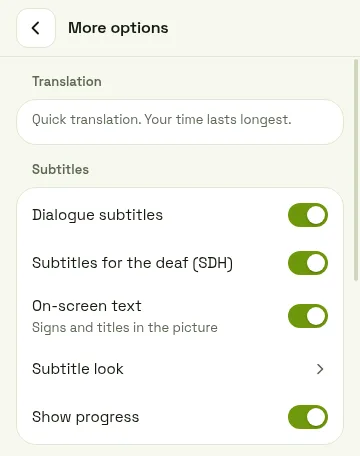
What we saw on two videos without captions
We make Vocnu, so weigh this: on 27 November 2026, with SDH on in Standard, it got 35 of 38 lines right on a calm NASA video and about a third on a short film full of shouts.
- NASA’s “Getting to Know the Goldilocks Planet” on Internet Archive is one narrator over soft music; we played its first two and a half minutes.
- The first line came about a minute and a half after we turned Vocnu on; the title and first sentence had none.
- After that every sentence showed in order, word for word, names such as Kepler too, but for one doubled “sky”.
- SDH put no label on the music under the voice; one speaker meant no dashes.
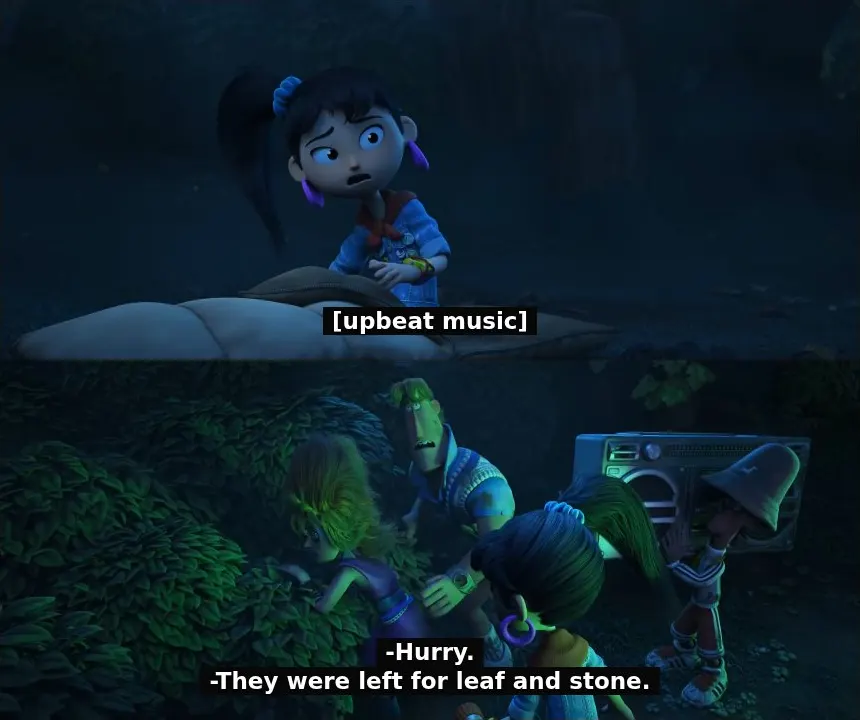
Sprite Fright, a short film also on Internet Archive, was the hard case: few words, shouted over music.
- We played it from 4 minutes in; it waited about 70 seconds while Vocnu prepared.
- About a third of the lines came out right, mostly calm ones such as “Guys, this isn’t funny.”
- Shouts over the music and single words were often misheard or missed: “Sprite them!” became “Spray them.”, “Run!!!” never showed, and one scream came out in another alphabet.
- SDH put one label on the music, [upbeat music], set one quick exchange with dashes, and marked none of the screams.
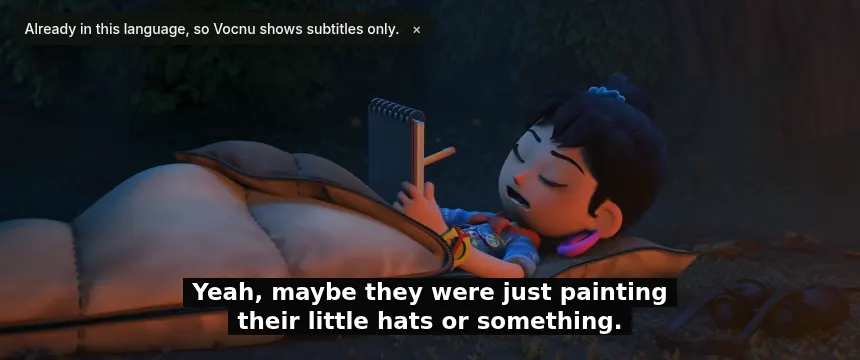
What the SDH switch adds
The switch is free in Standard and Premium alike, and changes what the subtitles say:
- A site’s own SDH file comes first, its sound labels and speaker names kept, in English when the file is in another language.
- Without one, Vocnu names what it hears from a short list: music, laughs, screams, applause, a door that slams, a phone that rings and a few more.
- It would rather miss a sound than invent one, and speaker names come only from a site’s file.
- From the sound alone, a quick exchange between two people shows as two lines, each after a dash.
SDH against closed captions, and SDH files for your own videos, are in what are SDH subtitles.
Free captions first: when they are enough
Try the free captions before Vocnu:
| Option | Where it works | Enough when | Falls short when |
|---|---|---|---|
| Chrome’s Live Caption | Any sound playing in Chrome on a computer | You need captions at once, in a language it hears | You want lines on the picture: its words sit in a box of their own and shift as it listens |
| YouTube’s automatic captions | YouTube videos and live streams | The video has them in English | Accents, dialects and background noise, which by YouTube’s help they can misrepresent; live, they come in English only |
| A streaming service’s SDH or CC, such as Netflix’s | The titles that come with them | The title has SDH or CC in English | A title lacks them: Netflix says some shows have no SDH for some seasons or episodes |
| Vocnu with SDH | Videos in Chrome, Brave or Edge on a computer | A video has no captions you can use, or speaks another language | You need it free and at once: it costs by the minute, takes a minute or two to start, and mishears shouts over music |
Make the subtitles easier to read
Under “More options”, Subtitle look sets the size from 50 to 250 %, the color, the font, a background and the position:
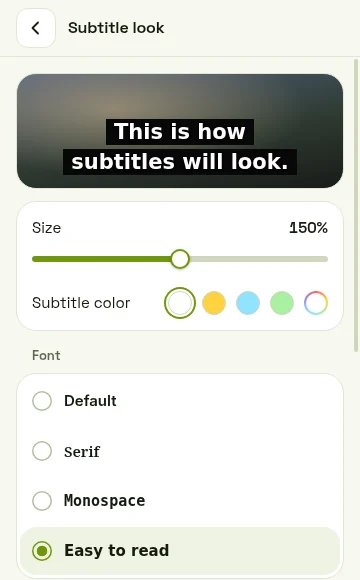
Bigger captions on the sites’ own players are in how to make subtitles bigger, and lines that go by too fast in dyslexia and subtitles.
What subtitles for the deaf cost
You pay for the minutes Vocnu subtitles, and SDH adds nothing.
- Standard subtitles cost €0.01 to €0.02 a minute, so a two-hour film costs €1.19 to €2.50.
- A new account gets 2 h 40 min of Standard subtitles free, and plans start at €10 a month.
- Live streams are subtitled in Premium only, at €0.06 to €0.13 a minute, a few seconds behind the speakers and without sound labels.
When Vocnu is not the right pick
Skip Vocnu in these cases.
- The video already has good captions or SDH in English. Turn those on; they cost nothing.
- Every word must be right, as in an exam or a legal matter. Ask for a human captioner: Vocnu’s subtitles are made by AI and miss words.
- You watch on a TV, a phone, a tablet or in an app. Vocnu works in Chrome, Brave and Edge on a computer.
- You need captions in a call. Zoom, Teams and Meet have captions of their own.
A lecture or the news in another language, read and heard, is in Vocnu for lectures and talks and for news and live streams.
Questions and answers
Turn on Vocnu in Chrome, Brave or Edge on a computer and choose subtitles in English; it writes down what it hears.
Yes. It adds nothing to the price of Standard or Premium subtitles.
Many do, but Netflix says some shows have no SDH for some seasons or episodes.
Sources
- Chrome Help: Live Caption and Live Translatesupport.google.com (opens in a new tab)
- YouTube Help: Use automatic captioningsupport.google.com (opens in a new tab)
- Netflix Help: How to use subtitles, captions, or choose audio languagehelp.netflix.com (opens in a new tab)
- Internet Archive: NASA's Getting to Know the Goldilocks Planet, the calm video we testedarchive.org (opens in a new tab)
- Internet Archive: Sprite Fright, the film we testedarchive.org (opens in a new tab)
- Blender Studio: Sprite Frightstudio.blender.org (opens in a new tab)
Found something out of date? Write to support@vocnu.com and we will check it and correct the page.