
In short
- YouTube, Disney+ and Apple TV style subtitles inside the player; Netflix and HBO Max in your profile settings.
- BBC iPlayer changes only the size, and Prime Video keeps its subtitle presets on Amazon’s website.
- On Windows and Mac, the system’s caption style sets how Chrome’s Live Caption looks.
- Vocnu’s extension draws its subtitles up to 250% in your font, color and background, on any site.
- On an English video it can redraw the site’s own English subtitles in that look, from €0.01 a minute.
Where each web player keeps its subtitle size
Each service below has a free setting of its own. This is where it sits in a desktop browser:
| Service | Where to find it | What you can change |
|---|---|---|
| YouTube | Settings under the video > Subtitles/CC > Options | Font, color, size up to 400%, background, window and edge |
| Netflix | Account > Profiles > your profile > Subtitle appearance | Font, size, shadow and background color |
| Prime Video | Prime Video Settings > Subtitles on Amazon’s website | Size and color, saved as presets |
| Disney+ | The Audio & Subtitles Menu at the top right, then the gear wheel | Subtitle Styling, though some browsers don’t support it |
| HBO Max | Your profile > Settings > Subtitle Style | Font, color, size and opacity |
| BBC iPlayer | The subtitle icon at the bottom right of the player | Size only |
| Apple TV | The Languages button over the video > Style | One of Apple’s ready-made styles |
- Netflix keeps the look in your profile, and a TV app shows a change made on the web once you reload it.
- HBO Max says changes made on HBOMax.com don’t carry over to other devices.
- We read Prime Video’s row from Amazon’s help: its settings page needs a Prime account.
- Subtitles burned into the picture are part of it, so no setting can change them.
Windows, Mac and Chrome caption styles
Your computer keeps a caption style of its own, and Chrome uses it:
- Windows 11: Start > Settings > Accessibility > Captions, choose a Caption style, then Edit it.
- Mac: System Settings > Accessibility > Hearing > Subtitles and Captioning. Add a style with +, and untick Allow video to override.
- Chrome: Settings > Accessibility > Caption preferences opens those same settings on Windows and Mac.
- In Chrome, the style sets how Live Caption looks: Chrome’s own captions for any sound playing in a tab.
One look on every site with Vocnu
Vocnu’s browser extension draws its own subtitles over the video, in a look you set once:
- Add Vocnu from the Chrome Web Store, sign in or create a free account, and press Connect the extension.
- Click Vocnu’s icon, then More options, then Subtitle look.
- Set Size up to 250%, a Font such as Easy to read, which tells I, l and 1 apart, and a Solid Background.
- Pick Bottom or Top for Position, and raise the lines with Distance from the edge.
- Check the sample line at the top of the view, then play a video.
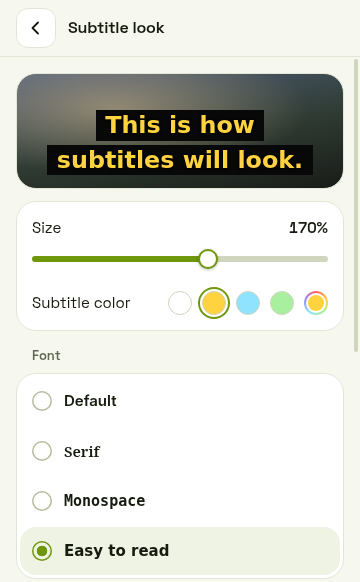
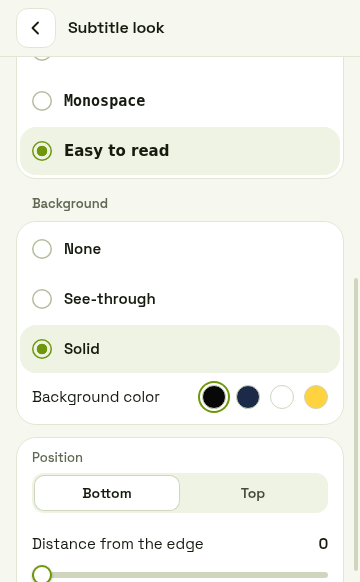
- The look reaches open tabs at once and stays the same in fullscreen.
- It is kept in this browser, not your account, and Reset to the default look undoes it.
- Words with no background get an outline, and text too close to its box’s color turns black or white.
Your look on a site’s own English subtitles
Vocnu also subtitles a video already spoken in the language you choose, so the look works on English videos too:
- Choose English and Subtitles only in Vocnu.
- It uses the site’s English subtitle file when there is one, the SDH file when you turn that on.
- With no file, it writes what it hears, and machine subtitles can miss or mishear words.
- The site’s own captions hide under Vocnu’s and come back when you turn it off.
We tried the look above on 27 November on Sprite Fright, an English animated film on YouTube, with Standard subtitles:
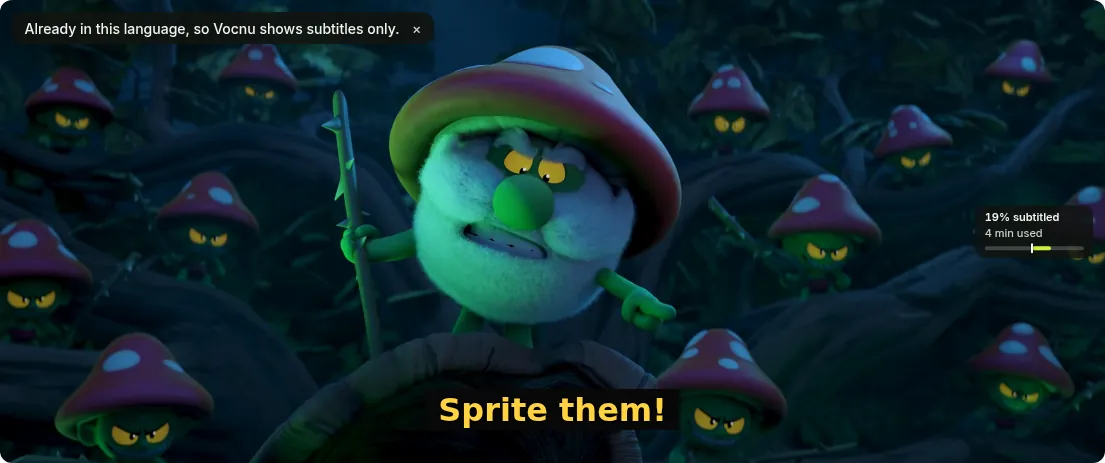
- Vocnu used YouTube’s English subtitle file and was ready about 7 seconds after we turned it on.
- YouTube’s captions were on but stayed hidden, so no line showed twice.
- Lines kept coming after a jump ahead and after each of YouTube’s ads.
What it costs
A look costs nothing to set, while Vocnu’s subtitles use subtitle time:
- Standard subtitles cost €0.60 to €1.25 an hour of video, the same on a video in its own language.
- A new account gets 2 h 40 min of Standard subtitles free once its email is confirmed.
- Where a service has its own setting, that is free, so use it there and keep Vocnu for the rest.
If subtitles go by too fast rather than look too small, read how to slow them down, and see what else Vocnu does for deaf and hard-of-hearing viewers.
Questions and answers
YouTube shows them at 100% until you change it. Raise the size under Settings > Subtitles/CC > Options, up to 400%, and it stays your default until you click Reset.
Yes, in most TV apps. Netflix has Size and Style in the player’s settings, and the Apple TV app has Subtitles and Captioning under Settings > Accessibility. Vocnu’s look works in Chrome, Brave and Edge on a computer, not in TV apps.
Several resize one site’s subtitles, such as Netflix’s. Vocnu draws its own subtitles in one look on any site, from the site’s English file when it has one, and they use subtitle time after the free time.
Sources
- YouTube Help: Manage caption settingssupport.google.com (opens in a new tab)
- Netflix Help: How to change subtitle appearancehelp.netflix.com (opens in a new tab)
- Prime Video Help: Subtitlesprimevideo.com (opens in a new tab)
- Disney+ Help: Format captionshelp.disneyplus.com (opens in a new tab)
- HBO Max Help: Caption stylinghelp.hbomax.com (opens in a new tab)
- BBC iPlayer Help: Using subtitlesbbc.co.uk (opens in a new tab)
- Apple Support: Change subtitles or languages in the Apple TV appsupport.apple.com (opens in a new tab)
- Chrome Help: Manage captions and translations in Chromesupport.google.com (opens in a new tab)
- Microsoft Support: Change caption settings in Windowssupport.microsoft.com (opens in a new tab)
- Apple Support: Use subtitles and closed captions on Macsupport.apple.com (opens in a new tab)
- Blender Studio: Sprite Frightstudio.blender.org (opens in a new tab)
Found something out of date? Write to support@vocnu.com and we will check it and correct the page.