
In short
- Burned-in, or hard, subtitles are part of the picture. Soft subtitles are a track viewers can turn off.
- Burning re-encodes the whole video: 38 seconds in ffmpeg and 45 in HandBrake for our 93-second clip.
- HandBrake reads an SRT as Latin-1 unless told otherwise. Our file lost its first line until we set UTF-8.
- ffmpeg burned the same file right with one command and no settings.
- Vocnu’s free subtitle generator and subtitle translator made the English SRT without an account.
Hard vs soft subtitles
Hard subtitles are part of the picture. Soft subtitles stay text: a track inside the video file, or an SRT or VTT file beside it.
| Subtitles | Burned-in (hard) | Soft (track or file) |
|---|---|---|
| Turn them off | Never | In the player’s menu |
| Where they show | Any player or site | Players and sites that read subtitle files |
| Fix a typo | Burn the whole video again | Edit the text file |
| Making the file | A full re-encode: 38 to 45 s for our clip | A copy with the track added: 0.13 s and 2.8 KB more |
Burn them in only for a platform that takes no subtitle file. Everywhere else, a soft SRT or VTT file lets viewers choose and lets you fix a line later.
Make the translated SRT for free
On 25 November 2026 we took a 93-second German Terra X clip about river meanders from Wikimedia Commons and made its English subtitles:
- Open Vocnu’s free subtitle generator, choose the video, set the spoken language and press Make subtitles.
- Press Translate these subtitles. The subtitle translator opens with the file.
- Choose English, press Translate, then Download SRT.
- No account needed. The generator takes 2 files a day, the first 5 minutes of each; the translator 3 files a day, up to 1,000 lines each.
- Our 24 German lines took about a minute, the English about 6 seconds.
- Already have subtitles in the video’s language? Start at the translator.
- Read the English before you burn it in: a wrong word in the picture stays there.
Burn subtitles into a video with ffmpeg
ffmpeg is a free command-line tool for Windows, macOS and Linux. To burn an SRT into an MP4:
- Put the video and the SRT in one folder and open a terminal there.
- Run ffmpeg -i video.webm -vf subtitles=video.en.srt video-en.mp4
- Play video-en.mp4: the English line is now part of the picture.
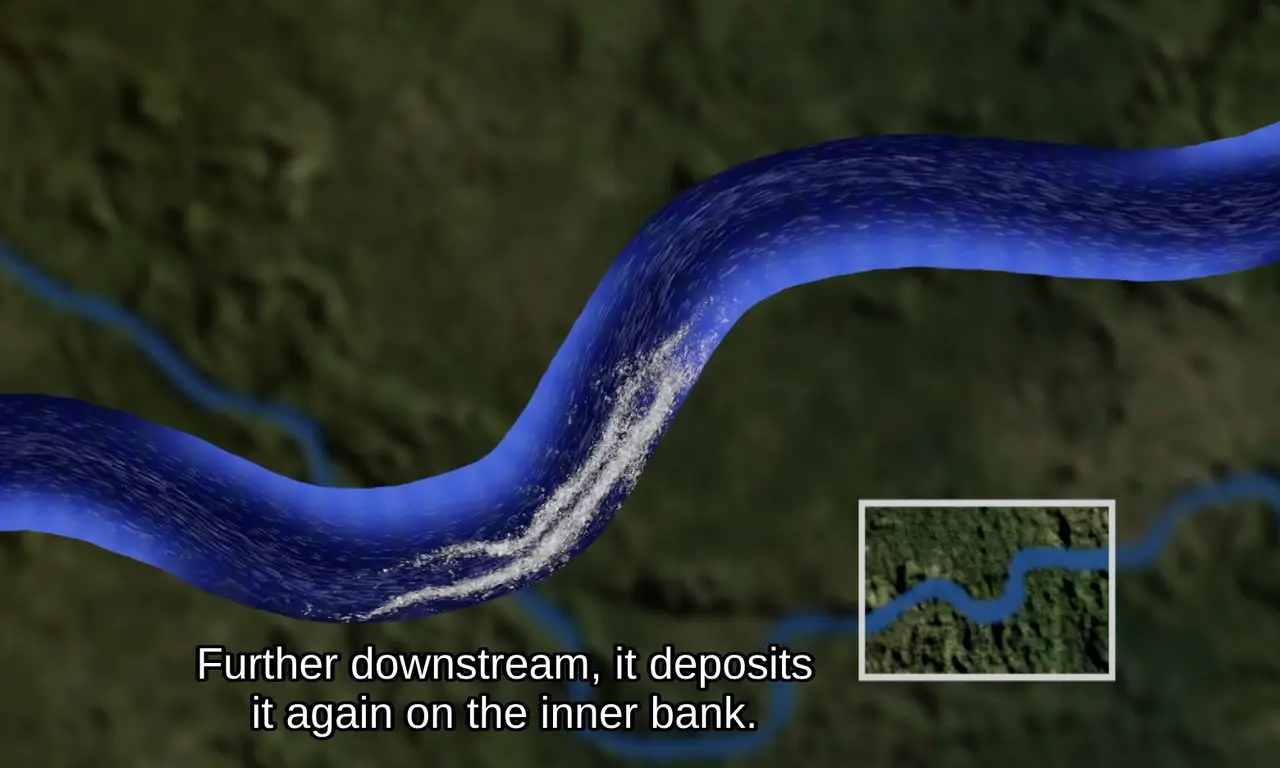
- With no font set, ffmpeg 9.1 drew Liberation Sans on our Linux laptop: white with a black outline, centred at the bottom.
- It read our UTF-8 file right, German and French letters included, without being told.
Burn subtitles in with HandBrake
HandBrake is a free video converter with an app and a command-line version. We ran HandBrake 1.11.2’s command line:
- HandBrakeCLI -i video.webm -o video-en.mp4 --srt-file video.en.srt --srt-codeset UTF-8 --srt-burn
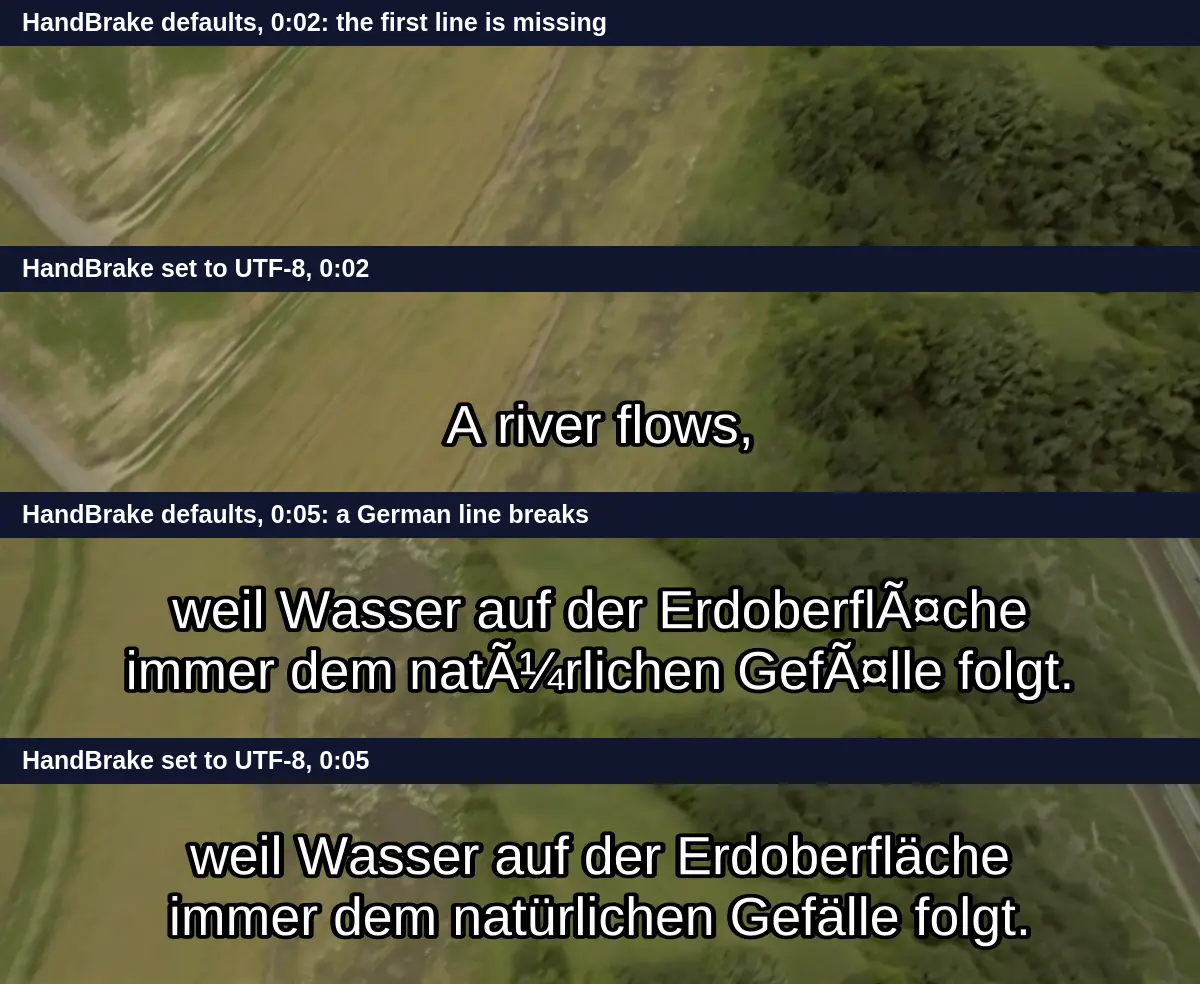
- Without --srt-codeset UTF-8, HandBrake reads the file as Latin-1, as its help says.
- Our file starts with an invisible UTF-8 mark. Read as Latin-1, it hid the first line, “A river flows,”.
- We burned the German and French files too: Erdoberfläche came out as Erdoberfläche, and French accents broke the same way.
- In the HandBrake app, import the SRT on the Subtitles tab, set its character code to UTF-8 and set it to burn into the video.
What burning cost in our test
| 93 seconds of 1080p | ffmpeg 9.1 | HandBrake 1.11.2 |
|---|---|---|
| Time to burn | 38 s | 45 s |
| File size, source 98 MB | 48 MB | 56 MB |
| Picture above the subtitles vs source (SSIM, 1 = same) | 0.987 | 0.986 |
| Video it made | H.264, CRF 23 | H.264, RF 22 |
| UTF-8 subtitles | Right by default | Right with UTF-8 set |
- Times are from our laptop while it ran other work, so yours will differ.
- The size comes from each tool’s default settings, not from the subtitles.
- VLC 3.0.24 and mpv 0.42.0 played both copies to the end with the English line on screen, and had no subtitle track to turn off.
Burned-in subtitles in the Vocnu app
The free tools stop at the SRT, so the burning is yours. In the Vocnu app, subtitles are burned in only into a voice-over video:
- Choose the voice-over video, then turn on Burn subtitles into the picture.
- It adds €0.04 to €0.08 a minute, the price of 30 seconds of Premium voice-over.
- Subtitles alone, as files, cost €0.01 to €0.02 a minute in Standard. A new account gets 2 h 40 min of them free.
- Making them for viewers who can’t hear the sound? See SDH subtitles.
Questions and answers
No. They are part of every frame, so keep the original video if you may need it without them.
A little, since the video is encoded again. Above the subtitles, our ffmpeg and HandBrake copies scored 0.987 and 0.986 SSIM against the source, where 1 means identical.
The tool read the file in the wrong character set. In HandBrake, set the subtitles’ character code to UTF-8, since it assumes Latin-1.
Hard subtitles are drawn into the video’s frames for good. Soft subtitles are a separate track or file that viewers can turn on or off.
Sources
- FFmpeg Filters Documentation: subtitlesffmpeg.org (opens in a new tab)
- HandBrake Documentation: Command line referencehandbrake.fr (opens in a new tab)
- HandBrake Documentation: Subtitleshandbrake.fr (opens in a new tab)
- Wikimedia Commons: Warum mäandern Flüsse? (ZDF/Terra X, CC BY 4.0)commons.wikimedia.org (opens in a new tab)
Found something out of date? Write to support@vocnu.com and we will check it and correct the page.