
In short
- SRT numbers each cue and writes 00:00:03,140; VTT starts with WEBVTT and writes 00:00:03.140.
- A web page’s video loaded only the real VTT. A renamed SRT or a VTT without its header failed.
- VLC and mpv played both. YouTube and Vimeo take both, and Vimeo recommends WebVTT.
- VTT can place a line on screen. Chrome obeyed line:0 align:start; mpv left the line at the bottom.
- Vocnu’s free subtitle converter fixed our broken files in the browser, without uploading them.
SRT vs VTT: the differences
Both are plain text: each cue is a start and end time, then its lines. They differ in four places:
| Part of the file | SRT | VTT |
|---|---|---|
| First line | 1, the first cue’s number | WEBVTT, then a blank line |
| Timestamps | 00:00:03,140, with a comma | 00:00:03.140, with a dot; hours may be left out |
| Cue names | A number on every cue | Optional, any text |
| Position and style | YouTube reads no style markup in it | Settings such as line:0 align:start, plus STYLE and NOTE blocks |
The W3C specification writes WebVTT for HTML’s track element, which puts subtitles on a web page’s video.
One clip as SRT and as VTT
On 24 November 2026 we ran 48 seconds of Tears of Steel, in English, through Vocnu’s free subtitle generator and saved both files.
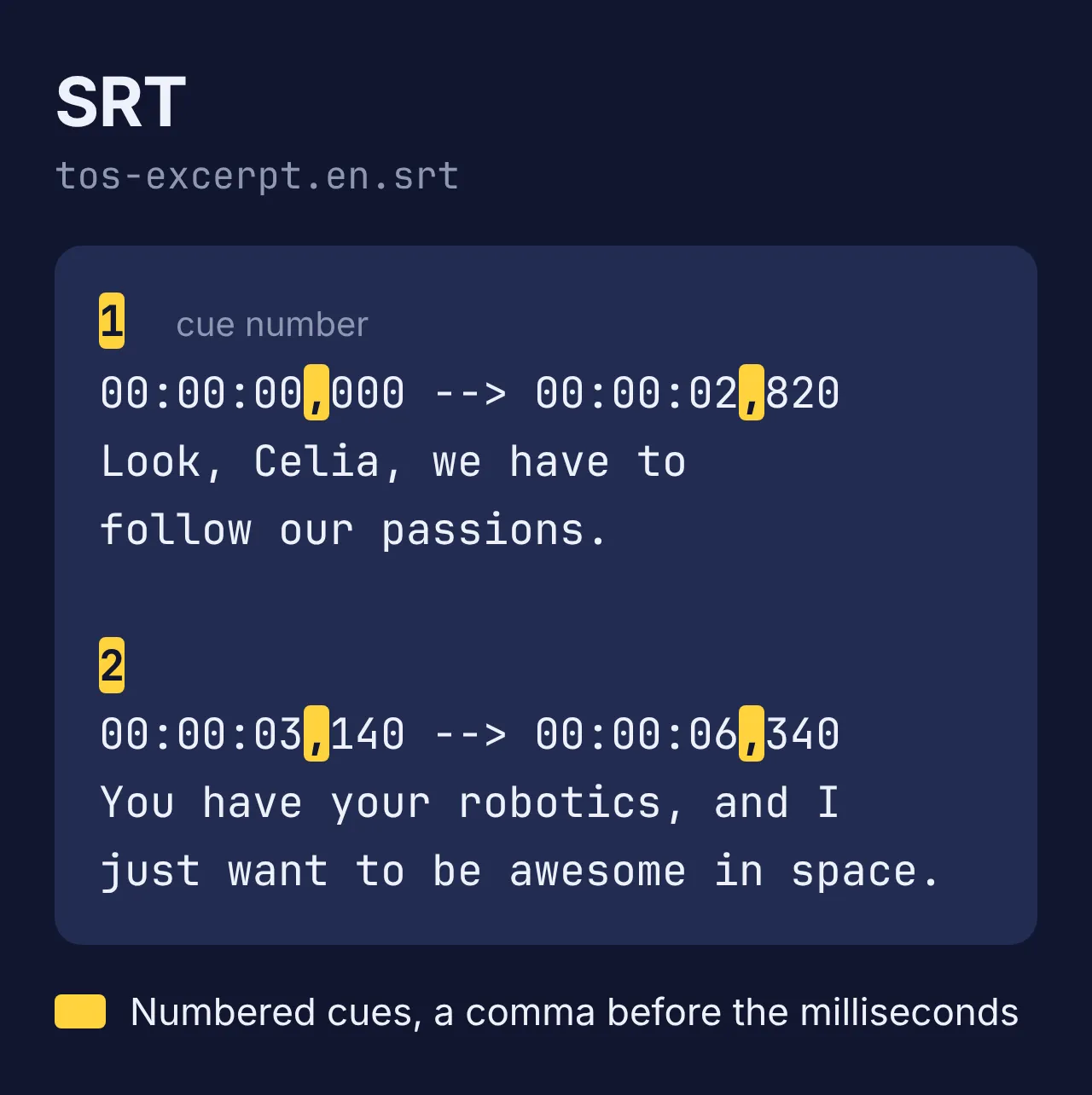
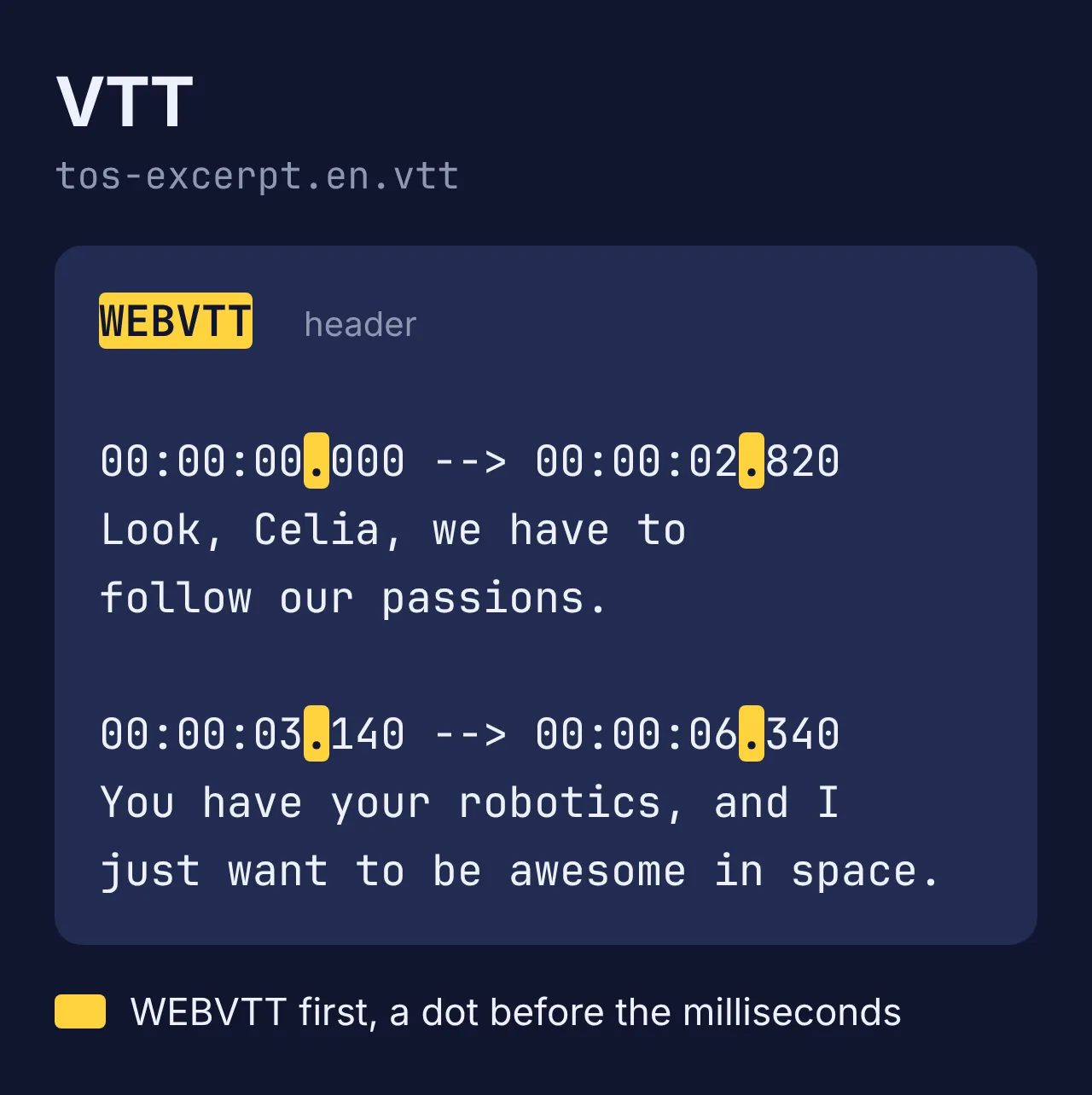
- Both hold the same 14 cues, words and times.
- The SRT numbers its cues; the VTT has only WEBVTT and a blank line on top.
- Every timestamp differs by one character: a comma or a dot before the milliseconds.
We then played five versions with the clip: in Chrome 158 on a local web page with a track element, and in VLC 3.0.24 and mpv 0.42, on Linux.
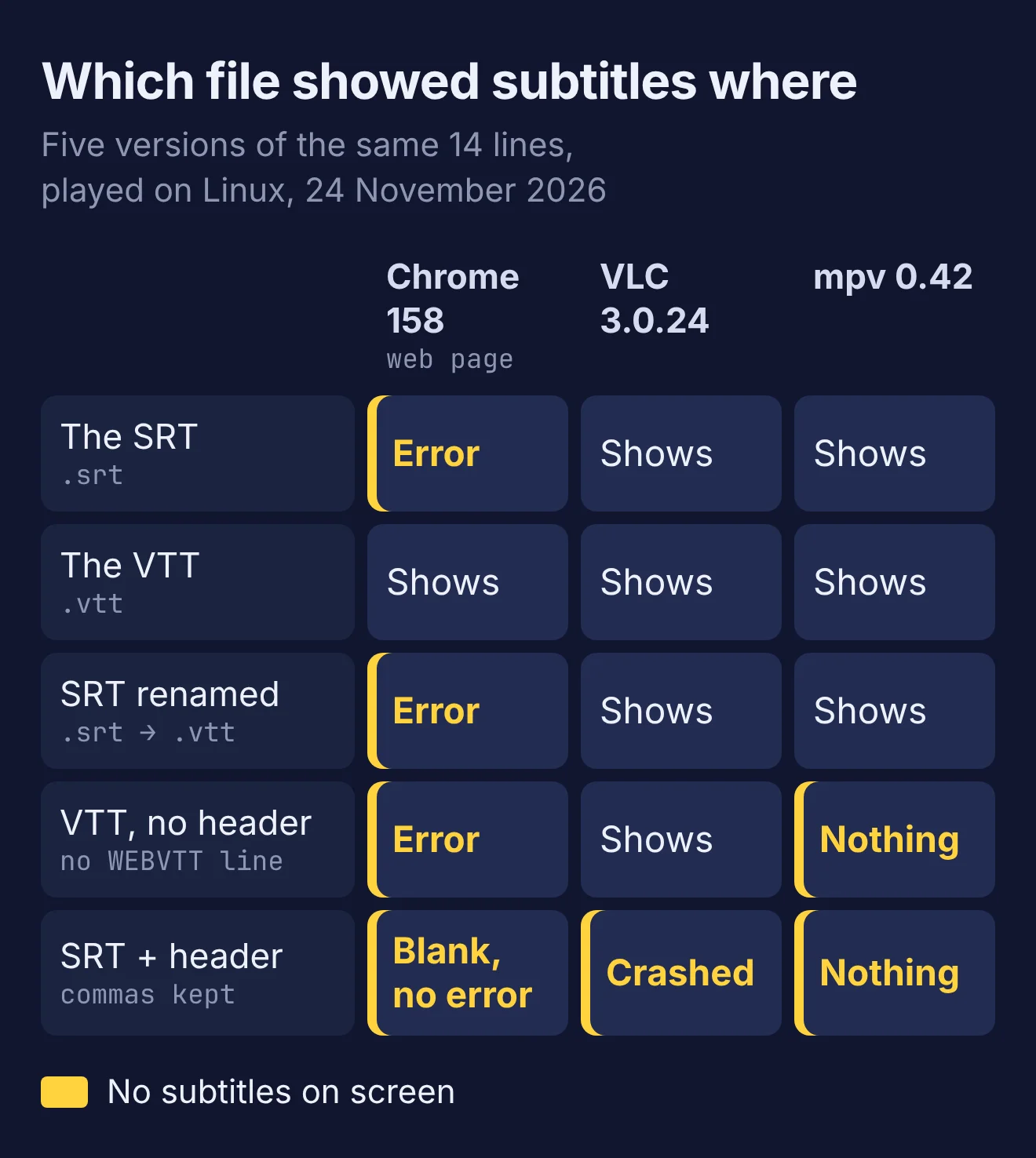
- Chrome showed subtitles only from the real VTT. The SRT, the renamed SRT and the headerless VTT each gave an error.
- The SRT with WEBVTT added but commas kept was hardest to spot: Chrome loaded 0 cues and no error. The same file crashed VLC every time.
- VLC and mpv read the renamed SRT as an SRT, going by its content, not its ending.
- Without its header, the VTT still played in VLC, while mpv found no subtitle format in it.
- Last, we gave the first cue line:0 align:start and italics. Chrome put it top left in italics; mpv kept the italics but left it at the bottom.
Which file to use where
Pick by where the subtitles will play:
| Where it plays | Use | Why |
|---|---|---|
| A video on your own web page | VTT | HTML’s track element reads WebVTT; Chrome refused our SRT |
| YouTube | Either | It suggests SRT if you’re new to caption files |
| Vimeo | Either, ideally VTT | It recommends WebVTT |
| VLC or mpv on your computer | Either | Both played our SRT and our VTT |
| Lines placed on screen | VTT | YouTube and Chrome read VTT positions |
- YouTube’s help says of SRT, “No style info (markup) is recognized.” For WebVTT, “Positioning is supported, but styling is limited” to bold, italics and underline.
- Vimeo “supports SRT and WebVTT files” saved as UTF-8, and adds: “We recommend using WebVTT.”
Fix a subtitle file that won’t play
Every failure in our test came down to the header or the timestamps. To turn an SRT into a VTT by hand, as Vimeo’s troubleshooting page suggests:
- Add WEBVTT as the first line, then a blank line.
- In every timestamp, replace the comma before the milliseconds with a dot.
- Save it as UTF-8 text with the ending .vtt.
- Make both edits: the header alone gave the blank track above.
- The cue numbers can stay. Chrome loaded all 14 cues from a VTT that kept them.
- Or drop it into Vocnu’s free subtitle converter. It runs in your browser, so the file is never uploaded.
- It fixed our comma file and headerless file, and our SRT went to VTT and back unchanged but for line endings.
- It keeps italics, bold and underline but drops positions: our line:0 align:start was gone, even from the VTT it saved.
Where ASS and SDH files fit
Two more subtitle files often sit next to SRT and VTT:
- ASS files can set fonts, colours and positions on screen. Converted to SRT or VTT, they keep italics, bold and underline and lose the rest.
- SDH subtitles are SRT or VTT files that also write out sounds and speakers, for viewers who can’t hear.
Get SRT and VTT files from Vocnu
Vocnu writes subtitles for a video in its own language or translated, and saves them in both formats:
- The free subtitle generator needs no account: 2 files a day, the first 5 minutes of each.
- In the Vocnu app, a job gives you SRT, VTT and ASS files.
- Standard subtitles cost €0.01 to €0.02 a minute of video. A new account gets 2 h 40 min of them free, and plans start at €10 a month.
- The subtitles are made by AI, so read them before you publish.
Uploading to YouTube? See Vocnu for YouTube creators.
Questions and answers
WebVTT, or Web Video Text Tracks, is the W3C subtitle format behind .vtt files, made for adding subtitles to video on web pages.
Open it in any text editor to read or edit it, or load it in VLC or mpv with its video to watch the subtitles.
Not for a web page: Chrome rejected our renamed SRT, since a VTT needs the WEBVTT header and dots in its timestamps. VLC and mpv played it anyway, as an SRT.
Yes. Vocnu’s free subtitle converter does it in your browser, though positions on screen don’t carry over.
Sources
- W3C: WebVTT, the Web Video Text Tracks Formatw3.org (opens in a new tab)
- YouTube Help: Supported subtitle and closed caption filessupport.google.com (opens in a new tab)
- Vimeo Help: How to add captions or subtitles to my videohelp.vimeo.com (opens in a new tab)
- Vimeo Help: Troubleshooting caption and subtitle issueshelp.vimeo.com (opens in a new tab)
- Blender Foundation: Tears of Steel (CC BY 3.0)mango.blender.org (opens in a new tab)
Found something out of date? Write to support@vocnu.com and we will check it and correct the page.